 Sign in
Best RDP Provider in India: How to Choose and Buy
If you are typing best RDP provider in India into a search box, you want a Windows desktop that stays online, sits in the right place and can be paid for from India without fuss. This guide explains what actually matters, so you can compare any provider on the same checklist and then buy RDP with confidence.
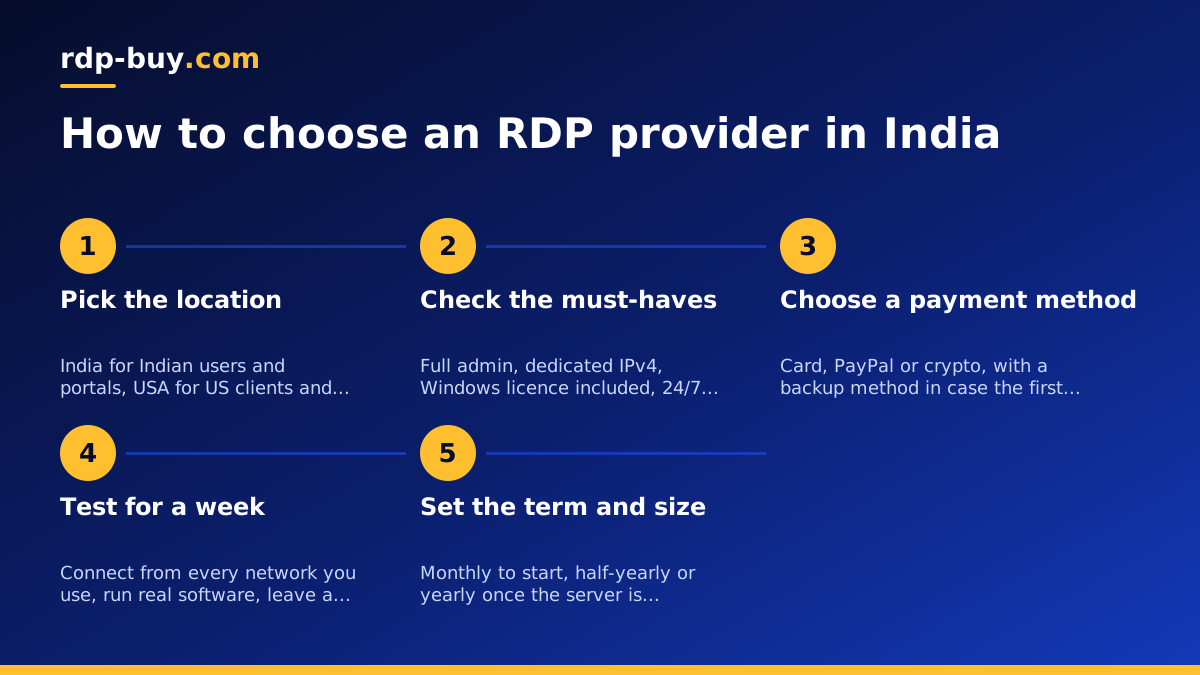
What the best RDP provider in India actually gives you
There is no single company that is best for every Indian buyer, and any list that ranks providers without knowing your work is guessing. What you can do is define what the best RDP provider in India looks like for your job, then measure each option against that definition. For most buyers the definition has five parts: the server is in the right location, the plan has enough resources for the software you run, you get full control of the machine, you can pay from India with a method you already use, and someone answers when something breaks at two in the morning.
An RDP server is a Windows machine in a data centre that you control through Remote Desktop from your laptop, your phone or an office PC. The provider keeps it powered, cooled and connected. You install your software once and come back to it from anywhere. Everything else in this guide is about choosing a version of it that fits an Indian buyer, whether that means an India RDP server or one overseas.
India location or a server overseas: decide this first
The location of the server changes how the desktop feels and what it can reach, so settle it before you compare plans. The rule is simple: put the server close to the people and services it talks to most, not close to you.
Choose an India RDP server when your users, customers and tools are in India. A desktop in an Indian data centre gives you the shortest path to Indian users, Indian bank and payment portals, Indian ecommerce seller dashboards, GST and compliance sites and any software that behaves differently when accessed from outside the country. Typing, scrolling and moving windows also feel most immediate when the server is near you.
Choose a USA RDP when the work is for overseas clients or depends on US services. Freelancers serving American agencies, teams that run US advertising accounts, traders on exchanges hosted in North America and anyone who uses tools that are restricted or slow from an Indian address usually do better with a US desktop, and working on it from India is comfortable for office, browser and automation tasks.
Singapore sits in between. It is close to India in network terms, works well for South East Asian clients and marketplaces, and is a sensible middle ground when your work is split across Asia. The full list of 33 locations is on the RDP server locations page, and if you cannot decide, pick the location nearest to whatever you will have open on the screen most of the day.
- Indian users, Indian portals, Indian marketplaces: India location.
- US clients, US tools, US exchanges: USA location.
- Clients across Asia or a mix: Singapore as the middle ground.
- Not sure: the location nearest to the services you use most.
What drives RDP price in India
People searching for RDP price in India usually want a number, but the honest answer is that the price depends on three choices you make, and any provider's price list follows the same logic. Understanding the logic matters more than any single figure, because it tells you where to save and where not to.
The first driver is plan size. More CPU cores, more memory and more storage cost more, and the jump between the smallest and the largest plan is where most of the difference comes from. The second driver is the billing term. Paying for a longer term in one go usually costs less per month than paying month by month, which rewards buyers who already know they will keep the server. The third driver is location. Data centre costs differ by country, so the same plan can carry a different price in different cities.
What should not change the price is the basics. The Windows licence is included in Windows prices, so you are not paying extra to run a legal copy of Windows Server. Full admin access, a dedicated IPv4 address and support are part of the plan, not add-ons. If a provider quotes a low headline price and then charges separately for the licence, the IP or the ability to install your own software, the comparison is not like for like.
The must-haves on any plan you shortlist
Whatever the location and the size, a plan you buy RDP India style should tick every box below. These are not premium features. They are the baseline that separates a real server from a shared desktop with restrictions, and a provider that cannot offer all of them is not a candidate for best RDP provider in India for any serious use.
Full admin access means you are the administrator, able to install any software, change settings, add users and run services; shared accounts where you are a limited user are fine for a browser and nothing else. A dedicated IPv4 address is a public address no other customer shares, which matters for client logins, for marketplace tools that flag shared addresses and for automation that calls APIs. Windows licence included means no surprise charge and no grey area. 24/7 support is the only useful kind, because Indian working hours overlap only partly with every other region. Ready in minutes means automatic provisioning after payment, so you start the same day.
- Full admin on a Windows Server desktop, not a limited user account.
- A dedicated IPv4 address that only your server uses.
- Windows licence included in the plan price.
- 24/7 support by ticket or chat.
- Automatic provisioning so the server is ready in minutes.
Paying for RDP from India
Payment is where many Indian buyers lose time. International card payments sometimes fail on the first attempt and some banks need international usage switched on. The practical approach is to choose a provider that accepts more than one method, so a problem with one does not block your order.
If you have a debit or credit card with international transactions enabled, paying by card is the quickest path, and the guide to buying RDP with a card walks through the checkout. If your bank blocks the charge, ask it to enable international online payments or raise the limit, then try again. PayPal works for buyers who already hold a verified account linked to a card.
Crypto is the third route, and for many Indian freelancers who are already paid in stablecoins it is the simplest. You pay the invoice from your own wallet, the transaction confirms on the network, and the server is provisioned. The guide to buying RDP with crypto covers which networks to use and how to avoid sending to the wrong chain. Whichever method you choose, keep the invoice email, because you will want it when you renew.
Common ways Indian buyers use an RDP server
It helps to see your own situation in a list, because the use case decides both the location and the plan size. These are the patterns that come up most often from India.
Freelancers and agencies serving US clients. A US desktop with the client's tools installed, kept online so work continues through local power cuts and ISP outages, with a stable US address for client logins. Traders. A desktop near the exchange or broker that stays logged in to the platform, so orders and alerts do not depend on a home connection. Students and researchers running heavy software. Statistical packages, CAD, rendering and data tools that choke a thin laptop run on a bigger server, and the laptop just shows the screen. Ecommerce sellers. One desktop with every marketplace dashboard, pricing tool and inventory sheet, shared by a small team without passing around laptops. Automation and AI agents. Scripts, schedulers and agent tools such as Claude Code (by Anthropic) that must stay running around the clock belong on a machine that never sleeps, and the Windows RDP for AI agents page explains that setup.
Two things matter more in India than elsewhere: power and broadband interruptions do not touch a server in a data centre, and the time zone gap with US and European clients means work often has to happen while you sleep, which is exactly what an always-on desktop does.
How to test the provider in week one
The best RDP provider in India for you is the one that passes a real test, not the one with the nicest page. Buy the smallest term that makes sense, then spend the first week checking the things that matter before you commit to a longer plan.
Start by connecting from the places you actually work: home broadband, a mobile hotspot and the office. The guide to connecting to your RDP server covers Windows, Mac, Linux and phone clients. Then install your real software and run a normal working day on the server. Leave something running overnight and check in the morning that it is still going. Open a support ticket with a genuine question and note how long a useful answer takes. Finally, log in to the client accounts and portals you depend on and confirm none of them object to the server's address or location.
- Connect from home, mobile and office networks.
- Install your actual software and work a full day on the server.
- Leave a task running overnight and confirm it survived.
- Raise one real support ticket and judge the answer.
- Log in to every client portal and marketplace you rely on.
Picking a billing term and a plan
Once the test is done, choose the term. Plans are billed monthly, half-yearly or yearly. Monthly is right while you are still deciding or for a short project. Half-yearly suits a freelancer with steady client work who wants a lower monthly cost without a long commitment. Yearly makes sense for an agency or a trading desk that knows the server is permanent. You can start monthly and move to a longer term at renewal, so there is no need to over-commit on day one.
For plan size, match the server to the heaviest thing you will run. A browser, email and office desktop fits a small plan. Several marketplace dashboards, a trading platform with many charts or a team of two or three sharing the desktop want a mid-sized plan. Rendering, data work and always-on agents need the larger plans. The which RDP plan do you need guide goes through this in more detail.
When you are ready, open the Windows RDP plans, pick the location you decided on in the second section, choose the size that matches your heaviest task and the term that matches how long you expect to keep it. Every plan comes with full admin access, a dedicated IPv4 address, the Windows licence included and 24/7 support, and the server is ready in minutes after payment. Budget buyers can also look at cheap RDP for the smallest sensible starting point.