 Sign in
Best RDP Providers: How to Judge One Before You Buy
A search for the best RDP providers returns ranked lists that rarely explain what the ranking is based on. This guide takes a different route: it gives you the checklist a good provider has to pass, so you can judge any seller yourself before you buy RDP.
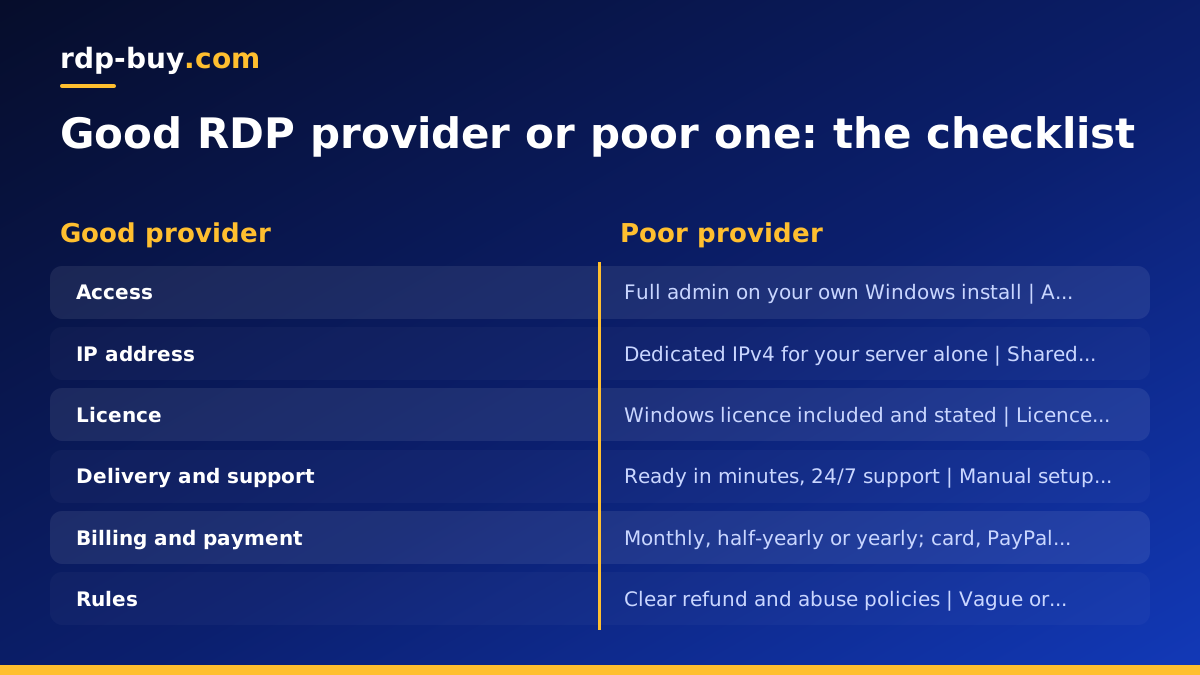
Why best RDP providers lists rarely answer your question
Most pages that promise the best RDP providers are built to rank in search, not to help you choose. They list names, give each one a star rating and move on. What they skip is the part that matters: what you plan to run on the desktop, where your users or APIs are, how you prefer to pay, and what happens when something breaks at two in the morning.
This guide will not name or rank any company. Instead it walks through the things that separate a good RDP provider from a poor one, in the order you should check them. By the end you will have a short list of yes or no questions. Any provider that answers no to the first few is not the best RDP provider for you, whatever a list says.
One more note before the checklist. The phrase RDP server best suited to you depends on the job. A desktop for light browsing and a desktop for a trading platform or an always-on AI agent are different purchases. Keep your own use in mind as you read, and the checklist will do the rest.
Access and the IP address: full admin and a dedicated IPv4
The first thing to check is what kind of account you receive. A proper Windows RDP gives you full administrator access: you can install software, change system settings, add Windows features, create extra user accounts and reboot the machine whenever you want. Some sellers offer a shared desktop where you are one user among many on the same Windows installation. That is a different product. You cannot install what you need, you share the CPU and memory with strangers, and a problem caused by someone else becomes your problem.
The second thing is the IP address. A good provider gives every server a dedicated IPv4 address that belongs to your machine alone. This matters more than most buyers expect. Websites, trading platforms and APIs treat your traffic as coming from one stable address, so logins stay consistent and you are not blocked because a stranger on the same address behaved badly. A shared or rotating address is fine for a quick test and poor for anything you rely on.
If a provider cannot clearly say whether you get admin rights and a dedicated IPv4, treat that as a no. A dedicated admin RDP should be the default, not an upgrade you discover after ordering.
Windows licence, location choice and setup time
Windows Server needs a licence, and a good provider includes it in the plan price. Check the plan page or the terms for a plain statement that the Windows licence is included. If the licence is not mentioned, ask before you pay. An unlicensed desktop can stop working or lose features, and an activation message on your first login is not the welcome you want.
Location is the next question, and it is a real one rather than a marketing point. The desktop should sit close to whatever it talks to most. If you use it to run a broker platform, you want the server near the broker. If it will host an agent that calls APIs in one region, put it in that region. If you simply want a desktop that feels responsive from where you are, pick the nearest city. A provider with a wide spread of locations gives you that choice; rdp-buy.com lists 33 server locations so you can match the desktop to the job.
Setup time is the last item in this group. A good provider delivers a server that is ready in minutes after payment, with the login details sent to you automatically. Manual provisioning that takes a day or two is a sign the provider runs on spreadsheets rather than systems, and it usually predicts slow support later.
Support, billing terms and payment options
Support is where providers differ most, and it is the hardest thing to judge from a product page. Look for 24/7 support in writing, with a ticket system or chat you can reach without logging in to the server itself. If the server is unreachable, email and a web ticket are your only way in, so test both before you depend on them. A provider that answers only during office hours in one time zone is a poor fit for an always-on workload.
Billing terms should give you a choice. Monthly billing suits a first order and short projects. Half-yearly or yearly billing suits a desktop you already know you will keep. The best RDP provider for you lets you start monthly and move to a longer term later rather than forcing a long commitment up front. Also check that renewal is automatic if you want it, and that you can switch it off if you do not.
Payment options matter more than they look. Card is the simplest. PayPal gives you a familiar buyer flow and keeps your card out of the provider's hands. Crypto suits buyers who prefer not to share a card at all, or who are ordering from a country where cards are often declined by overseas merchants. A good provider accepts all three; you can read how each works on the pages for buying RDP with PayPal and buying RDP with crypto.
- Support: 24/7, reachable by ticket or chat even when the server is down.
- Billing: monthly, half-yearly or yearly, with renewal you control.
- Payment: card, PayPal or crypto, your choice at checkout.
A plan ladder that matches real uses
A single plan with one size of everything is a warning sign. Real buyers have different needs, and a good provider sells a ladder of plans so you can pick a rung that fits. The smallest rung should be enough for a clean desktop with a browser and a couple of light applications. The middle rungs should cover a trading platform with several charts, an office suite with large files, or a browser automation tool. The top rungs should give an AI agent or a Docker-based workflow room to run around the clock without swapping to disk.
What you want to see on the plan page is the amount of CPU, memory and storage per plan, stated plainly, with an honest suggestion of what each plan is for. What you do not want to see is vague labels such as starter, pro and ultimate with no numbers behind them. Our guide on which RDP plan you need walks through the sizing questions in detail, and the cheap RDP page explains which jobs genuinely suit the smallest plan.
A related sign of a well-run provider is that you can move up the ladder later. Starting small and upgrading when the desktop feels tight is far better than guessing high on day one. Ask whether upgrades keep your data and IP address, and how long an upgrade takes.
Transparent refund and abuse rules
Read the refund policy before you pay, not after. A good provider states in plain words when a refund is available, how to request it, and what is excluded. Common and reasonable exclusions are servers that have been used for abuse and custom builds that cannot be resold. What you should be wary of is a policy that is missing entirely, or one written so broadly that any request can be refused.
The abuse policy deserves the same attention. Every serious provider forbids spam, attacks on other networks, scanning, phishing and similar activity, and will suspend a server that does them. That protects you too: it keeps the provider's address ranges clean, which keeps your dedicated IPv4 in good standing with the services you use. What you want is a clear list of what is not allowed, a notice before suspension where possible, and a way to respond if your server was compromised rather than misused on purpose.
Both documents tell you something about the company behind the product. Clear rules usually come from a provider that has handled real cases and written down what it learned. Vague rules usually mean the decision is made case by case, which is rarely in the customer's favour.
How to test a provider in the first week
The checklist above can be run from the provider's website. The real test starts when the server arrives. Order the smallest plan that fits your use on monthly billing, then spend the first week checking the things that only a live server can show you. Treat it as a trial with a small cost, and be ready to move on if it fails.
Start with the basics on day one. Note the time between payment and the welcome email with your login details. Connect, confirm you are an administrator, and check the IP address shown inside Windows matches the one you were given. Change the password straight away and run Windows Update. Then install the software you actually plan to use and leave it running.
During the rest of the week, pay attention to consistency rather than peak performance. Does the desktop feel the same at busy times of day? Does your application stay running overnight without you touching it? Open a low-priority support ticket with a genuine question and see how long a useful reply takes. Reboot the server once from the control panel and time how long it takes to come back. By the end of the week you will know more about this provider than any ranked list could tell you.
If you are new to remote desktops, our guide on how to connect to your RDP server covers the first login from Windows, Mac and a phone.
- Day one: time the delivery, confirm admin rights and the dedicated IP, change the password, run updates.
- Days two and three: install your real workload and leave it running unattended.
- Days four to seven: watch for consistency, test support with a real question, reboot once and time it.
Choosing the RDP server best suited to you
Put the checklist together and the choice becomes simple. A provider that gives you full admin access and a dedicated IPv4, includes the Windows licence, offers a real choice of locations, delivers in minutes, supports you around the clock, bills monthly or longer, accepts card, PayPal or crypto, sells a ladder of plans and publishes clear refund and abuse rules has passed every test on the page. Everything else is detail.
On rdp-buy.com each of those boxes is ticked on purpose. The Windows RDP plans page lists every plan with its resources and a plain description of what it suits, from a light desktop to an always-on machine for agents and automation. Pick a plan, choose one of the 33 locations, pay the way you prefer, and the server is ready in minutes with the licence included.
If you are still unsure which rung of the ladder is yours, start one size smaller than you think you need on monthly billing, run the first week test above, and upgrade when the desktop tells you it is time. That is the most reliable way anyone has found to pick the best RDP provider: let a live server prove it.