 Sign in
Self Host n8n for Clients: An Agency Setup Guide
If you build automations for other businesses, deciding how to self host n8n for clients shapes your security, your support load and how cleanly you can hand work over. This guide covers the licence question, the main hosting models and a repeatable setup on hosting for AI agents and workflows.
Why agencies self host n8n for clients
n8n is a workflow automation tool that connects apps, APIs, databases and AI models through visual workflows. Agencies and freelancers use it to build lead routing, reporting, AI assistants, data syncs and back office automations for their clients.
Self hosting gives you control that a shared cloud account does not. You decide where data lives, which community nodes are installed, how long execution logs are kept, and how the instance is backed up. You can run custom code, connect to databases inside a private network, and tune the instance for heavy workflows. For a broader comparison of the two approaches, see VPS vs managed services for agents and workflows, or the VPS for n8n page.
The trade-off is responsibility. When you host n8n for a client, you are running production infrastructure for their business. Plan for that from the first day.
Check the n8n licence first
n8n is distributed under its own fair-code licence, the Sustainable Use License, with some features under a separate enterprise licence. The licence allows free use for your own internal business purposes, and it places limits on offering n8n itself to others as a commercial service.
Building workflows for a client and running them on an instance the client owns is a common, straightforward arrangement. Running one instance that you sell access to, or reselling n8n under your own brand, is a different situation and may need a commercial agreement with n8n. The details matter and can change, so read the current licence and FAQ on n8n.io, and contact n8n if your model is unclear. This guide is general information, not legal advice.
Three hosting models for client work
Most agencies end up with one of these setups. Each has clear strengths.
- One server per client, owned by the client. The client orders the server in their own name and gives you access. They own the data and the bill, and handover is simple: you remove your access. This is the cleanest model for licensing and trust.
- One server per client, managed by you. You order and run a dedicated instance for each client and include it in a support retainer. Isolation is strong, since one client's runaway workflow cannot slow another's.
- One server, several isolated instances. You run separate n8n containers for each client on one larger machine, each with its own database, encryption key and domain. This uses resources well but needs careful separation and monitoring.
- Avoid: putting several clients' workflows and credentials in a single shared n8n instance. One mistake or compromised account exposes everyone.
Recommended setup for each client instance
Whichever model you choose, standardise the build so every client gets the same reliable setup. Docker Compose makes this repeatable.
Keep the Compose file and environment template in a private Git repository. A new client then becomes a short checklist instead of a fresh project. Our step by step Docker VPS page and the official docs on docs.n8n.io cover the details of each component.
- A Linux VPS with full root access and a dedicated IPv4 address, in a location close to the client's main systems.
- Docker and Docker Compose, with n8n running from the official image.
- PostgreSQL as the database rather than the default SQLite, for reliability under load.
- A reverse proxy such as Caddy or Traefik to provide HTTPS on the client's own subdomain.
- A unique, securely stored encryption key for each instance. n8n uses it to encrypt saved credentials, and losing it means losing access to them.
- Queue mode with Redis and separate workers for clients with heavy or parallel workloads.
- Execution data pruning so logs do not fill the disk.
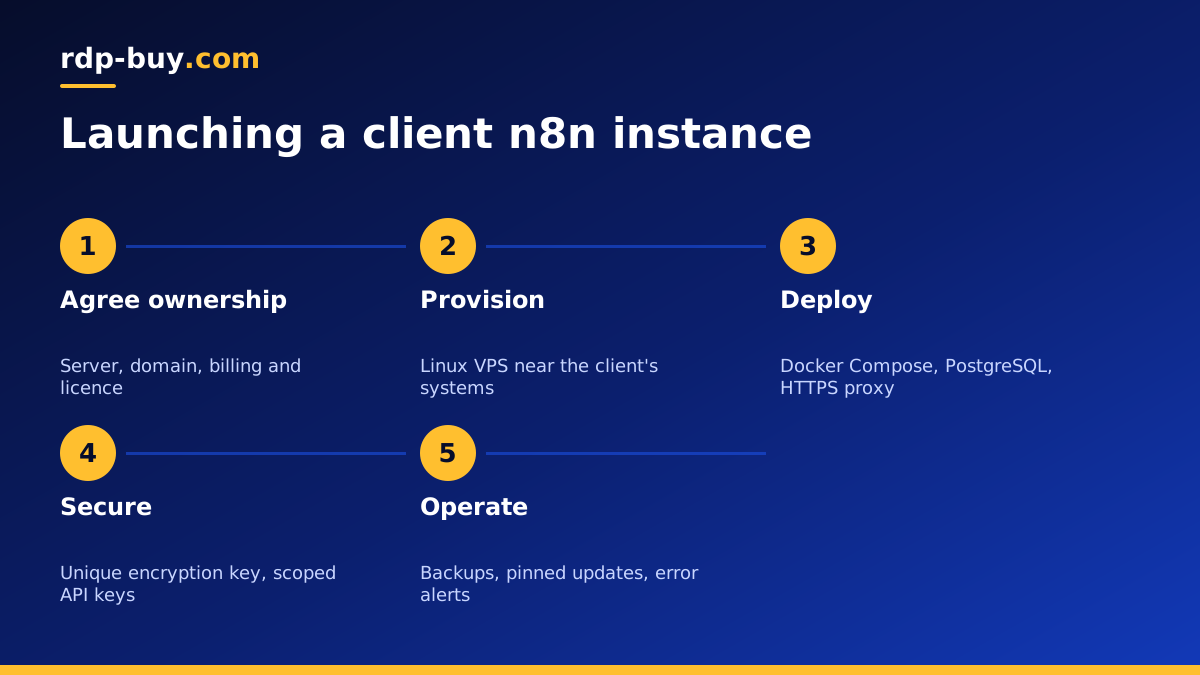
Step by step: launching a new client instance
Here is a practical order of work for a new client.
- Agree who owns the server, the domain and the billing, and record it in your contract.
- Order a Linux VPS. Servers are ready in minutes. Point a subdomain such as automations at the client's domain to the server's IP.
- Harden the server: updates, a non-root user, SSH keys, and a firewall that allows only SSH, HTTP and HTTPS.
- Clone your Compose template, fill in the environment file with the domain, database password and a new encryption key.
- Start the stack, confirm HTTPS works, and create the owner account using the client's email.
- Invite yourself as a separate user so actions are traceable.
- Build workflows, then document each one: what triggers it, what it touches and who to contact when it fails.
- Set up an error workflow that alerts both you and the client when a workflow fails.
Handling client credentials safely
Your clients trust you with access to their CRM, email, payment and AI accounts. Treat those credentials as the most sensitive part of the job.
Ask clients to create dedicated API users or keys for automations rather than sharing their personal logins. Scope each key to the minimum permissions the workflow needs. Store credentials only inside n8n's encrypted credential store, never in workflow notes, code nodes or shared documents.
Keep each client's encryption key in your password manager under that client's entry, and also give it to the client if they own the server. Rotate keys when staff leave either side.
Backups, updates and monitoring
A client instance is production. Schedule a nightly dump of the PostgreSQL database and copy it off the server, together with the environment file and encryption key stored securely. Export workflows to a private Git repository as a second line of defence, and test a restore before you need one.
Update n8n on a schedule rather than whenever a new version appears. Read the release notes, update a staging copy first for larger clients, then update production during a quiet window. Pin the image version in your Compose file so updates are deliberate.
Monitor disk space, memory and the health of the n8n container, and watch for failed executions. Clients notice a broken automation quickly, so it is better that you notice first.
Handing over cleanly when a contract ends
Every client relationship ends eventually, whether the client brings automation in house, moves to another agency or simply stops a project. A clean handover protects your reputation and the client's operations, so plan it at the start rather than at the end.
If the client owns the server, handover is mostly about knowledge and access: deliver the documentation, confirm their team can sign in as owner, then remove your own user and SSH keys. If you own the server, agree in advance whether you will transfer it, migrate the instance to a server the client orders, or export the workflows and shut it down after an agreed date.
In every case, hand over the full set of items below and get written confirmation that the client has received them. Then delete any copies of their credentials and encryption key from your own systems.
- An export of every workflow, plus the latest database backup.
- The n8n encryption key and the environment file, delivered securely.
- A list of every connected account and API key, with who owns each one.
- Notes on schedules, webhooks and any external services that call the instance.
Connecting AI agents and tools
Many client projects now pair n8n with AI models and agents. n8n's AI nodes call hosted model APIs, and you can connect it to agents that run on the same server or a neighbouring one. Some agencies run a coding agent such as Claude Code (by Anthropic) on a separate server to build and maintain integrations; our Claude Code VPS setup guide shows how. Keep agents that execute commands away from the client's production n8n instance, and give them only the access they need.
Choosing servers for client n8n instances
Size each instance for the client's workload. Light, scheduled workflows run comfortably on a modest plan. Heavy data syncs, many webhooks, queue mode with workers, or AI workflows that process documents need more memory and cores. Pick a location near the client's main apps or their customers from 33 locations.
Every server includes full root access, a dedicated IPv4 address and 24/7 support, with monthly, half-yearly or yearly billing that you or the client can choose to match the contract. When you are ready to launch your next client, set up AI agent hosting for the instance and follow the checklist above.
