 Sign in
n8n Self Hosting vs Cloud: Which Should You Choose?
The n8n self hosting vs cloud decision comes down to control against convenience. This guide compares both honestly, explains who each suits, and shows how to run self hosted n8n on a server built for AI agent hosting if that is the route you choose.
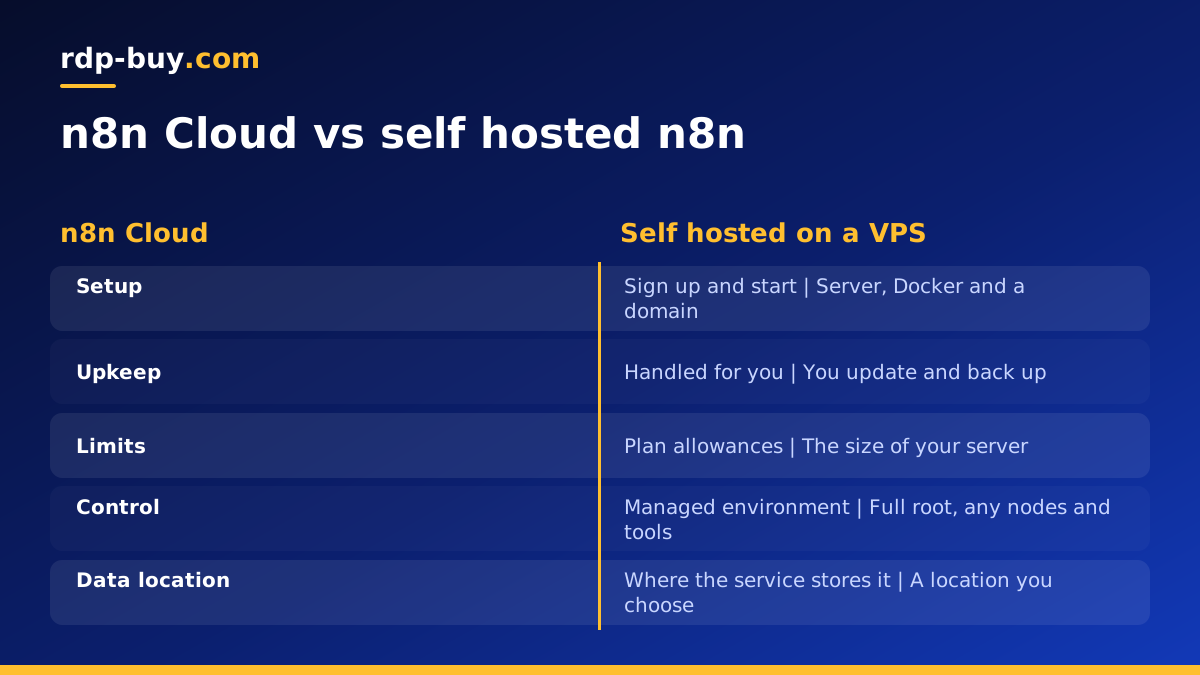
n8n self hosting vs cloud in one paragraph
n8n is a workflow automation tool that connects apps, APIs and AI models. You can use it in two main ways. n8n Cloud is the hosted service run by the n8n team: you sign up, log in and build workflows, and they look after the servers. Self hosting means you install n8n yourself, usually with Docker, on a server you control, and you look after it.
Cloud is the quicker start and needs no server skills. Self hosting gives you full control over the server, where your data lives, which community nodes you install and how the instance is configured, in exchange for doing the upkeep yourself. Many people who start on Cloud move to a self hosted instance on a VPS for AI agents once their workflows grow or they want more control.
What n8n Cloud gives you
n8n Cloud is the simplest way to start. There is nothing to install, updates are handled for you, and you can be building a workflow within minutes of signing up. For a team that has no one comfortable running a Linux server, that convenience is worth a lot.
The trade off is that you work within the limits of the plan you pick. Cloud plans are structured around usage, such as the number of workflow executions, and some features depend on the plan level. You also have less freedom over the environment itself: you cannot install arbitrary system packages, and you rely on the service for where and how your data is stored.
Check the current plans and terms on n8n.io before deciding, since they change over time.
What self hosting n8n gives you
Self hosting puts the whole instance in your hands. You choose the server, the location, the database and the version, and you can add community nodes or custom code nodes that need extra system packages. Your workflow data and credentials stay on a server you control.
The self hosted community edition is free to use under n8n's own licence, so the main running cost is the server it runs on. Usage is limited only by what that server can handle, rather than by a plan allowance, which suits workflows that run often or process a lot of items.
The cost of that freedom is responsibility. You keep n8n updated, secure the server, set up HTTPS and run backups. The n8n documentation covers the self hosting options in detail, including Docker and queue mode for larger setups.
Side by side: the points that decide it
Here is how the two options compare on what usually matters:
- Setup: Cloud is ready straight after sign up. Self hosting needs a server, Docker and a domain, which takes an hour or two the first time.
- Upkeep: Cloud is maintained for you. Self hosting means you apply updates, watch disk space and handle backups.
- Limits: Cloud works within plan allowances. Self hosting is limited by the size of your server.
- Control: Cloud manages the environment. Self hosting lets you install community nodes, system packages and custom configuration.
- Data location: with Cloud, data lives where the service stores it. Self hosting lets you choose the country and city of your server.
- Network identity: a self hosted server has its own dedicated IP address, which helps when an API or partner asks you to whitelist an IP.
Who should choose n8n Cloud
Cloud is the right choice when convenience matters more than control. It suits people who want to try n8n without any setup, small teams without anyone to look after a server, and workflows that run occasionally and fit comfortably inside a plan allowance.
It is also a sensible first step if you are not yet sure n8n is the right tool. You can learn how workflows, triggers and credentials work, then export your workflows and move them to a self hosted instance later if you need to.
Some teams also use both for a while: Cloud for quick experiments and a self hosted instance for the workflows that run all day. That split lets you learn the tool without pressure, while the workflows that matter most run on a server you control, sized for the work they do and placed in the location you choose.
Who should self host n8n
Self hosting makes sense when one or more of these apply:
- Your workflows run often, on schedules or from busy webhooks, and you would rather size a server than watch a usage allowance.
- You need community nodes, extra system tools or custom code that the hosted service does not allow.
- You want workflow data and credentials kept on a server in a country you choose.
- You run AI agents in n8n that call models and tools all day, and want a predictable environment for them.
- You need a fixed IP address for API whitelists or partner integrations.
- You already run other self hosted tools and are comfortable with Docker.
Why a VPS is the right home for self hosted n8n
You can install n8n on a laptop or a home machine, but workflows stop whenever that machine sleeps, loses its connection or restarts. Webhooks from other services fail, scheduled runs are missed, and you need port forwarding or a tunnel to receive anything from outside.
A VPS solves all of that. It runs around the clock, has a dedicated public IPv4 address for your domain and webhooks, and sits in a data centre location you choose, ideally close to the APIs your workflows call. With full root access you can install Docker, a reverse proxy and anything else your workflows need.
The VPS for n8n page lists plans sized for n8n, and our guide on what you can run on an RDP or VPS shows what else can share the server.
How to self host n8n on a VPS, step by step
A typical self hosted setup takes these steps:
- Order a Linux VPS, log in over SSH and update the system. Create a sudo user, set up SSH keys and turn on a firewall that allows SSH, HTTP and HTTPS.
- Point a subdomain such as n8n.yourdomain.com at the server's dedicated IPv4 address.
- Install Docker and the Compose plugin from docker.com.
- Create a compose file based on the n8n documentation, with n8n, a Postgres database for production use, and a reverse proxy such as Caddy or Traefik for automatic HTTPS.
- Set the environment variables for your domain, time zone, webhook URL and an encryption key, and keep that key safe, since credentials depend on it.
- Start the stack, open your domain, create the owner account and import any workflows you exported from Cloud.
- Schedule nightly backups of the database and the n8n data volume to storage outside the server.
Moving from n8n Cloud to self hosted
If you start on Cloud and later move, plan the switch. Export your workflows from the Cloud instance, set up the self hosted server and import them. Credentials need to be added again on the new instance, since they are encrypted with each instance's own key.
Update webhook URLs in the services that call your workflows, test each workflow on the new server, and only then turn off the Cloud versions. Running both briefly in parallel, with triggers active on only one, avoids double runs.
Choosing a server for self hosted n8n
If self hosting is the right fit, choose a plan with enough memory for n8n, its database and your busiest workflows, plus some headroom. You can get started with our AI agent hosting plans or go straight to Linux VPS plans. Every server includes full root access, a dedicated IPv4 address and a choice of 33 server locations.
Billing can be monthly, half yearly or yearly, and you can pay by card, PayPal or crypto. Servers are ready in minutes, with 24/7 support if anything in the setup needs a hand. rdp-buy.com is not affiliated with n8n; we provide the server, and you run n8n on it under its own licence.
