 Sign in
Claude Code VPS: How to Run Claude Code on a Server 24/7
A Claude Code VPS gives Claude Code (by Anthropic) a permanent Linux home where long tasks keep running after you close your laptop. This guide covers why people move it to a server, what plan to choose, the exact setup steps and how to keep it safe, with AI agent hosting as the natural place to start.
Why run Claude Code on a VPS instead of your laptop
Claude Code (by Anthropic) is a command line coding agent. It reads your repository, edits files, runs tests and executes shell commands while it works through a task. On a laptop that works well until the lid closes, the Wi-Fi drops or the machine goes to sleep in the middle of a long refactor. A Claude Code VPS solves that by giving the agent a machine that never sleeps.
The second reason is isolation. An agent that can run shell commands is safer on a separate server than on the computer that holds your personal files, browser sessions and password manager. If something goes wrong on a VPS you rebuild the server; if something goes wrong on your main machine you have a much bigger cleanup.
The third reason is consistency. A server with the same operating system as your production environment means the tests Claude Code runs behave the way they will in production. You also get a dedicated IP address, which helps when a database, firewall or third party API only accepts connections from known addresses. If you already know you want this setup, our hosting for AI agents page lists the plans built for it.
- Always on: long tasks finish even when your own computer is off.
- Isolated: the agent works inside a server you can wipe and rebuild.
- Reachable: connect over SSH from any computer, tablet or phone.
- Predictable: one Linux environment that matches where your code will run.
What a Claude Code server actually needs
Claude Code itself is light. The model runs on Anthropic's side, so your server is not doing the heavy thinking. What uses resources on the VPS is everything the agent runs for you: package installs, compilers, test suites, Docker containers, language servers and local databases.
That means you size the server for your project, not for the agent. A small script repository needs very little. A large monorepo with a full test suite, or a project that starts several containers during tests, needs more memory and CPU so that each step does not crawl. A good rule is to look at how your laptop copes with the same build today and choose a plan that is at least comparable.
Storage matters more than people expect. Dependencies, build caches, container images and Git history add up quickly, and running out of disk space halfway through a task is one of the most common reasons an unattended agent stops. Choose a plan with room to spare and clean caches on a schedule.
- Operating system: a current Ubuntu or Debian release is the simplest choice.
- Access: full root access so you can install Node.js, Git and your toolchain.
- Memory and CPU: sized for your build and test suite, not for the agent.
- Disk: enough for repositories, dependencies, caches and container images.
- Location: close to you for a responsive terminal, or close to the services your code talks to.
Choosing between a Linux VPS and a Windows RDP for Claude Code
Most people run Claude Code on a Linux VPS. The tooling is native, setup is quick, and you work entirely over SSH. If your project is a web app, an API, a data pipeline or anything that deploys to Linux, this is the obvious fit. Our VPS for Claude Code page is built around exactly this setup.
A Windows server makes sense when the code you are building only runs on Windows: desktop software, .NET projects tied to Windows APIs, or automation that drives Windows applications. In that case a Windows RDP for AI agents gives you a full desktop plus the agent. If you are unsure which family fits, the guide on RDP vs VPS walks through the trade offs.
Step by step: set up Claude Code on a VPS
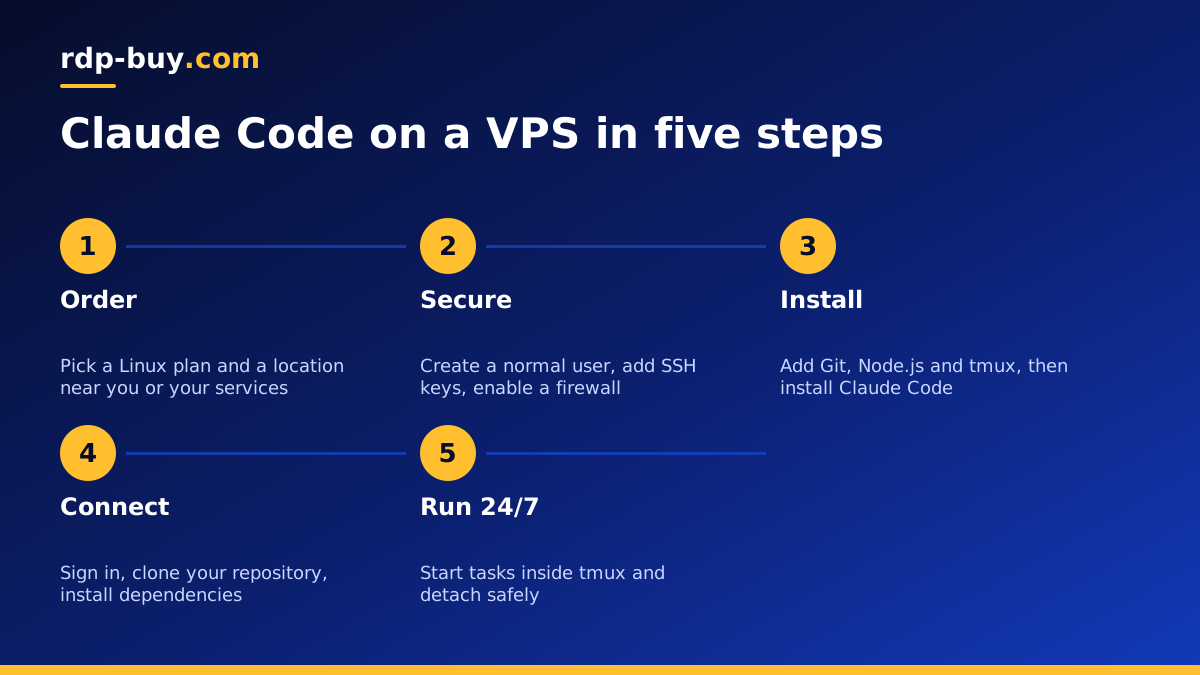
The steps below assume a fresh Ubuntu or Debian server with root access. Always check the official install instructions on anthropic.com before you start, because install methods and requirements can change between releases.
- Order and connect: once the server is ready, connect with ssh root@your-server-ip using the credentials from your welcome email.
- Update the system: run your package manager's update and upgrade commands so you start from current packages.
- Create a normal user: add a non root user for daily work, give it sudo, and copy your SSH key to it.
- Install the basics: Git, a build toolchain, tmux and a current Node.js release, which the Claude Code install documentation lists as a requirement.
- Install Claude Code: follow the official install command from Anthropic's documentation, then run claude in a terminal to start the sign in flow.
- Authenticate: sign in with your Anthropic account or set your API key as an environment variable, never hard coded inside a repository.
- Clone your project: add a deploy key or SSH key for your Git host, clone the repository and install its dependencies.
- Start inside tmux: run tmux new -s claude, launch Claude Code inside it, and detach with Ctrl+b then d. The session keeps running after you disconnect.
Keeping Claude Code sessions alive around the clock
The single most important habit on a Claude Code server is never running the agent directly in a bare SSH session. If your connection drops, the shell closes and the task dies with it. A terminal multiplexer such as tmux or screen keeps the session running on the server, and you reattach later with tmux attach -t claude from any device.
For repeatable, non interactive jobs, such as a nightly task that asks the agent to update dependencies and open a pull request, use Claude Code's non interactive mode from a script and trigger it with cron or a systemd timer. Write the output to a log file so you can review what happened in the morning.
Keep an eye on the boring things that stop unattended work: disk space, memory pressure and expired credentials. A small cron job that warns you when disk usage gets high saves a lot of confusion later.
Security basics for an AI coding agent server
An agent that can run commands deserves the same care as any production server. The good news is that the basics are simple and cover most of the risk.
- Keys, not passwords: use SSH keys and disable password login once your key works.
- Firewall: allow SSH and only the ports your project genuinely needs.
- Least privilege: run Claude Code as a normal user, not as root.
- Scoped credentials: give the server a Git key and API tokens that only reach the repositories and services it needs.
- Review permissions: use Claude Code's permission settings so risky commands need your approval.
- Snapshots and backups: push work to Git often and keep a backup routine so a bad command is easy to undo.
Working with Claude Code servers from any device
Once Claude Code lives on a VPS, your laptop becomes a window into it rather than the place where work happens. You can start a task from your desk, check progress from a tablet over SSH, and pick it up again from another computer without copying files around.
Many developers also connect an editor to the server over SSH so they can read the diffs Claude Code produces in a familiar interface. Because the repository, dependencies and running processes all stay on the server, the experience is the same whichever device you connect from.
If you run more than one agent, for example Claude Code alongside an n8n workflow server that triggers it, keep each in its own user account or container. Our Docker VPS plans suit people who prefer to package every tool in containers.
How to pick the right Claude Code VPS plan
Start from your project. Small repositories and script work fit a modest plan. Larger codebases, heavy test suites and Docker based workflows need more memory, CPU and disk. Because billing is monthly, half-yearly or yearly, you can begin small, watch how the server copes for a few weeks and move up when builds start to queue.
Pick a location close to where you work so the terminal feels responsive, or close to the databases and APIs your code connects to. With 33 locations to choose from, there is usually one near both. Every plan includes full root access, a dedicated IPv4 address and 24/7 support, and servers are ready in minutes, so you can be running your first task the same day.
When you are ready, compare the plans on our AI agent hosting hub, or go straight to Linux VPS plans if you already know the size you need. You can pay by card, PayPal or crypto.
