 Sign in
What Is a Virtual Dedicated Server? VDS vs VPS and Bare Metal
A virtual dedicated server (VDS) is a virtual machine whose processor cores and memory are reserved for you, so it behaves like a small dedicated server while keeping the flexibility of a VPS. Here is what that means in practice, how it compares with the alternatives, and how to choose a dedicated server plan.
What is a virtual dedicated server?
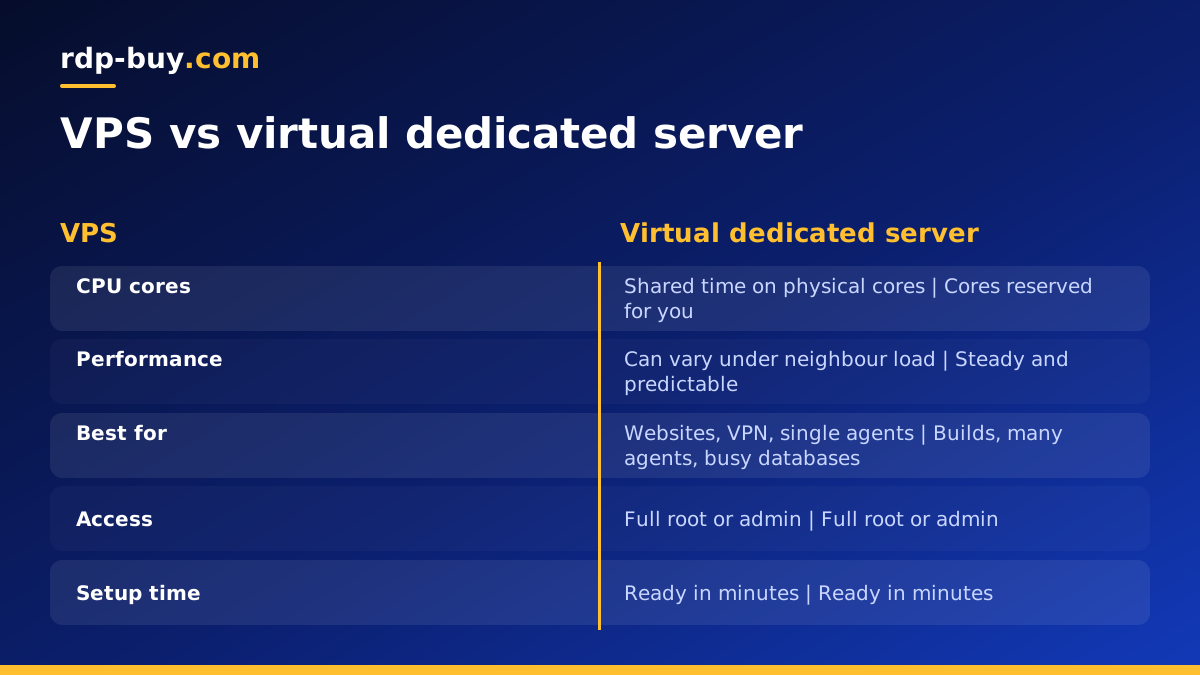
A physical server can be divided into several virtual machines by a hypervisor. How those machines share the hardware is what separates a VPS from a VDS. On a typical VPS, virtual CPU cores are scheduled onto physical cores shared with other customers, on the reasonable assumption that not everyone is busy at once. On a virtual dedicated server, specific resources, most importantly the CPU cores, are reserved for one customer and are not shared.
The result is a server that is still virtual, with its own operating system, full root or administrator access and quick provisioning, but whose performance does not depend on what the neighbours are doing. The terms vary between hosts: VDS, dedicated vCPU and dedicated CPU server usually describe the same idea. On rdp-buy.com these are the dedicated CPU server plans.
VDS vs VPS vs bare metal at a glance
The three options sit on a line from most shared to least shared.
- VPS: a virtual machine with shared CPU time. Economical and ideal for light or bursty workloads such as websites, VPNs, small automations and single agents.
- VDS: a virtual machine with reserved cores. Steady performance for sustained workloads, with the convenience of a virtual server.
- Bare metal: a whole physical machine, no hypervisor, every core and all memory yours. Best for the heaviest workloads, custom virtualisation and software that must run directly on hardware.
How a VDS works under the hood
The hypervisor on the host machine assigns physical cores to your virtual machine and does not schedule anyone else's work on them. Memory is allocated to your server and not overcommitted to others. Storage and network are still shared infrastructure, but your compute is predictable.
You interact with a VDS exactly like any other server. On Linux you log in over SSH as root; on Windows you connect over Remote Desktop as administrator. You install software, configure the firewall and run services the same way. The difference only shows in how consistently the server performs under load.
Because the resources are reserved, a VDS also makes capacity planning easier. If a job used most of four cores last week, it will have the same four cores next week, so you can schedule builds, backtests or batch jobs with confidence and spot real growth in your graphs rather than noise from other customers.
Who should choose a virtual dedicated server
A VDS makes sense when your workload keeps the processor busy for long periods, or when you need performance you can plan around. Typical cases include:
- Running many AI agents, automations or browser sessions in parallel, as described on the AI agent hosting hub.
- Build servers and CI runners that compile code and build images throughout the day.
- Trading setups with several terminals, backtests or optimisations running around the clock.
- Busy databases, APIs and application servers where response times must stay steady.
- Data processing, scraping and media conversion jobs that run for hours.
- Teams sharing one Windows server where several people work at once.
When a regular VPS is the better buy
If your server spends most of its time waiting on the network, reserved cores add cost without a visible benefit. A personal website, an n8n instance with a few workflows, a VPN, or a single assistant that calls model APIs all run well on a standard Linux VPS. For Windows desktop tools with light use, a regular Windows RDP plan is enough.
Start there, watch CPU use during your busiest hours, and move to a VDS only if the numbers show sustained load or uneven performance.
When to skip VDS and go bare metal
A VDS covers most heavy workloads, but some needs go further. If you want to run your own hypervisor such as Proxmox, need every core and all the memory of a machine, or run software with licensing tied to physical hardware, a bare metal server is the right tool. It takes a little more setup, but there is no virtualisation layer between you and the hardware.
How to choose a VDS plan
Size a virtual dedicated server from the work it will do.
- Cores: count the jobs that run at the same time and how many threads each uses.
- Memory: heavy CPU work often needs heavy memory too, especially browsers, compilers and databases.
- Storage: leave room for data, logs, container images and backups.
- Operating system: Linux for builds, Docker, databases and agents; Windows for Windows-only software, with the licence included in Windows prices.
- Location: near your users, your trading venue or the APIs your software calls.
Location and network identity
A VDS is often the backbone of a project, so its location matters. Pick the city closest to what the server talks to most. rdp-buy.com has 33 locations, listed on the server locations page. Every server includes a dedicated IPv4 address, which keeps allowlists, broker logins and API access stable as you grow.
Common myths about virtual dedicated servers
Because the names are similar, VDS plans attract a few misunderstandings worth clearing up before you buy.
- "A VDS is a physical server." It is not. It is a virtual machine with reserved resources. If you need the physical machine, choose bare metal.
- "Reserved cores fix every slow server." They fix processor contention. If memory, disk or a slow external API is the bottleneck, reserved cores will not help much.
- "A VDS manages itself." With full root or administrator access, updates, firewall rules and backups are still yours to run.
- "Bigger is always safer." An oversized VDS wastes budget. Size from measurements and leave sensible headroom.
Questions to answer before you buy a VDS
A few quick questions help you avoid buying the wrong tier. How many jobs run at the same time, and for how long? Does CPU use stay high for hours, or only spike briefly? Do you need Windows software, or will Linux do? Where are the users, venues or APIs the server works with? And do you expect to grow within the next few months? If your answers point to steady, sustained load near a known location, a virtual dedicated server is likely the right fit.
Moving from a VPS to a VDS
Most people arrive at a VDS from a VPS that has started to feel slow. The move is straightforward: order the new server, install the same software, copy your data and configuration across, test, then switch DNS or your clients to the new IP address. Keeping the old server running for a few days while you test gives you an easy fallback.
Containers make this even simpler. If your services run in Docker Compose, you can copy the project folder and volumes to the new machine and start them with one command. The Docker VPS page has more on container setups.
Buying a virtual dedicated server
If your workload needs steady performance, browse the dedicated CPU server plans and choose cores and memory from the checklist above. Every server comes with full root or administrator access, a dedicated IPv4, 24/7 support and billing that can be monthly, half-yearly or yearly. Servers are ready in minutes, and you can pay by card, PayPal or crypto.
If you are unsure whether you need reserved cores yet, start on a VPS on monthly billing, measure, and upgrade when the evidence says so. Support is available 24/7 to help you decide.
