 Sign in
Compare VPS Providers: A Buyer's Checklist Before You Order
To compare VPS providers fairly, you need to look past the headline plan and check access, location, billing, payment options and support. This checklist shows what to compare and how to test a provider before you buy VPS hosting for something that matters.
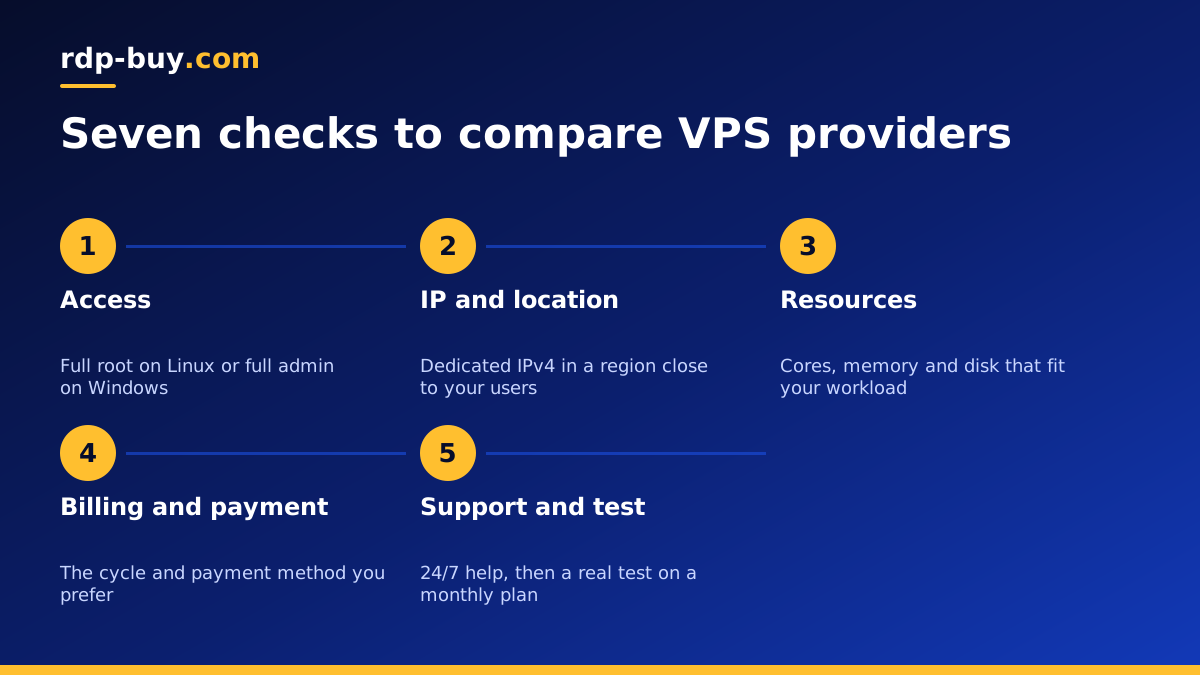
Why comparing VPS providers is harder than it looks
Most VPS plan pages look alike: a list of cores, memory, disk and a monthly figure. The things that decide whether you will be happy six months later are usually further down the page, or missing from it altogether. Who controls the operating system? Is the IP address yours alone? Can you choose where the server lives? What happens when something breaks at night?
A good comparison starts with your workload. Write down what you will run, who will use it and where they are. A trading terminal for one person in Europe has different needs from a public API with users across the United States, and both differ from an AI agent that runs scheduled jobs around the clock.
With that list in hand, work through the checks below for every provider on your shortlist, then choose the one that answers all of them clearly. If you already know what you need, you can go straight to the Linux VPS plans and compare them against this list.
Check 1: access and control
The first thing to confirm is how much control you get. A real VPS should give you full root access on Linux or full administrator access on Windows. That means you can install any software, change firewall rules, run Docker, edit system files and reboot when you choose.
Be careful with plans that are closer to managed app hosting, where a control panel decides what you can install. They can be fine for a simple website, but they get in the way as soon as you want to run a bot, an agent, a VPN or anything slightly unusual.
Also check which operating systems are offered and whether you can reinstall the server yourself. Being able to wipe and rebuild in a few clicks is extremely useful when an experiment goes wrong.
Check 2: the IP address
Ask whether each server gets its own dedicated IPv4 address. A dedicated address matters when you point a domain at the server, when an API provider or broker asks you to whitelist an IP, and when you run mail, a VPN or anything that depends on reputation.
Shared or changing addresses cause hard to diagnose problems: whitelists that stop working, certificates that fail, and services that suddenly treat your traffic as suspicious. A dedicated IPv4 on every server avoids all of that.
Check 3: locations
Location affects how responsive your server feels and which services treat it as local. Compare how many regions each provider offers and, more importantly, whether they have one close to your users, your exchange or the APIs your software calls.
A wide choice also helps later. If your audience grows in a new region, it is much easier to add a second server with the same provider than to start again somewhere else. You can see the 33 locations available at rdp-buy.com on the server locations page, including several cities in the United States for USA VPS plans.
Check 4: resources that match your workload
When you compare plans, compare like with like. Look at the number of CPU cores, the amount of memory, the disk size and the disk type, and ask whether CPU cores are shared with other customers or dedicated to you.
For most websites, bots and agents, a shared core VPS is fine because the workload is light and bursty. If your software keeps the processor busy for long periods, a dedicated CPU server is the fairer comparison, and for the heaviest work a bare metal server.
Also check how easy it is to move up a size. A provider that lets you upgrade without rebuilding the server saves a lot of time as your project grows.
Check 5: billing terms and payment methods
Read the billing options as carefully as the plan itself. Monthly billing lets you test without a long commitment, while half yearly or yearly billing suits a project you know will run for a long time. Make sure the provider offers the cycle you want rather than forcing a long term.
Payment options matter too. Some buyers want to pay by card, some by PayPal, and some prefer crypto. If you have a preference, check it is supported before you start an order. At rdp-buy.com you can pay by card, PayPal or crypto, and the buy VPS with crypto page explains that checkout step by step.
For Windows servers, check whether the Windows licence is included in the plan or billed separately, since that changes what you are really comparing.
Check 6: setup speed and support
Find out how long it takes before you can log in. A VPS that is ready in minutes lets you start work straight away, while a manual setup can stall a launch for a day or more.
Then look at support. Is it available around the clock, or only during office hours in one time zone? Can you reach a person through chat or tickets? Servers tend to fail at inconvenient times, so 24/7 support is worth more than it seems when everything is working.
Check 7: test before you commit
Once a provider passes the checks above, run a short practical test on a monthly plan before committing to a longer term. A simple routine:
- Log in over SSH or Remote Desktop and confirm you have full root or administrator access.
- Install the software you actually plan to run, not a synthetic test.
- Reboot the server and confirm your services come back on their own.
- Test the connection from where your users are, using ping and a real page load or API call.
- Open a simple support ticket to see how quickly and clearly the team responds.
- Check that the IP address stays the same after a reboot and a reinstall.
Red flags when you compare VPS providers
Some warning signs are worth walking away from, whatever the plan looks like:
- No clear statement of what access you get to the operating system.
- Vague answers about whether the IP address is dedicated to you.
- Only one or two locations with no option close to your users.
- Long term billing as the only choice for new customers.
- No way to contact support outside business hours.
- Plan pages that promise unlimited everything without explaining what that means.
Ready to choose a VPS plan
If you have worked through the checklist and want a server that ticks every box, you can buy a VPS at rdp-buy.com with full root access, a dedicated IPv4 address and a choice of 33 locations. Billing can be monthly, half yearly or yearly, payment works by card, PayPal or crypto, and servers are ready in minutes with 24/7 support behind them.
Not sure whether you need Linux or Windows? Read Windows or Linux server: which to rent, and if a remote desktop suits you better, compare the Windows RDP plans as well.
