 Sign in
Forex VPS Explained: Choosing a Windows Server for Trading
A forex VPS is a Windows server in a data centre that runs your trading platform all day, so expert advisors, alerts and open positions are not at the mercy of your laptop or home internet. This guide explains what it does, who needs one, how to pick a location and plan, and how to buy an RDP server set up for trading.
What a forex VPS is
Traders say VPS, but what most of them need is a Windows server they control through Remote Desktop. Popular trading platforms such as MetaTrader are built for Windows, so a forex VPS is usually a Windows RDP with enough memory and CPU to keep the platform, its charts and any automated strategies running without interruption.
You connect to it from your PC, Mac, tablet or phone, see the Windows desktop and use your platform exactly as you would at home. The difference is that when you disconnect, the platform keeps running in the data centre. Our trading focused plans are listed on the forex RDP page, and every plan includes full admin access, a dedicated IPv4 address and the Windows licence.
Why traders move their platform to a server
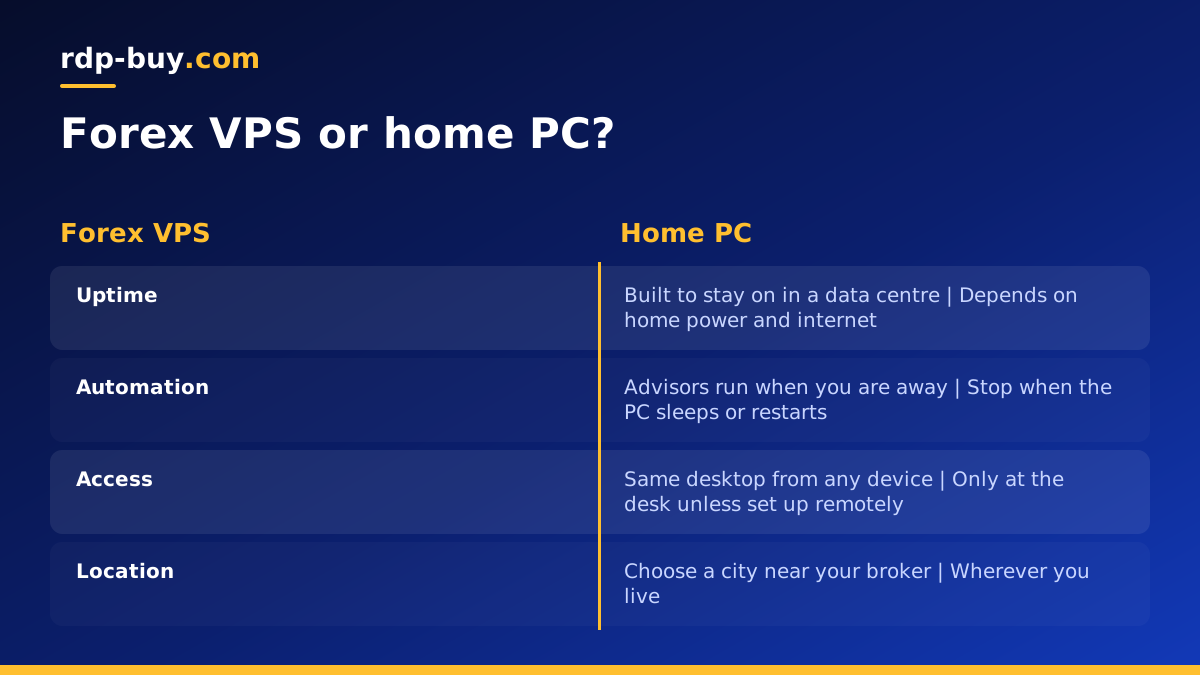
Automated strategies only work while the platform is running. On a home computer, several ordinary things can stop it: a power cut, a Wi-Fi drop, an operating system update that restarts the machine overnight, or simply closing the lid. Each one can mean a missed entry, an unmanaged position or a trailing stop that never moves.
A server in a data centre removes those everyday risks. It is designed to stay on, sits on a professional network rather than a home connection, and does not reboot because a family member needed the computer. You also stop needing to leave a PC running at home all day.
- Expert advisors and bots keep running around the clock.
- Alerts and copy trading stay active when you are away.
- Manual traders get the same desktop from any device, with charts and layouts exactly as they left them.
- Several platforms or accounts can run side by side on one server if the plan is big enough.
Choosing the location for a forex VPS
Location matters because every order travels from your platform to your broker's trading server. The closer your VPS is to that server, the shorter the trip. Brokers usually say where their trading servers are, often in their documentation or by asking support.
Major forex and financial hubs include New York, London, Frankfurt, Tokyo and Singapore. Pick the location closest to your broker's server. If you trade with a broker in the US, a New York or Chicago server is a common choice. For brokers based in Europe, London or Frankfurt are typical.
We offer 33 locations, listed on the server locations page, including USA RDP, UK RDP, Germany RDP and Singapore RDP.
How big should a forex VPS be
Trading platforms are not huge on their own, but they add up. Each open chart, indicator and expert advisor uses memory and CPU, and Windows itself needs its share before you open anything.
As a rough guide by workload rather than numbers: a single platform with a handful of charts and one or two advisors fits a smaller plan. Several platforms, many charts with heavy indicators, or multiple accounts running at once need more memory. Strategy testing and optimisation in the platform's tester are CPU heavy, so if you backtest on the server, extra cores help a lot.
Watch the server for a few days after setup. If memory is nearly full during busy market hours, step up a plan. Our guide which RDP plan do you need lists typical setups, so you can match a tier to your own setup.
Setting up your trading server step by step
Servers are ready in minutes after payment. Once you have the IP address and login, follow these steps:
- Connect with Remote Desktop. The guide how to connect to your RDP server covers Windows, Mac and mobile.
- Change the administrator password to a long, unique passphrase.
- Run Windows Update and restart until everything is current, so the server does not restart itself in the middle of a trading session later.
- Download your trading platform from your broker's official website and log in to your account.
- Copy over your expert advisors, indicators, templates and chart profiles.
- Enable automated trading in the platform and check that each advisor is attached and active.
- Set Windows Update active hours or a maintenance window outside your main trading hours.
Keeping a forex VPS reliable
Once the platform is running, a light routine keeps it that way. Check the platform's journal and experts log for errors after each change. Restart the platform during quiet market hours rather than in the middle of a session. Keep only the charts and tools you actually use, because every extra chart costs resources.
Plan for Windows updates. They are important for security, but an unplanned restart can stop your advisors. Schedule updates for the weekend when the forex market is closed, and log in afterwards to confirm the platform restarted correctly. Many traders add the platform to Windows startup so it opens automatically after a reboot.
Keep copies of your advisors, settings and templates somewhere other than the server. If you ever need to rebuild, you can be trading again quickly.
Forex VPS versus running the platform at home
Running at home costs nothing extra if you already own a PC, and for a manual trader who only trades while sitting at the desk, it may be enough. As soon as you rely on automation, alerts or positions that need managing while you are away, a server becomes the more dependable choice.
A home setup depends on your electricity, your internet and your computer staying on. A server depends on a data centre built to stay on, with 24/7 support if something needs attention. If you also want to run AI tools or scripts alongside your trading, an RDP gives you a Windows desktop for that too, as described on the Windows RDP for AI agents page.
Paying for your trading server
You can pay by card, PayPal or crypto. See buy RDP with card, buy RDP with PayPal or buy RDP with crypto for each method. Billing can be monthly, half-yearly or yearly, which lets you test a location for a month before committing to a longer term.
Choosing your forex VPS plan
Find out where your broker's trading server is and choose the nearest location. Count your platforms, charts and advisors to pick the plan size, adding CPU if you will backtest on the server. Start monthly, watch resource use for a week, then adjust.
When you are ready, browse our Windows RDP plans for trading or the dedicated forex RDP page, choose the location and plan, and pay by card, PayPal or crypto. Your server comes with admin access, a dedicated IPv4 address and the Windows licence included, ready in minutes.
