 Sign in
Dedicated Server for Agencies: Host Many Client Sites Well
A dedicated server for agencies gives a web or marketing studio guaranteed resources for every client site it hosts, with one machine to manage instead of a pile of small plans. Here is how to tell when you are ready, how to organise the server, and how to buy a dedicated server that fits.
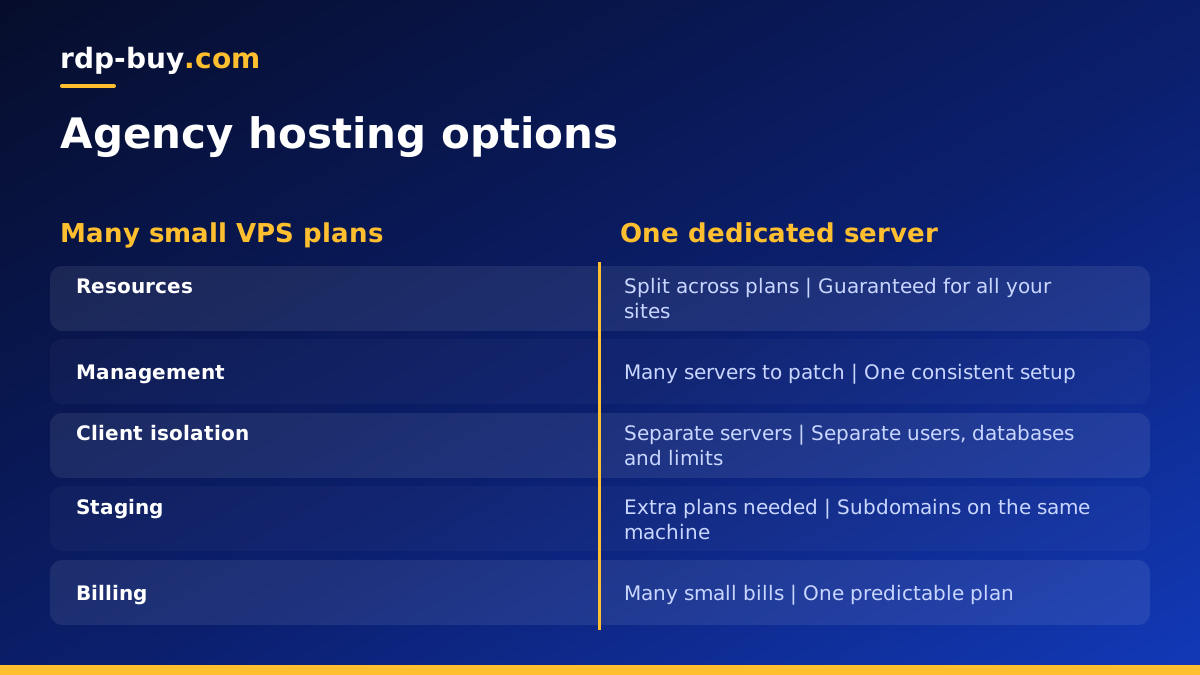
Why agencies move to a dedicated server
Most agencies start hosting client sites on whatever is closest to hand: a shared hosting account, a few small VPS plans, or the client's own hosting. As the client list grows, that patchwork becomes hard to manage. Logins are scattered, update schedules differ, and one busy site can slow down its neighbours.
A dedicated server gives you resources that are not shared with other customers. The CPU, memory and storage on your plan are yours, so performance stays predictable as you add sites. With full root or administrator access you also choose the control panel, the web server, the PHP versions and the security tools, then apply them consistently across every client.
It also turns hosting into a cleaner service for your clients. You can offer care plans with updates, backups and monitoring handled on infrastructure you know inside out.
Signs your agency has outgrown VPS plans
If several of these sound familiar, consolidating onto a dedicated machine is usually worth a closer look. If you are also deciding on the operating system, our guide on Windows or Linux servers covers that choice.
- You manage many small servers and spend more time patching them than improving client sites.
- A traffic spike on one client site slows others hosted alongside it.
- Large stores, membership sites or busy WooCommerce shops need more steady CPU than your current plans give.
- Clients ask for staging copies, and you have nowhere tidy to put them.
- Your backups, monitoring and updates differ from server to server.
- You want one predictable bill for hosting instead of many small ones.
How to organise client sites on one server
Structure is what makes a shared agency server safe and easy to run. The goal is that each client lives in its own space, so a problem with one site stays with that site.
- One system user per client. Each site runs under its own Linux user with its own home folder, so a compromised plugin cannot read other clients' files.
- Separate databases and database users for every site, with passwords that are never reused.
- Per site PHP pools or containers with resource limits, so one heavy site cannot starve the rest.
- A control panel if your team prefers a graphical interface, or a configuration tool and Docker Compose if you prefer code.
- Clear naming for folders, databases and logs, so anyone on the team can find a client's files quickly.
- Staging sites on subdomains, protected by a password so search engines and the public cannot see them.
Security for a multi client server
One server with many clients means one security mistake can affect many clients. Build good habits in from the first day:
- SSH key login only, with password login and direct root login turned off.
- A firewall that opens only the ports your sites and tools need.
- Automatic security updates for the operating system, plus a weekly window for application and plugin updates.
- A web application firewall and login rate limiting for content management systems.
- Malware scanning and file change alerts for each site.
- Separate logins for every team member, removed as soon as someone leaves.
Backups that clients can rely on
Clients rarely ask about backups until they need one. Set a schedule that backs up every site's files and database daily, store copies off the server, and keep several generations so you can recover from a problem that went unnoticed for a while.
Test restores regularly, ideally by restoring a client site to a staging subdomain and checking it loads correctly. Document the steps so anyone on the team can do it during an emergency. Being able to say exactly how a site is protected is a strong selling point for your care plans.
Sizing a dedicated server for agency hosting
Size the server around your current client list, then add room for growth and for staging copies.
- CPU cores matter for dynamic sites, ecommerce checkouts and many PHP workers running at once.
- Memory feeds the database, object caching and PHP processes. More memory lets you cache more and keeps sites fast under load.
- Storage must hold every site, its media, its databases and local backups before they are copied away.
- Headroom for new clients, seasonal peaks and the occasional heavy plugin.
Migrating client sites without downtime
Moving dozens of live sites is where careful planning pays off. Work in batches, starting with low traffic sites so you can refine the process before touching important ones.
For each site, copy the files and database to the new server, test it using a temporary hostname or a local hosts file entry, then switch DNS. Lower the DNS record's time to live a day or so before the move so the change spreads quickly. Keep the old copy running until traffic has fully moved, and watch error logs on the new server for the first days.
Tell clients when their site is moving and what, if anything, they need to do. A short message that explains the benefit, steadier performance and better backups, turns a technical chore into a visible improvement in your service.
Keep a simple migration sheet listing every site, its owner, its move date, and a tick once DNS, email records, SSL and backups have been checked on the new server. That sheet becomes your inventory once the move is done.
Monitoring and care plans on your own server
Running the server yourself lets you turn hosting into a proper care plan. Set up uptime checks for every client site, alerts for expiring SSL certificates and low disk space, and a monthly report that lists updates applied, backups taken and any incidents handled.
Group clients by how much attention their sites need. A brochure site may only need monthly updates and daily backups, while a busy store needs closer monitoring and faster response. Matching the care level to each client keeps your team's time focused where it matters, and gives clients a clear reason to stay with you rather than move their site elsewhere.
Keep internal tools such as uptime monitors and reporting dashboards on a separate small Linux VPS where possible, so you can still see what is happening if the main server has a problem.
Choosing a location for client sites
Pick a location near where most of your clients' visitors are. An agency serving American businesses will often choose a US city, while a European client base points to a European location. If you serve several regions, you can run one main server and add a second in another region later. All our options are listed on the server locations page.
Dedicated server, bare metal or several VPS?
Several VPS plans still suit agencies that want strict separation per client or need servers in many regions. A dedicated CPU server suits an agency that wants guaranteed resources for a growing group of sites. A bare metal server gives you the whole physical machine, which suits agencies running their own virtualisation layer to split it into private servers for each large client.
Many agencies mix them: a dedicated machine for the bulk of client sites, and a separate VPS for experiments, internal tools or a client with special requirements.
How to buy a dedicated server for your agency
Open our dedicated server plans, choose a location near your clients' audiences, and pick the cores, memory and storage that cover today's sites with room to grow. You get full root or administrator access, a dedicated IPv4 address, and 24/7 support, and servers are ready in minutes.
Billing is monthly, half-yearly or yearly, and you can pay by card, PayPal or crypto. Move a few smaller client sites first, confirm your backup and update routine works, then migrate the rest in planned batches.