 Sign in
USA VPS for SaaS Startups: Host Your MVP Close to US Users
A USA VPS for SaaS gives a young product a fast, affordable home near its American customers, with full control over the stack. This guide covers how to lay out an MVP on one server, how to grow from there, and how to buy a VPS in the USA that matches your stage.
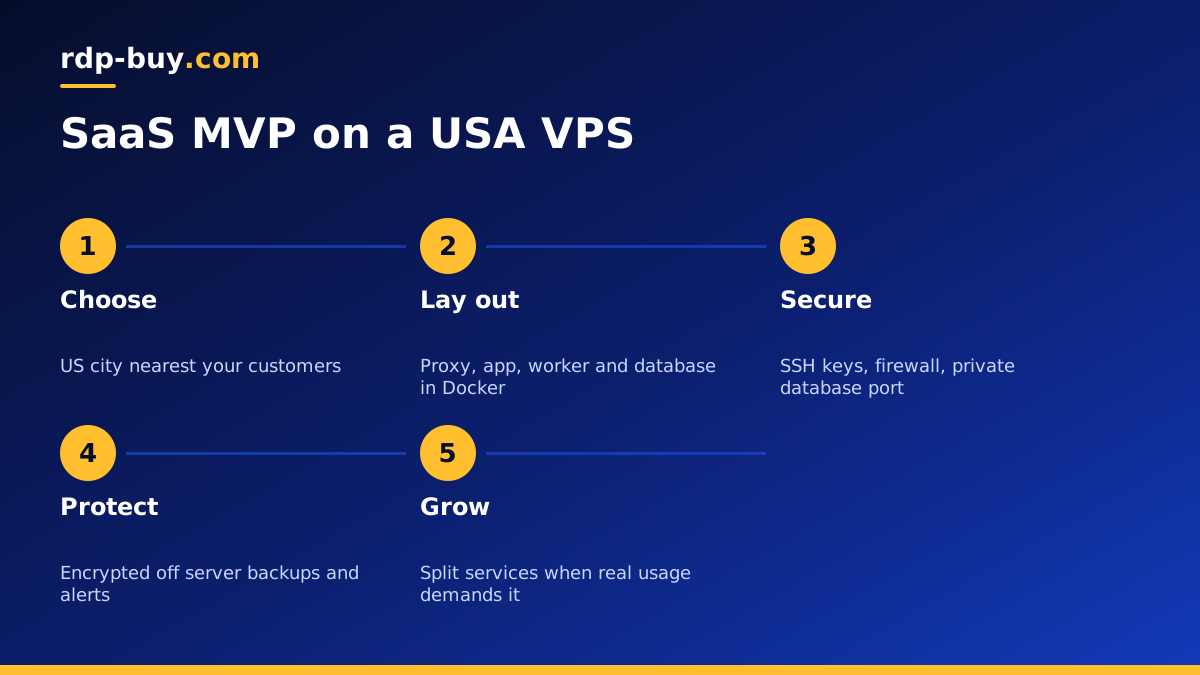
Why early SaaS teams choose a USA VPS
Most SaaS products start small: a web app, a database, a background worker and a handful of early customers. Managed platforms are convenient, but their costs and limits can grow faster than revenue, and they often hide the server behind abstractions that make debugging harder.
A US VPS sits in the middle. You get a real Linux server with full root access, a dedicated IPv4 address and a location near your American users, while still paying for a single plan you understand. For a team that is comfortable with basic Linux and Docker, it is a straightforward way to launch and learn.
Location matters because SaaS apps are interactive. Every click that loads a dashboard, saves a form or fetches a report makes a round trip to the server. Hosting near the bulk of your users keeps that feeling snappy, and keeps customer data in the country where many of your buyers expect it to be.
A simple one server layout for an MVP
At MVP stage, one well organised server is usually enough. A common layout runs everything in containers with Docker Compose:
- Reverse proxy in front, handling HTTPS certificates and routing traffic to the app.
- Web app container running your framework of choice.
- Background worker for emails, reports, imports and scheduled jobs.
- Database, often Postgres or MySQL, with its data on a persistent volume.
- Cache or queue, such as Redis, if your app needs one.
- Monitoring agent that reports errors, uptime and resource use.
Sizing your USA VPS for a SaaS launch
Size the server around what runs on it, not around hopes for future traffic. You can move up when real usage tells you to.
- Memory is usually the first limit. The database, the app runtime and the worker all keep data in RAM, and Docker adds a little overhead.
- CPU matters for background jobs, PDF or image generation, and any heavy API endpoints.
- Storage must hold the database, uploaded files, logs and local backups before they are copied off.
- Headroom. Aim for a plan where normal load leaves plenty of spare memory, so a busy day or a big import does not tip the server over.
Deploying your app safely
A boring, repeatable deploy is worth more than a clever one. A good starting routine:
- Build container images in your CI pipeline, for example with workflows stored alongside your code on GitHub.
- Tag every image with a version, and keep the previous one so you can roll back quickly.
- Run database migrations as a separate, deliberate step, after taking a fresh backup.
- Restart the app with Docker Compose and run a quick health check before you call the deploy done.
- Keep secrets in environment files on the server, readable only by the deploy user, never in the repository.
Security basics for a customer facing server
Customers trust you with their data from day one, so treat the VPS like production even when you have only a few users. Use SSH keys and disable password login, run a firewall that only opens SSH, HTTP and HTTPS, keep the operating system and images updated, and never expose the database port to the internet.
Add rate limiting to login and sign up endpoints, store passwords with a proper hashing library, and log admin actions. If you handle sensitive data or sell to larger companies, document these controls early: security questionnaires arrive sooner than most founders expect.
Backups, monitoring and on call for a small team
Schedule automatic database dumps, encrypt them and copy them to storage outside the server. Test a restore on a spare VPS before launch, and again whenever your schema changes significantly.
Set up uptime checks for your main URL and API, error tracking for the app, and alerts for low disk space and high memory use. Send alerts to a channel the team actually watches. With a small team, simple and reliable alerts beat a complex dashboard nobody opens.
Our Docker VPS page covers the container side of this setup in more detail.
VPS or managed platform: what you trade
A managed app platform handles servers, scaling and patching for you, and that is genuinely useful when your team has no one comfortable with Linux. The trade is control and predictability. Platform bills often rise with every extra worker, database add on or bandwidth tier, and the limits you hit are the platform's, not yours.
On a VPS you pay for one plan and decide how to use it. You can run any database version, any background tool and any monitoring stack, and you can read every log on the machine. The cost is time: someone has to apply updates, watch disks and handle backups. For many technical founders that is a fair trade in the early months, and the skills carry straight over when the product grows onto several servers.
If you are weighing Linux against Windows for the product itself, our guide on Windows or Linux servers explains why most SaaS stacks live on Linux.
Answering customer questions about hosting
As soon as you sell to businesses, buyers will ask where their data lives, how it is backed up and who can access it. A single US server makes these answers simple: data is stored in a named US city, backups are encrypted and copied to a second location, and access is limited to named team members using SSH keys.
Write these answers down in a short security page or document while the setup is still small. Keep it honest and specific to what you actually run, and update it whenever the architecture changes. It saves time on every sales call and keeps the whole team describing the system the same way.
When to grow beyond one server
A single VPS can carry a SaaS a long way, but certain signals tell you it is time to split things up:
- The database and app compete for memory, and moving up a plan no longer helps enough.
- Background jobs slow down the web app during busy periods.
- You need a staging server that mirrors production for safer releases.
- Customers or contracts ask for stronger separation or redundancy.
- You start serving many customers outside the US and want a second region.
Choosing a US city for your SaaS
Pick the US city closest to the majority of your customers, or the one nearest to the third party APIs your app calls most often. If your users are spread across the country, a central or coastal location that matches your largest customer group is a sensible first choice. All the options are listed on our server locations page, and you can add a server in another city later as you grow.
If part of your team needs a Windows environment for sales demos, finance tools or support, a USA RDP can sit alongside the Linux server without changing your app stack.
Buying the right USA VPS for your SaaS
Start with our USA VPS plans, choose the city nearest your customers, and pick the memory and storage that fit your one server layout with headroom to spare. Billing can be monthly while you validate the product, then half-yearly or yearly once you have traction. You can pay by card, PayPal or crypto, including the option to buy a VPS with crypto.
Servers are ready in minutes with full root access and 24/7 support. Launch on one clean server, measure what your real users do, and upgrade or split services only when the numbers ask for it.