 Sign in
Self Hosted n8n vs Paid Cloud: How to Choose Your Setup
Choosing between self hosted n8n and the paid n8n Cloud service is mostly a choice about who runs the server and how much control you need. This guide compares the two on the points that matter in practice and shows when AI agent hosting on your own VPS is the better fit.
What the two options actually are
n8n is a workflow automation tool that connects apps, APIs and AI models with visual workflows. You can use it in two main ways.
n8n Cloud is the hosted service run by n8n itself. You sign up, pick a paid plan, and get an n8n instance in the browser. n8n handles the servers, updates and backups, and each plan comes with usage limits such as how many workflow executions you can run. Current plan details are on n8n.io.
Self hosted n8n means you install n8n on a server you control, usually with Docker on a Linux VPS. The community edition is available under n8n's fair code licence, which allows use for your own internal business purposes, while paid self hosted editions add features aimed at larger teams. You run the server, so you decide its size, location and settings. The official setup guides are on docs.n8n.io.
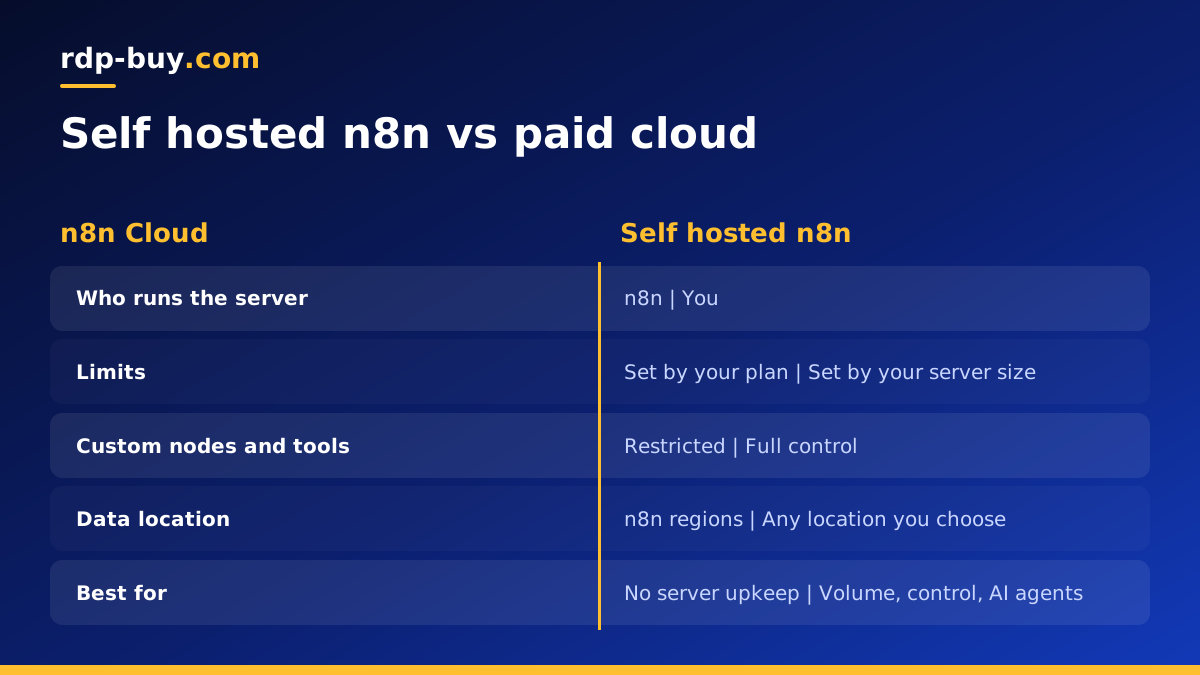
Self hosted n8n vs paid cloud at a glance
Both run the same workflow editor and most of the same nodes. The differences are in control, limits and responsibility.
- Setup: Cloud is ready after sign up. Self hosting needs a server, Docker and a domain, which takes some time the first time.
- Upkeep: Cloud updates and backs up for you. Self hosting makes you responsible for updates, backups and security.
- Usage limits: Cloud plans include execution and feature limits per tier. Self hosting is limited mainly by the size of your server.
- Control: self hosting lets you install community nodes, set environment variables, run local tools and choose the n8n version. Cloud offers less low level control.
- Data location: self hosting lets you choose exactly where data lives. Cloud runs in the regions n8n provides.
- Fixed IP: a VPS gives your workflows a dedicated IPv4 address you can add to allow lists. That is harder to guarantee on a shared cloud service.
When paid n8n Cloud makes more sense
Cloud is the right call when nobody on the team wants to look after a server. If you are not comfortable with Linux, Docker or reverse proxies, the time you would spend learning and maintaining them may be worth more than the subscription.
It also suits teams that run a modest number of workflows, value official support from n8n directly, and are happy to work within the plan's limits. Starting on Cloud is a fair way to learn n8n before deciding whether to self host later, since workflows can be exported and imported between instances.
When self hosted n8n makes more sense
Self hosting pays off as your automation grows or your needs become specific. These are the most common reasons teams move to their own server.
- High volume: workflows that run very often, process large batches, or poll many APIs can outgrow plan limits. On your own server, more executions simply use more server resources.
- AI agent workflows: n8n's AI agent nodes call model APIs, run tools and keep memory. Long running agent workflows benefit from a server you size yourself.
- Custom code and nodes: self hosting lets you install community nodes, add npm packages to Code nodes and run command line tools next to n8n.
- Data control: some teams need customer data to stay in a particular country or on infrastructure they manage.
- Integration with other services: running n8n next to a database, a vector store or another agent such as Claude Code (by Anthropic) on the same server keeps everything in one place.
The real cost of self hosting is time
Self hosted n8n is not free of effort, even when the software licence costs nothing. Be honest about the jobs you are taking on.
You need to keep n8n and the operating system updated, which with Docker usually means pulling a new image and restarting the container after reading the release notes. You need backups of the n8n database and the encryption key, stored somewhere other than the server. You need HTTPS in front of the editor, a firewall, and strong login settings. And you need to notice when something breaks, which means basic monitoring and alerts.
For many teams that is a few hours to set up and a little time each month. For others it is a distraction. Our guide on what you can run on an RDP or VPS server shows how n8n fits alongside other tools on the same machine.
A simple self hosting setup that works
If you decide to self host, a small, well organised setup is easier to keep healthy than a clever one.
- Choose a Linux VPS in a location near the APIs your workflows call most.
- Point a subdomain at the server's dedicated IPv4 address.
- Install Docker and run n8n with Docker Compose, using PostgreSQL for the database rather than the default file database for heavier use.
- Put a reverse proxy such as Caddy or Nginx in front of n8n for HTTPS.
- Store the encryption key and environment settings safely, and back up the database on a schedule.
- Set a restart policy so n8n comes back after a reboot, and add an uptime check on the editor URL.
Questions to ask before you decide
If you are still undecided, a few honest answers usually settle it. Work through them with whoever will own the automations day to day.
- Who on the team will apply updates and check backups, and do they have the time each month?
- How many workflow executions do you expect now, and how fast is that number growing?
- Do any workflows need a fixed IP address that partners or APIs can add to an allow list?
- Must customer data stay in a specific country or on infrastructure you control?
- Do you plan to use community nodes, extra npm packages or command line tools inside workflows?
- Will AI agent workflows run for a long time or call many tools in sequence?
Security differences to keep in mind
On Cloud, n8n is responsible for the platform's security, and you are responsible for your account, credentials and workflow logic. On a self hosted instance, the whole stack is yours. That means turning on user management with strong passwords, keeping the editor behind HTTPS, limiting which ports the firewall exposes, and protecting webhook URLs that trigger sensitive actions.
Self hosting also lets you go further than a shared service can. You can restrict the editor to a VPN or to your office IP address, keep credentials on a server only your team can reach, and review logs directly. If you follow the basics in our first steps on a new Linux server guide, a self hosted instance can be very well protected.
Can you mix both?
Yes. Some teams keep simple, low volume workflows on Cloud and run heavy or sensitive workflows on their own server. Others prototype on Cloud and move finished workflows to a self hosted instance once they know the load. Because workflows export as JSON, moving between the two is straightforward, though credentials must be set up again on the new instance.
Choosing a server for self hosted n8n
If self hosting fits, size the server from your workflows. Light automations need little; AI agent workflows, large data batches and many parallel executions need more memory and cores. Start with headroom, watch usage, and resize when the numbers tell you to.
rdp-buy.com offers a VPS for n8n and a Docker VPS, both covered by the wider AI agent hosting range. Every plan includes full root access, a dedicated IPv4 address, 33 server locations, 24/7 support and monthly, half-yearly or yearly billing, and servers are ready in minutes. rdp-buy.com is an independent hosting provider and is not affiliated with n8n.
