 Sign in
Forex VPS Tokyo: Picking a Server Location Near Your Broker
A forex VPS in Tokyo makes sense when your broker's trading servers are in Asia, and very little sense when they are not. This guide shows how to find where your broker really is, how to compare locations, and how to set up a Windows RDP server for MetaTrader in the right place.
Why location matters for a forex VPS
A forex VPS is simply a Windows server that runs your trading platform around the clock. Its two jobs are to keep MetaTrader 4 or MetaTrader 5 online when your own computer is off, and to place orders with as little delay as possible. The first job works in any location. The second depends on distance.
Every order travels from your platform to your broker's trade server and back. The further apart they are, the longer that round trip takes. For a manual swing trader the difference is invisible. For an Expert Advisor that scalps small moves or reacts to news, a shorter path can mean fewer requotes and fills closer to the price the strategy saw.
That is why the question is never which city is best for forex in general. It is which city is closest to your broker's trade server. For some traders that answer is Tokyo. For many it is London or New York.
Who should consider a Tokyo or Asian location
Tokyo is one of the major hubs for financial data centres in Asia, alongside Singapore and Hong Kong. Brokers that serve Asian clients, Japanese brokers, and some liquidity providers place trade servers there.
An Asian location is worth considering if your broker's server name or documentation points to Asia, if your broker is regulated in Japan or the wider region and runs its infrastructure there, or if you trade during the Asian session and your broker offers a separate Asian server. It can also help if you live in Asia and use the VPS desktop a lot yourself, because a nearby server feels more responsive over Remote Desktop.
If your broker's trade server is in London or New York, a Tokyo VPS will add delay rather than remove it. Do not choose a location because of the trading session you prefer; choose it because of where the broker's machines are.
How to find where your broker's trade server is
Brokers do not always publish this clearly, but there are reliable ways to find out.
- Ask support: send your broker a short message asking which data centre or city hosts the trade server for your account type. Many brokers answer directly.
- Read the server name: MetaTrader server names sometimes include a region or city hint, such as Live, Asia, London or NY. Treat this as a clue, not proof.
- Check the documentation: some brokers list their data centres on a VPS or infrastructure page, or partner with VPS providers in specific locations.
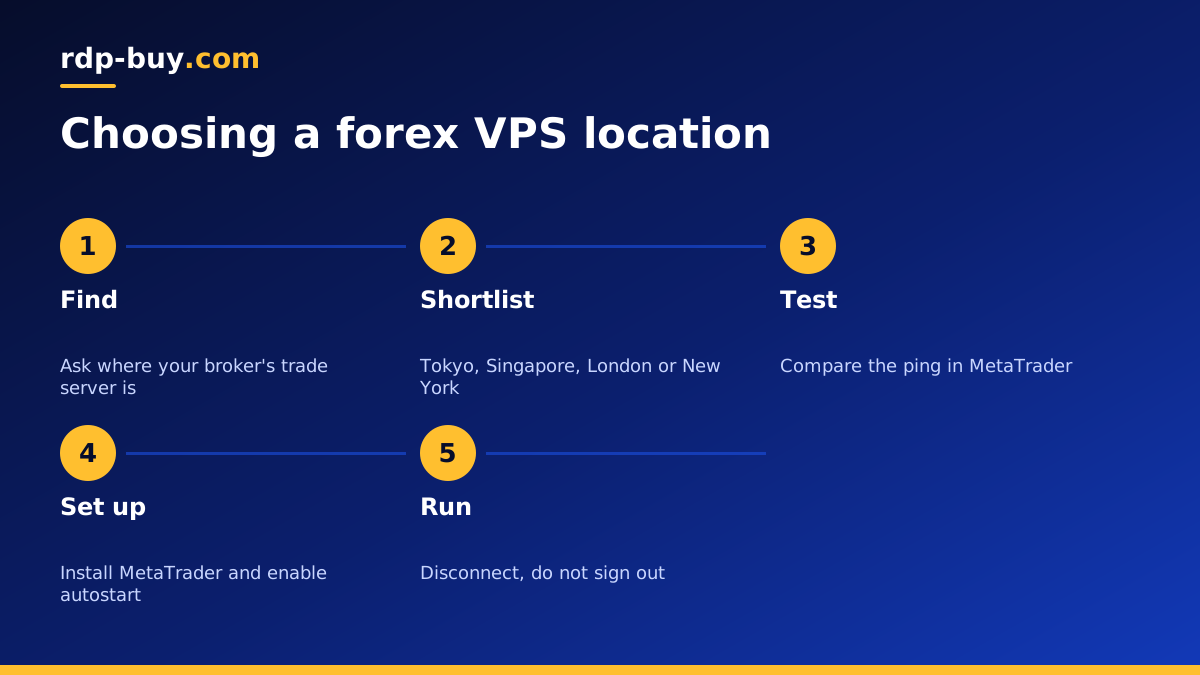
- Measure it: run a test VPS in two or three candidate locations, log in to MetaTrader on each, and compare the ping shown in the connection status at the bottom right of the platform.
Tokyo vs Singapore vs London vs New York
These are the cities most traders end up choosing between. Each suits a different broker setup.
- Tokyo: a good fit for brokers and liquidity hosted in Japan, and for traders focused on yen pairs with an Asian broker.
- Singapore: another major Asian hub. If your broker hosts in Singapore, a Singapore RDP is the closer choice.
- London: the most common home for forex broker servers worldwide, including many brokers that serve clients in Asia. A UK RDP fits these brokers.
- New York: common for US based brokers and some global ones. A USA RDP fits these brokers.
Testing delay before you commit
The only measurement that matters is from your VPS to your broker's trade server, not from your home to the VPS. You can check it in a few minutes.
Deploy a Windows server in the location you are considering, install MetaTrader from your broker's website, and log in to your account. Look at the connection indicator at the bottom right of the terminal, which shows the current ping to the trade server. Note it at a few different times of day. If you are deciding between two cities, repeat the test in the second location and keep the one with the lower and more stable reading. Because servers are ready in minutes, a short test is quick and saves guessing.
Trading with brokers in more than one region
Some traders use one broker hosted in Asia and another hosted in Europe or America. In that case, one server cannot be close to both. You have two sensible options.
The first is to run two smaller servers, one near each broker, and keep each platform on the server closest to its trade server. This gives every strategy the shortest path and keeps the setups independent, so a problem on one does not affect the other. The second is to run everything on one server placed near the broker whose strategies are most sensitive to delay, and accept a longer path for the others. Swing strategies and manual accounts can usually live with that compromise, while fast Expert Advisors should get the closer server.
Common location mistakes
A few mistakes come up again and again. Choosing a server near your home instead of near your broker is the most common one: it makes the desktop feel snappy but leaves your orders on the long route. Picking a city because of the trading session is another; markets trade around the clock, but your broker's machines stay where they are. Finally, many traders never re-check. Brokers sometimes move servers or open new ones, so test the ping again every few months and after any broker announcement about infrastructure.
Setting up MetaTrader on a forex VPS
Once you have chosen the location, set up the server so it can run unattended.
- Connect with Remote Desktop and install Windows updates first, then reboot.
- Download MetaTrader from your broker, not from a third party site, and log in.
- Copy your Expert Advisors, indicators and templates into the platform's data folder, then restart the terminal.
- Enable algorithmic trading and confirm each Expert Advisor shows as active on its chart.
- Add MetaTrader to the Windows startup folder so it opens after any reboot.
- Disconnect from Remote Desktop instead of signing out, so the platform keeps running.
- Secure the server with a strong password and the steps in our RDP best practices checklist.
How big should a forex VPS be?
MetaTrader is light on its own. One terminal with a few charts and an Expert Advisor runs comfortably on a small plan. Requirements grow with the number of terminals, charts, Expert Advisors and indicators you run at once, and with anything else you keep open, such as a browser.
Start with a plan that leaves spare memory, watch Task Manager for a week of normal trading, and move up a size if memory is always close to full. Our guide on which RDP plan you need and our article on RDP for trading go into more detail.
Choosing your forex VPS plan
Find your broker's trade server, pick the nearest location, test the ping, and then choose a plan size. If the answer is Asia, check the 33 server locations for Tokyo or the nearest Asian option. If it is London or New York, choose there instead.
When you are ready, you can get a forex RDP or browse all Windows RDP plans. Every plan includes the Windows licence in the price, full administrator access, a dedicated IPv4 address, 24/7 support and monthly, half-yearly or yearly billing, and servers are ready in minutes so you can test a location the same day.
