 Sign in
Hermes Agent Telegram Setup: Chat With Your Agent From a VPS
A Hermes Agent Telegram setup lets you message your own AI agent from your phone while it runs on a server that never sleeps. This guide covers the steps, the safety settings that matter, and how to choose AI agent hosting that keeps the bot online.
Why connect Hermes Agent to Telegram
Hermes Agent, from Nous Research, is an open source agent you run yourself. On its own you talk to it in a terminal. Connected to a messaging app such as Telegram, it becomes something you can reach from anywhere: ask it to research a topic, summarise a document, run a scheduled task or check on a job, all from a chat on your phone.
That only works if the agent is running when you send the message. A laptop that sleeps, travels or restarts for updates is a poor home for a chat agent. Running it on a server for your AI agents keeps it online around the clock, with a stable dedicated IPv4 address and full root access to install and manage everything.
Check the official project pages on nousresearch.com and its GitHub repository for the current list of supported messaging platforms and commands, because agent projects change quickly.
What you need before you start
Our VPS for Hermes Agent page lists plans and locations that suit a personal agent, if you do not have a server yet.
- A Linux VPS with a current distribution, SSH key login and a firewall enabled.
- Hermes Agent installed and working in the terminal, following the project's install guide.
- An API key for the model provider you plan to use, or a local model setup if you prefer that route.
- A Telegram account and the official Telegram app on your phone.
- A few minutes to create a bot and note its token.
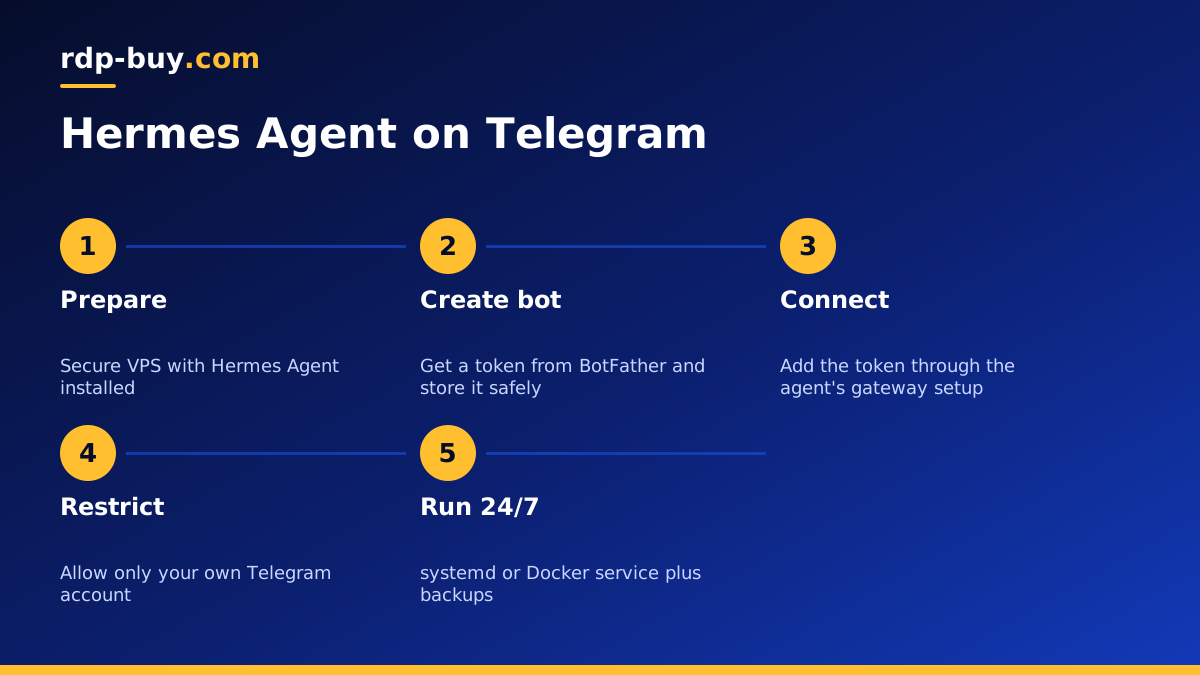
Step one: create a Telegram bot
Telegram bots are created through Telegram's own official bot management account, BotFather. Open a chat with it in the app, use its command to create a new bot, choose a display name and a username, and it will give you a bot token.
Treat that token like a password. Anyone who has it can control the bot. Store it in a password manager straight away, and never paste it into public chats, screenshots or code repositories. If it ever leaks, use BotFather to revoke it and generate a new one.
Step two: connect the token to Hermes Agent
Hermes Agent connects to messaging apps through its gateway or messaging setup, depending on the version you run. The usual pattern is to run the agent's setup command for messaging, choose Telegram and paste the bot token when asked, or to add the token to the agent's environment or configuration file.
Keep the configuration file readable only by the user that runs the agent. After saving, start the gateway in the terminal first, send your bot a message from Telegram, and confirm the agent replies. Testing in the foreground makes any error messages easy to see before you turn it into a background service.
Step three: restrict who can talk to your agent
This is the most important step. A Telegram bot can be found and messaged by anyone who knows or guesses its username. If your agent can browse, run tools or read files, you do not want strangers giving it instructions.
Use the agent's allow list or authorised users setting so it only responds to your own Telegram account, and any teammates you choose. Check the documentation for the exact setting name in your version. Then test it: ask a friend to message the bot and confirm it ignores them.
- Allow only named Telegram user IDs, not everyone.
- Keep risky tools, such as shell commands or file deletion, behind an approval step where the agent supports it.
- Use a separate model API key for the agent, with a spending limit set in your provider account.
- Avoid adding the bot to large group chats where many people can send it messages.
Step four: keep the bot online 24/7
Once the gateway works in the foreground, run it as a background service so it starts on boot and restarts after a crash. A systemd service is the standard way on Linux: it runs the gateway under your agent user, restarts it if it stops, and writes logs you can read with the journal tool. Running it in Docker with a restart policy is a good alternative if you prefer containers, and our Docker VPS page explains that approach.
Add a simple health check. Some people schedule a daily message from the agent to themselves, so silence becomes an obvious sign that something is wrong. Rotate logs so they never fill the disk, and apply operating system updates on a regular schedule.
Step five: back up the agent's memory and settings
Over time Hermes Agent builds up configuration, skills and memory that make it more useful to you. Back up its data folder and configuration to storage outside the server on a schedule, and keep the bot token and API keys in your password manager rather than only on the VPS. If you ever need to rebuild, you can restore the data, reconnect the token and be back in a chat with your agent quickly.
Useful things to ask your agent from Telegram
Once the connection is stable, the value comes from building small daily habits around it. Chat is a natural way to hand off short tasks while you are away from your desk.
Ask it to summarise a long article or report you forward, draft a reply you will edit later, keep a running list of ideas, or remind you of something at a set time if your version supports scheduled tasks. If you give it access to tools on the server, it can check whether a website is up, read a log file or report on a job that runs overnight.
Keep the first tasks low risk. Let the agent read and summarise before you let it change anything. As you learn how it handles your requests, widen its permissions one step at a time, and keep approval prompts on for anything that sends messages, spends money or deletes data.
Troubleshooting common Telegram problems
Most problems with a Telegram connected agent fall into a few familiar groups. Start with the logs, because they usually point straight at the cause, then work through this list:
- The bot does not reply. Check the gateway is running, read its logs, and confirm the token was pasted without extra spaces.
- It replied once, then stopped. The process may have crashed when you closed SSH. Run it as a service rather than in a terminal session.
- Someone else can use it. Your allow list is missing or wrong. Fix it and revoke the token if you are unsure who had access.
- Replies are slow. Look at the model provider's status, the server's memory use, and whether a long task is running.
- Errors about the model. Check the API key, the model name and any spending limit in your provider account.
Linux VPS or Windows RDP for a chat agent?
A Linux VPS is the natural home for Hermes Agent and its gateway, since the project and its tooling are built around Linux. A Windows desktop makes sense only if you want the agent to work with Windows only apps. For that case, see our Windows RDP for AI agents page.
Choosing hosting for your Hermes Agent bot
Look for a plan with enough memory for the agent and any tools it runs, full root access to set up services and firewalls, and a location close to the model APIs you use. Our AI agent hosting plans cover these needs, with servers ready in minutes and 24/7 support if you get stuck on the first setup.
Billing is monthly, half-yearly or yearly, and you can pay by card, PayPal or crypto. Start with one bot for yourself, lock it down using the steps above, and add teammates to the allow list only when you are comfortable with how it behaves.