 Sign in
Host AI Agent Locally or on a VPS: How to Decide
You can host an AI agent locally on your own computer, and for early testing you probably should. This guide explains how far a local setup goes, the signs you have outgrown it, and when AI agent hosting on a server becomes the better choice.
What it means to host an AI agent locally
Hosting an AI agent locally means the agent's process runs on hardware you own: a laptop, a desktop or a small computer on a shelf. The agent may still call a model through a remote API, or it may use a model on your own machine. Those are separate choices, and mixing them up causes a lot of confusion.
An agent is really a loop of work. It reads a task, decides what to do, uses tools, and repeats. That loop is often light, because the heavy thinking usually happens on the model provider's side when you use an API. So even a modest machine can run the agent itself. The question is rarely whether your computer can run it. The question is whether your computer should be the place it lives.
Tools such as n8n, OpenClaw, Hermes Agent and Claude Code (by Anthropic) can all run on a personal machine, so starting locally is a realistic option for nearly everyone.
How to host an AI agent locally the sensible way
If you are starting out, a local setup is a cheap way to learn how your agent behaves. Treat it as a workshop rather than a permanent home, and set it up so that moving later is easy.
- Use Docker where you can. A container keeps the agent and its dependencies together, so the same setup can move to a server later. The Docker site has installers for each system.
- Keep settings in one file. Store API keys and configuration in an environment file, and never paste them into your code.
- Give the agent its own folder. Limit what it can read and write, particularly on a computer that also holds personal files.
- Log what it does. Writing actions to a file makes it much easier to see why something went wrong.
- Stop your computer from sleeping during long tests, or the agent will simply pause.
Where a local AI agent starts to struggle
A local setup usually fails for ordinary, unglamorous reasons rather than a lack of power. Your laptop closes when you leave the room. An operating system update restarts the machine overnight. The home internet drops, or your IP address changes and a webhook can no longer find you.
Those details matter because agents are valuable precisely when you are not watching. A scheduled report that runs only when your laptop is open is not really scheduled. A workflow that waits for an incoming webhook needs an address that is always reachable, which a home connection rarely provides without extra work.
Security is the other pressure. An agent with broad permissions on your personal computer sits beside your browser sessions, documents and saved passwords. If it is tricked by bad input or simply makes a mistake, those are within reach. Separating the agent from your personal machine is good practice, not paranoia.
Local versus VPS, side by side
A virtual private server is a rented machine that stays on. For agent work, the differences come down to a handful of points.
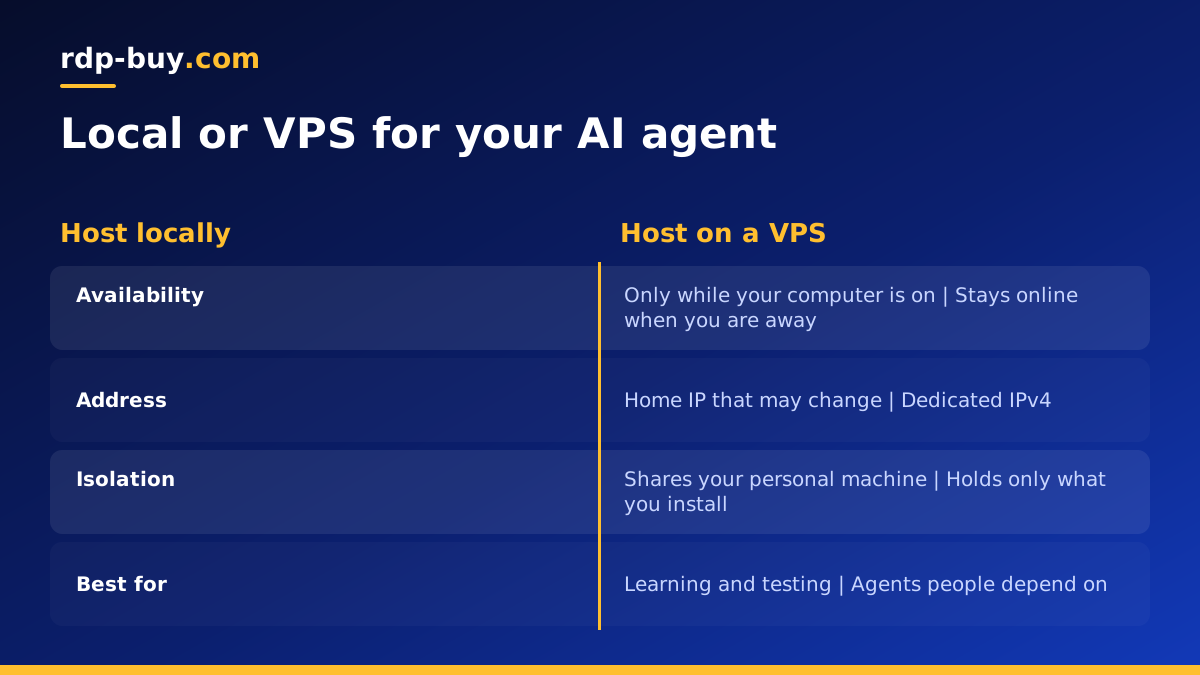
- Availability: a local agent stops with your computer, while a server keeps running when you are away.
- Address: home IPs can change, while a server has a dedicated IPv4 address for webhooks and allowlists.
- Isolation: a local agent shares a machine with your life, while a server holds only what you put there.
- Sharing: a server can be reached by your team, while a laptop goes where you go.
- Local models: your own computer may have a graphics card that a basic VPS does not, so large local models can favour your own hardware.
- Learning curve: local is easiest, while a Linux server asks for a few new skills.
Signs it is time to move off your own machine
You do not need to move on day one. Move when the agent stops being an experiment and becomes something you depend on. These are the clearest signals:
First, you notice that you are arranging your day around the agent, leaving the laptop open or avoiding restarts. Second, someone else depends on its output, such as a client or a colleague. Third, it needs to receive webhooks or messages at any hour. Fourth, it holds access to accounts you would not want on your personal computer. Fifth, you want more than one agent running together, which can make your own machine unpleasant to use.
If two or more of these apply, the time you spend babysitting a local setup has probably become a bigger cost than a server. Our guide to running an AI agent around the clock covers what a reliable setup looks like after you move.
How to move a local agent to a server
If you followed the local advice above, moving is mostly copying. Here is the usual order:
- Order a server close to the APIs and users the agent talks to, using the server locations page to compare.
- Connect over SSH with the root access you receive, then update the system and create a normal user.
- Install Docker, or whatever runtime your agent uses.
- Copy your project, leaving out anything that contains local secrets, and set the keys on the server.
- Start the agent and watch the logs through a full task.
- Configure automatic restarts so that it returns after a reboot.
- Point webhooks at the new address, then shut down the local copy so that two agents do not act at once.
Windows or Linux for your agent
Most agent tools run comfortably on Linux, and a Linux VPS is the natural home for anything that runs without a screen. Choose Windows when the agent needs to operate a desktop program or a real browser you want to watch. In that case, a Windows RDP for AI agents gives you a full desktop that you can log in to and observe. If you are unsure, the guide to choosing Windows or Linux sets out the trade-offs.
Whichever you pick, keep the same habits you built locally. Hold keys in an environment file, give the agent the narrowest permissions that still let it work, and keep logs where you can read them. A server removes the laptop problem, but it does not remove the need to supervise what an autonomous tool is allowed to do. Review its actions often in the first weeks, and only widen its access once you trust how it behaves. Do the same each time you add a new tool to the agent, because every new tool is a new way for it to make a mistake.
Choosing a server for your agent
Keep the decision simple. Keep the agent local while you are learning and nothing depends on it. Move it to a server once it needs to be available when you are not. Start with a plan sized for the agents you run today, since most agents calling remote APIs are light, and add capacity only when you run several at once or keep a browser open.
When you are ready, look through our hosting for AI agents options, or go straight to a matching page such as VPS for n8n, VPS for Hermes Agent or VPS for Claude Code. Every server comes with root or admin access and a dedicated IPv4, and is ready in minutes, so moving your agent can be a single afternoon's job.
