 Sign in
Dedicated Server for Database Hosting: When to Move Off a VPS
Databases are often the first part of an application to outgrow a shared or small virtual server. This guide explains when a dedicated server for your database makes sense, what to look for before you buy a dedicated server, and how to move your data across without drama.
Why databases outgrow a VPS first
A web server can often cope with more traffic by adding a cache or another worker. A database is harder to stretch. Every page, order, search and report ends up as queries that need CPU, memory and fast access to storage, and they all have to agree on the same data at the same time.
On a regular VPS the CPU cores are shared with other customers on the same host, which is fine for most workloads. A database under steady heavy load is one of the cases where guaranteed resources start to matter, because consistent query times depend on consistent CPU and memory. That is where a dedicated CPU server or a bare metal machine comes in.
If you are not sure how these options differ, our guide to dedicated server vs VPS covers the basics.
Signs it is time to move your database
Upgrading too early wastes money, and upgrading too late hurts your users. Watch for these signs:
- Query times vary a lot through the day, even for the same queries.
- The database uses most of the server's memory and you cannot give it a larger buffer or cache without starving other services.
- CPU stays high during normal traffic, not only during rare peaks.
- Backups, reports or imports slow the whole site while they run.
- You run the web app and the database on one machine and they compete for resources.
- You have already tuned indexes and queries and still need more headroom.
Tune before you upgrade
Before you spend on new hardware, make sure the database is not simply missing an index or running a few very slow queries. Turn on the slow query log in MySQL or MariaDB, or use the statistics views in PostgreSQL, and look at the queries that take longest or run most often. Adding the right index or rewriting one report query can make a bigger difference than a bigger server.
Also check the memory settings. Database engines need to be told how much memory they may use for caching. A default configuration on a large server can leave most of that memory unused. Once tuning stops paying off, it is time to look at a larger machine.
What to look for in a database server
When you choose a dedicated server for a database, the priorities are slightly different from a general purpose server:
- Memory first. The more of your working data fits in memory, the fewer reads hit storage. Size memory for your busiest tables and indexes, with room to grow.
- Guaranteed CPU cores. Dedicated cores give steady performance for many simultaneous queries.
- Fast storage with space to spare. Leave room for data growth, temporary files, logs and local backups.
- Full root access so you can tune the operating system and database settings yourself. Every plan includes it.
- A location close to your application servers, because every query travels between the app and the database. Our 33 server locations let you keep them in the same city.
- A dedicated IPv4 address, which every plan includes, and a firewall so only your app servers can reach the database port.
Dedicated CPU server or bare metal
There are two common steps up from a VPS. A dedicated CPU server is still virtualised but gives you cores that are reserved for you, so you do not share them with neighbours. It is quick to set up and easy to resize, which suits most growing databases.
A bare metal server gives you a whole physical machine with no virtualisation layer at all. It suits very large or very busy databases, or teams that want full control over the hardware and storage layout. Our guide to bare metal vs dedicated servers explains the trade offs in more depth.
Planning the migration
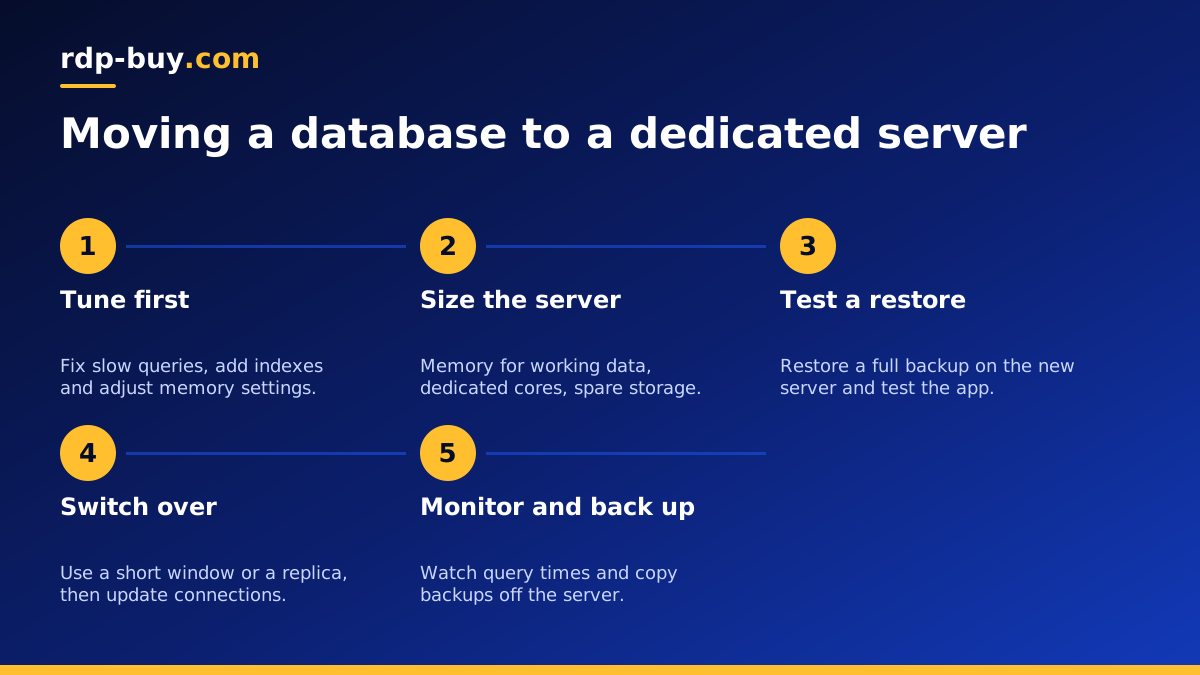
Moving a database is mostly about planning. A careful approach looks like this:
First, set up the new server: secure SSH, enable a firewall that only allows your application servers to connect to the database port, install the same database version you run today, and copy over your tuned configuration with memory settings adjusted for the larger machine.
Second, take a full backup of the current database and restore it on the new server as a test. Time how long it takes, check the data, and point a staging copy of your app at it to make sure everything works.
Third, plan the switch. For small databases, a short maintenance window with a final dump and restore is often simplest. For larger or busier ones, set the new server up as a replica of the old one so it stays in sync, then promote it to primary during a brief switch over. Both MySQL and PostgreSQL support replication.
Finally, update your application's connection settings, watch error logs and query times closely for a few days, and keep the old server available until you are confident.
Keeping the database safe after the move
A bigger server does not replace good habits. Schedule automatic backups and copy them off the server, test restores regularly, and keep the operating system and database patched. Limit database users to the permissions they need and never expose the database port to the whole internet. Monitor disk space, memory and slow queries so you can see the next upgrade coming long before it becomes urgent. Support is available 24/7 if you need help on the server side.
Choosing your dedicated database server
Start from your current data size and memory use, then add room for at least the growth you expect this year. Put the server in the same location as your application servers. If you want steady performance with easy resizing, a dedicated CPU server is the natural first step; for the largest workloads, look at bare metal.
When you are ready, compare the dedicated server plans. Servers are ready in minutes, billing can be monthly, half-yearly or yearly, and you can pay by card, PayPal or crypto. If you prefer crypto, our guide to buying a dedicated server with USDT walks through the checkout.
