 Sign in
USA VPS for Discord Bot and Telegram Bot Hosting 24/7
A chat bot is only useful while it is online, and a home computer is a poor place to keep one running. A USA VPS gives your Discord or Telegram bot a Linux server in the United States that stays on day and night. This guide covers why that works, how to set the bot up properly and how to choose a plan.
Why host your bot on a USA VPS
Discord and Telegram bots are small programs that keep a connection open to the chat platform, listen for messages and commands, and reply. They need to run all the time. On a home PC the bot stops whenever the computer sleeps, restarts for updates, loses power or drops its internet connection, and your community notices straight away.
A VPS is a virtual private server in a data centre with steady power and networking. It runs your bot around the clock without you leaving your own computer on. You get full root access to install any language or library, and a dedicated IPv4 address that belongs only to your server.
Choosing to buy a US VPS makes sense when your community is mostly in the Americas, or when the bot talks to US based APIs, databases or websites. Keeping the server near those services keeps each request short.
Which US city to choose
We offer US servers in New York, Los Angeles, Dallas, Chicago, Miami, Atlanta, Seattle, Silicon Valley and Honolulu, among our 33 server locations. For a chat bot, the server mainly talks to the platform's own servers and to any APIs your bot calls, so place it near those where you can. If you do not know where they are, a central US city such as Dallas or Chicago is a sensible default, and an East or West Coast city suits communities clustered on one side of the country.
What size of server does a bot need
Most simple bots are light. A moderation bot, a welcome bot or a small utility bot for one server or group runs comfortably on a modest plan. Needs grow when:
- The bot serves many servers or groups and handles many events at once.
- It uses a database to store levels, settings, tickets or logs.
- It processes media, such as music playback, image generation or file conversion, which uses more CPU and memory.
- It calls AI models or runs heavier logic for every message.
- You host several bots on the same server, each in its own process or container.
Step by step: putting your bot on the server
Your server is ready in minutes after ordering, and you receive its IP address and root login. A long term support release of Ubuntu or Debian is a safe choice for bots, and our guide to choosing a Linux distribution explains the options.
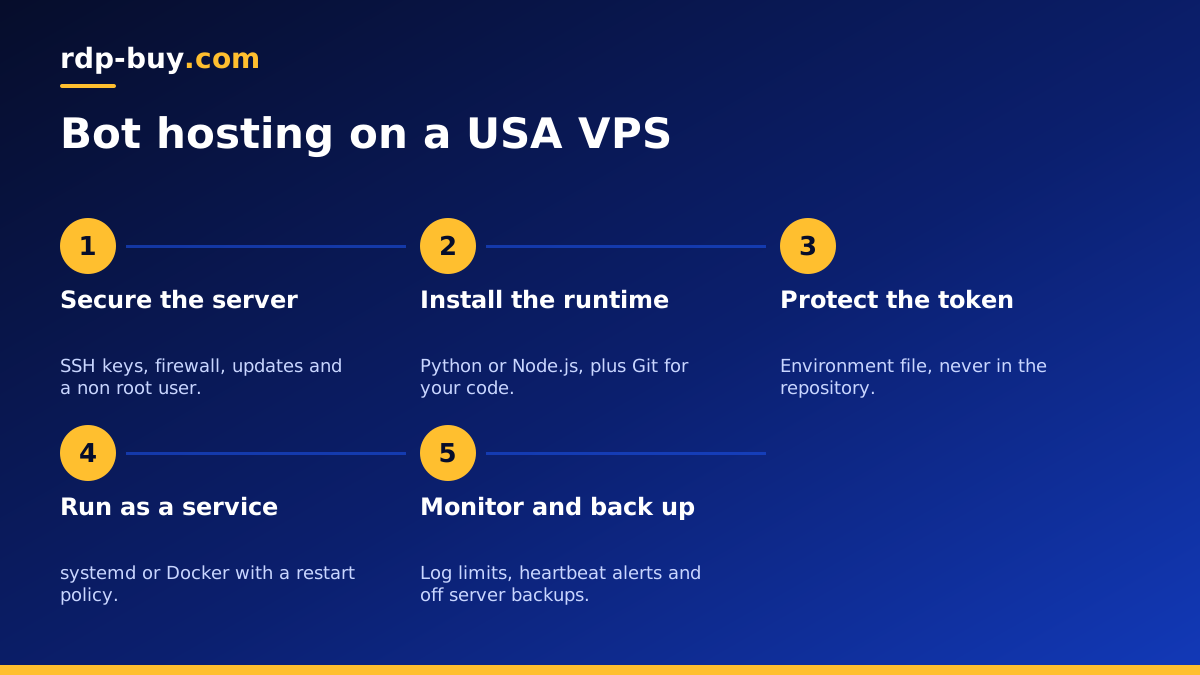
Secure the server. Connect over SSH, create a normal user with sudo rights, add your SSH key, disable password logins for root, enable a firewall that allows only SSH, and install updates. A bot usually only makes outgoing connections, so it rarely needs any other open ports unless it also serves a web dashboard.
Install the runtime. Most bots are written in Python or Node.js. Install the version your code needs, plus Git to pull your code from a repository.
Add the code and token. Clone your bot's repository and install its dependencies. Store the bot token in an environment file readable only by the bot's user, never in the code itself. Anyone with the token can control your bot.
Run it as a service. Do not leave the bot running in an SSH window. Create a systemd service that starts the bot as its own user, restarts it if it crashes and starts it again when the server boots. If you prefer containers, run it with Docker and a restart policy of unless-stopped. Our Docker VPS page covers that approach.
Test a reboot. Restart the server once and confirm the bot comes back online by itself.
Keeping the bot healthy
A few habits keep a bot dependable for months:
- Limit log size with journal settings or Docker log options, so logs do not fill the disk.
- Back up the database and configuration to a place outside the server on a schedule.
- Handle rate limits in your code, so the bot slows down politely instead of being blocked by the platform.
- Update dependencies regularly, since chat libraries change as the platforms change their APIs.
- Add a simple heartbeat to an uptime monitor, so you get an alert if the bot stops.
- Follow each platform's developer terms, including rules on data, spam and automation.
Running several bots on one VPS
Once one bot is running well, it is easy to add more on the same server. Give each bot its own folder, its own environment file and its own systemd service or container, so a crash in one never takes down the others. Name the services clearly so you can check and restart each one quickly.
If the bots share a database, create a separate database and user for each, with only the permissions it needs. Keep an eye on total memory use as you add bots, and move to a larger plan when the server regularly runs close to its limit. Billing can be monthly, half-yearly or yearly, so you can start small while testing and commit for longer once the bots are settled.
Bots that use AI
Many new bots pass messages to a language model or run agent style workflows. The bot itself stays light because the model usually runs on the provider's side, but you will want more memory if you keep conversation history, a vector database or extra tools on the server. If your bot is becoming a full AI agent, our AI agent hosting page and the guide to hosting AI agents on a VPS go further.
Choosing your USA VPS plan for bots
List the bots you will run, whether they use a database or process media, and how large their communities are. A single small bot fits an entry plan, while busy bots, media features or many bots together need more memory and CPU. If you are watching costs, the cheap VPS range suits most simple bots.
When you are ready, pick a plan on the US VPS hosting page, choose your city and billing period, and pay by card, PayPal or crypto. Support is available 24/7 if you need help with the server.
