 Sign in
USA RDP for Marketing Agencies: A Shared US Desktop for SEO
Agencies that run campaigns for American clients need to see the web the way US customers see it, and they need tools that keep working after the team logs off. A USA RDP gives the whole team one Windows desktop in the United States. Here is how agencies use it, what to check, and how to set it up.
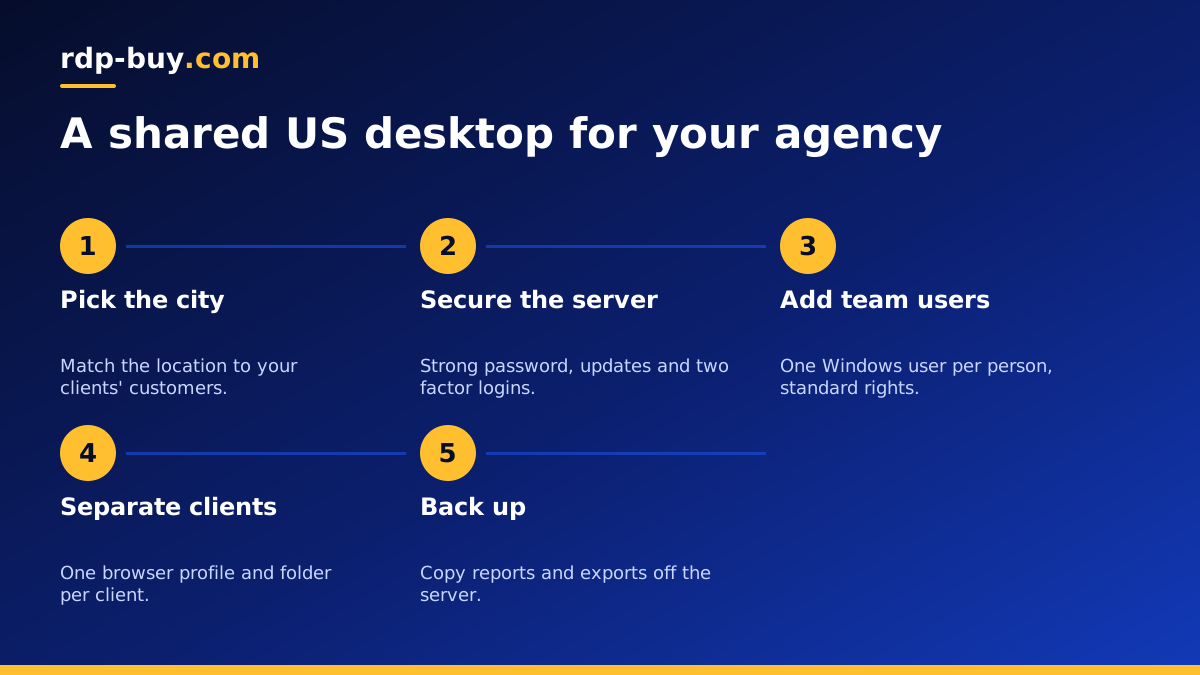
What a USA RDP does for an agency
An RDP server is a Windows computer in a data centre that you open with the Remote Desktop app. A USA RDP sits in an American data centre and has a dedicated US IPv4 address. For a marketing or SEO agency, that brings three useful things together: a US point of view on search results and ads, a desktop that runs scheduled tools around the clock, and a single shared workspace that staff and freelancers can log in to from anywhere.
Agencies with teams outside the United States find this especially useful, because search results, ad previews and many websites change depending on where the visitor appears to be. If your clients sell to Americans, it makes sense to buy RDP in the USA so your checks reflect what their customers actually see.
Everyday agency tasks that fit on a US desktop
Most agency work runs in a browser or in Windows desktop tools, so it moves to the server easily. Typical examples:
- Checking search results from a US location, including local results for the city where the server sits.
- Previewing ads and landing pages as US visitors see them.
- Running desktop SEO tools and site crawlers overnight without tying up anyone's laptop.
- Building client reports on a schedule and keeping all exports in one place.
- Managing client ad accounts from a stable, known address rather than from many home connections.
- Giving freelancers access to the tools they need without sharing personal devices.
Pick the city your clients care about
Local search results depend heavily on location, so the city matters more for agencies than for most buyers. We offer US servers in New York, Los Angeles, Dallas, Chicago, Miami, Atlanta, Seattle, Silicon Valley and Honolulu, as part of our 33 server locations.
If most of your clients are local businesses in one region, choose the city closest to them so your checks match what nearby customers see. If your clients are national brands, a central city such as Dallas or Chicago gives a balanced view, and agencies with clients on both coasts sometimes run one server in the East and one in the West.
Keep in mind that a server IP shows a location, but search engines also use other signals. Treat the server as a consistent US vantage point rather than a perfect copy of every user's results.
Setting up a shared agency desktop
Once your server is ready, which takes minutes after ordering, connect with the Remote Desktop app. Our guide on how to connect to your RDP server covers Windows, Mac and phones.
Secure it first. Change the administrator password to a long passphrase, run Windows Update and restart. Then create a separate Windows user for each team member and freelancer, and give them standard rights rather than administrator rights. That way you can see who did what, and you can remove access the day someone leaves.
Next, install one browser and create a separate browser profile for each client. Profiles keep cookies, logins and extensions apart, which reduces mistakes such as posting to the wrong account. Use a team password manager rather than saving passwords in files on the desktop, and turn on two factor authentication for every client account that supports it.
Finally, organise shared folders by client, and back up anything you cannot easily recreate, such as reports, exports and creative files, to storage outside the server.
What to check before you buy
Agency workloads grow as you add clients, so plan for more than your first week.
- Memory for many browser tabs and users. Ad managers, analytics dashboards and crawlers are heavy, and each logged in user adds load. Our guide on which RDP plan you need helps you estimate.
- Storage for exports and crawl data, which build up quickly.
- Full administrator access to install tools and manage users. Every plan includes it.
- Licensing handled for you. The Windows licence is included in Windows prices.
- Support across time zones. Support is available 24/7.
- Billing that suits client contracts. Choose monthly, half-yearly or yearly.
Working responsibly
A US desktop is a tool for doing honest work more reliably. Follow the terms of every ad platform, search engine and website you use, respect crawl limits and robots rules, and only run automation that the platform allows. Never use the server to create fake reviews, fake accounts or misleading activity. Clients trust agencies with their accounts and reputation, and a tidy, well secured shared desktop is part of earning that trust.
Keeping a shared desktop running smoothly
A server that many people share needs a few house rules. Agree on where files go, so client folders stay tidy and nobody saves work to the desktop where it gets lost. Ask people to close heavy tools and browser tabs they are not using, and to disconnect rather than sign out when a long job is still running, since signing out stops their programs.
Schedule heavy tasks such as full site crawls and large report exports for quiet hours, so they do not slow the server for colleagues who are working. Windows Task Scheduler can start tools at set times, and setting Windows Update active hours to cover your working day stops restarts from interrupting the team.
Once a month, review the user list and remove anyone who no longer needs access, check free disk space, clear out old exports and confirm backups ran. Keep a short document that explains how the server is set up, which tools are installed and who to ask for help. New team members can then get started on their first day without guesswork, and the desktop stays dependable as the agency grows.
When a Linux VPS fits better
Some agency tasks do not need Windows at all. Hosting client websites, running rank tracking scripts written in Python, or self hosting an automation tool such as n8n often works better on a Linux server. Many agencies pair a USA RDP for hands on desktop work with a USA VPS for websites and background jobs. Our guide to the difference between RDP and VPS explains how to split the work.
Choosing your agency RDP plan
Count the people who will log in at the same time and list the tools they use. A small team doing checks and reports fits a mid sized plan. Larger teams, heavy crawlers and many open dashboards need more memory and CPU. When in doubt, choose a step up, because a slow shared desktop wastes everyone's time.
When you are ready, compare the US RDP server plans, choose the city that matches your clients, and pick a billing period. You can pay by card, PayPal or crypto, for example through buying RDP with a card or with PayPal, which keeps agency bookkeeping simple.
