 Sign in
Buy RDP in Bangladesh: Picking a Location, Plan and Payment
Freelancers, traders and small businesses in Bangladesh often need a Windows computer that stays online all day and does not depend on home power or internet. This guide explains how to buy RDP from Bangladesh: which server location to pick, what changes the price, how to pay and how to connect once it is ready.
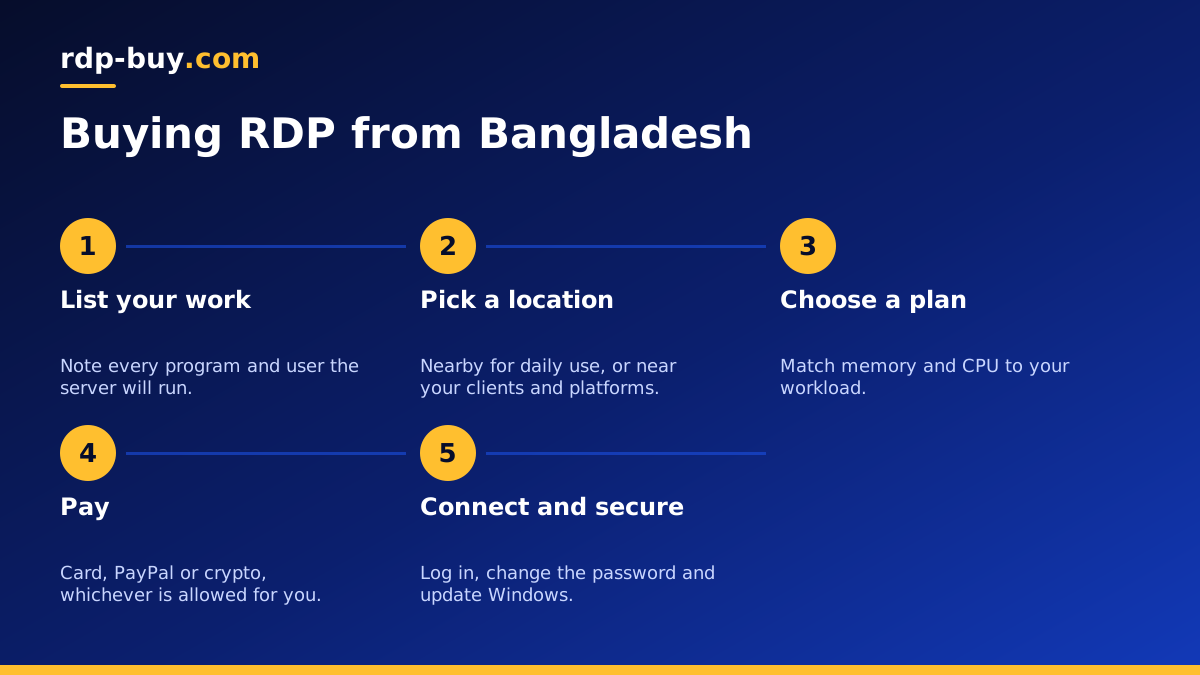
Why people in Bangladesh buy RDP
An RDP server is a Windows computer in a data centre that you control remotely with the Remote Desktop app. Everything you run on it keeps working when you switch off your own laptop, which is the main reason people in Bangladesh choose one.
Power cuts and unstable home connections can interrupt long jobs, trading platforms and client work. A server in a professional data centre keeps running through all of that. You also get a dedicated IP address, full administrator access, and a fast desktop you can open from a modest laptop or even a phone.
Common uses include freelance work for overseas clients, running trading terminals, managing ads and social media accounts, hosting small tools for a team, and running automation or AI agents that need to stay on. If you are new to the idea, our guide on what RDP is used for covers more examples. When you know what you need, the Windows RDP plans list every size and location.
Which server location should you choose
The best location depends on who and what the server talks to, not only where you live. We have 33 server locations, so think about these cases:
- You mainly use the desktop yourself for everyday work. A nearby location such as India RDP or Singapore RDP keeps the remote desktop responsive when you type and click.
- Your clients or platforms are in the United States. A USA RDP puts the server near them and gives you a US IP address, though the desktop may feel a little less snappy from Dhaka.
- Your work is focused on Europe. A UK RDP or Germany RDP sits close to European services.
- You trade forex. Choose the location nearest your broker's trading servers rather than nearest to you. The forex RDP page explains this choice.
What decides RDP price
Many people search for the RDP price in BD, but the honest answer is that price depends on what you choose. The main factors are:
- Memory and CPU. More resources cost more. A single browser or one trading platform needs far less than several programs and users together.
- Storage. Bigger disks cost more, so estimate what you will actually keep on the server.
- Billing period. You can pay monthly, half-yearly or yearly. Longer periods suit people who know they will keep the server.
- Location. Different data centres can be priced differently.
- Licence. Windows needs a licence. On our plans the Windows licence is included in the price, so there is nothing extra to buy.
How to pay from Bangladesh
You can pay by card, PayPal or crypto. Each has its own steps:
Card. An international debit or credit card is usually the simplest route. Make sure your card is enabled for international online payments before you check out. See buy RDP with a card for the steps.
PayPal. If you already have a PayPal account that can send payments, follow buy RDP with PayPal.
Crypto. Paying with crypto is another option for buyers who already use it legally where they are. The guide to buying RDP with crypto explains how to pick the right coin and network and avoid sending funds the wrong way.
Before you pay by any method, make sure you understand the rules that apply to international payments and crypto in Bangladesh, and choose a method that is allowed for you.
How to choose the right plan
Write down what will run on the server at the same time. Then use these rough guides:
- Light use: one person, a browser, office tools or a single trading platform.
- Medium use: several programs at once, many browser tabs, or two or three users.
- Heavy use: large files, rendering, many accounts, automation and several users together.
- Unsure? Start one step above what you think you need. Our guide on which RDP plan you need walks through it in detail.
RDP or VPS: which one should you buy
Before you order, check that a Windows RDP is really what you need. An RDP gives you a full Windows desktop with a graphical interface, which suits trading platforms, office tools, browsers, design software and any program that only runs on Windows. It is the natural choice if you want to click around a familiar desktop just as you would on your own PC.
A Linux VPS is different. It is usually managed from a command line over SSH and is a better fit for websites, databases, VPNs, Docker containers and developer tools. It needs no Windows licence, so it can be a lighter option when you do not need a desktop at all. If you are comfortable with Linux, the Linux VPS plans may suit you better.
If you are still unsure, our guide to the difference between RDP and VPS compares them side by side. Many buyers in Bangladesh start with an RDP because it feels like a normal computer, then add a small VPS later for a website or a bot.
One more tip for freelancers: if you work for clients in very different time zones, a server is especially useful. You can leave long uploads, renders or reports running overnight and find them finished in the morning, without keeping your own computer on and without worrying about the next power cut.
Getting started after you order
Servers are ready in minutes after payment. You receive the IP address, username and password. On Windows, open Remote Desktop Connection, enter the IP address and log in. On a phone or Mac, use the Microsoft remote desktop app. Our guide on how to connect to your RDP server shows each step.
Then do three things straight away: change the administrator password to a long, unique passphrase, run Windows Update, and install only the software you need. If your home internet is slow, lower the display quality in the Remote Desktop settings to keep the session smooth. Close the window with the X button to disconnect so your programs keep running, rather than signing out.
If anything goes wrong, support is available 24/7, which helps when you work late or with clients in other time zones.
Avoiding common mistakes
A few mistakes come up again and again with first time buyers. Do not buy RDP from a seller who shares one login among many people, because you cannot control what others do on the same machine and your work is not private. Do not store client passwords in a text file on the desktop. And do not choose a location just because it sounds popular: match it to your work, as explained above.
Finally, keep a copy of important files off the server. Even a well run server can be rebuilt or cancelled by mistake, so a simple backup to cloud storage or your own computer saves a lot of trouble.
Ready to buy RDP from Bangladesh
Pick the location that matches your work, choose a plan that fits what you will run, and select a billing period. If price is your main concern, start with the cheap RDP range and upgrade later. When you are ready, go to the RDP server plans, choose your location and complete the order with card, PayPal or crypto.
