 Sign in
Linux for VPS: Which Distribution Should You Choose?
Picking the right Linux for VPS hosting shapes how easy your server is to set up, update and support for years. This guide compares the main distributions, matches them to common workloads and shows what to choose when you buy a Linux VPS.
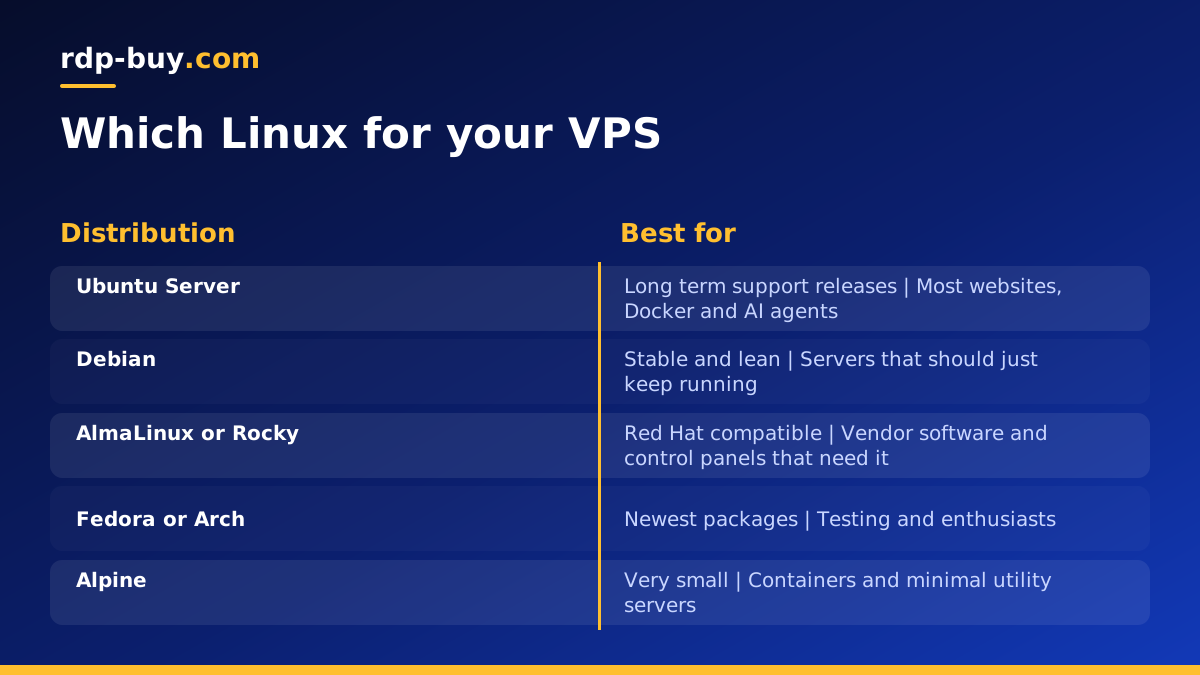
Why your choice of Linux for VPS matters
Every Linux distribution runs the same kernel at its core, so most software works on all of them. The differences are in the package manager, how often new versions arrive, how long each release receives security updates, and how much documentation and community help you can find.
Those differences add up. A distribution with a long support window means fewer major upgrades. One that matches the tutorials you follow means less translation of commands. One your team already knows means fewer mistakes at three in the morning.
The good news is that there is no wrong answer among the mainstream choices. When you order VPS hosting, you are choosing between a few solid options, each with a clear best fit.
Ubuntu Server: the default for most people
Ubuntu Server is the most common choice for a new VPS, and for good reason. Its long term support releases receive security updates for years, it has a huge library of packages, and almost every tutorial, install script and software vendor gives Ubuntu instructions first.
It suits websites, APIs, Docker hosts, automation tools such as n8n and most AI agent frameworks. If you are unsure, choose the latest long term support release of Ubuntu, and only consider something else if you have a specific reason.
The main thing to know is to stick with the long term support versions on a server. Interim releases are supported for a much shorter time, which means more upgrades than most servers need.
Debian: stable, lean and predictable
Debian is the project Ubuntu is built on. It is known for stability and for a conservative approach to updates: packages in a stable release change only for security and important fixes. That makes it a favourite for servers that should simply keep running.
Debian images are usually lean, with fewer extras installed by default, which suits people who want to add only what they need. Most Ubuntu instructions work on Debian with little or no change, because both use the apt package manager.
Choose Debian if you value predictability over having the newest package versions, or if you prefer a community run distribution without a commercial company behind it.
AlmaLinux and Rocky Linux: the Red Hat family
AlmaLinux and Rocky Linux are community distributions built to be compatible with Red Hat Enterprise Linux. They use the dnf package manager, follow the same file layout and tools as the Red Hat world, and offer long support windows for each major version.
They are the natural choice if your software vendor supports only Red Hat compatible systems, if you use a control panel that prefers them, or if your team already works with Red Hat at their day job. Security tooling such as SELinux is enabled by default, which is a plus once you learn how to work with it.
Between the two, the differences are small for most users. Pick whichever your software documentation mentions, or whichever your team is used to.
Other distributions worth knowing
A few other options come up for specific needs:
- Fedora Server moves fast with newer software, but each release has a short support window, so it suits testing more than long running production servers.
- Arch Linux is a rolling release that always has the latest packages. It is popular with enthusiasts, but frequent updates make it a less relaxed choice for a server.
- Alpine Linux is extremely small and widely used inside Docker images. As a full server operating system it suits people comfortable with its different tools.
- openSUSE Leap offers a stable release with good admin tools and is common in some European organisations.
Matching a distribution to your workload
If you know what the server will run, the choice gets easier:
- Websites and web apps: Ubuntu or Debian, because most stacks and guides target them.
- Docker and containers: Ubuntu or Debian. The host operating system matters less once everything runs in containers, so choose the one with the simplest Docker install. See Docker VPS for suitable plans.
- n8n, OpenClaw, Hermes Agent and other AI agents: Ubuntu is the safest choice because project documentation usually starts there. The AI agent hosting hub covers each tool.
- Claude Code (by Anthropic) on a server: any modern distribution that runs current Node.js works, and Ubuntu keeps the setup simplest. The VPS for Claude Code page has the details.
- Vendor software that lists Red Hat support: AlmaLinux or Rocky Linux.
- A VPN endpoint or small utility server: Debian, for a lean and steady base.
First steps on a fresh Linux VPS
Whichever distribution you pick, the first hour on the server looks much the same. Log in over SSH as root, confirm the release with the command cat /etc/os-release, and update every package with the distribution's package manager: apt on Ubuntu and Debian, dnf on AlmaLinux and Rocky Linux.
Next, create a normal user with sudo rights, copy your SSH public key to it, and turn off password login and direct root login for SSH. Enable a firewall: UFW is the simple option on Ubuntu and Debian, while firewalld comes ready on the Red Hat family. Allow SSH and only the ports your applications need.
Finally, turn on automatic security updates. On Ubuntu and Debian that means the unattended upgrades package; on AlmaLinux and Rocky Linux, dnf automatic does the same job. With those steps done, the server is ready for your software.
Questions to ask yourself before you decide
If you are still torn, a few honest answers usually settle it:
- Which distribution does the main software I plan to run document first?
- Which one have I, or my team, used before?
- How long do I expect this server to run before I rebuild it?
- Do I prefer newer package versions, or fewer changes between updates?
- Does any control panel, vendor or licence I rely on require a particular family?
Support windows and upgrades
Whatever you choose, check how long your release receives security updates. A server running a release that no longer gets updates is a growing risk, even if everything appears to work.
Plan major upgrades rather than letting them surprise you. Many people find it simpler to build a fresh VPS on the new release, move the application across and switch DNS, instead of upgrading in place. That is easy when your setup is written down as scripts or Docker compose files.
Between major releases, turn on automatic security updates and reboot from time to time so kernel fixes take effect.
Linux or Windows for your VPS
Sometimes the real question is not which Linux, but whether to use Linux at all. Linux is the natural choice for web servers, containers, development tools and most AI agents. Windows makes sense when you need desktop software, a trading terminal, or apps that only run on Windows, usually reached through Remote Desktop.
If that is your situation, read Windows or Linux server: which to rent and compare the Windows VPS plans, where the Windows licence is included in the price.
Can you change distribution later?
Yes. With full root access you can reinstall the server with a different operating system image. A reinstall wipes the disk, so back up your data and configuration first.
That flexibility is a good reason not to overthink the first choice. Start with Ubuntu or Debian if you have no strong preference, learn how the server behaves, and switch later if a specific need comes up. Keeping your setup in scripts or compose files makes any later move between distributions far less painful.
Choosing your Linux VPS
Once you have picked a distribution, choose the plan size and location and buy your Linux VPS at rdp-buy.com. Every plan includes full root access, a dedicated IPv4 address and a choice of 33 server locations, with monthly, half yearly or yearly billing and payment by card, PayPal or crypto.
Servers are ready in minutes, so you can install your distribution of choice and start setting up the same day, with 24/7 support if you need help along the way.
