 Sign in
Linux VPS for Free: What You Really Get and When to Pay
A Linux VPS for free sounds ideal for learning or a side project, and in some cases it is. This guide explains where free servers come from, the limits that usually come with them, and the point where it makes sense to buy a Linux VPS instead.
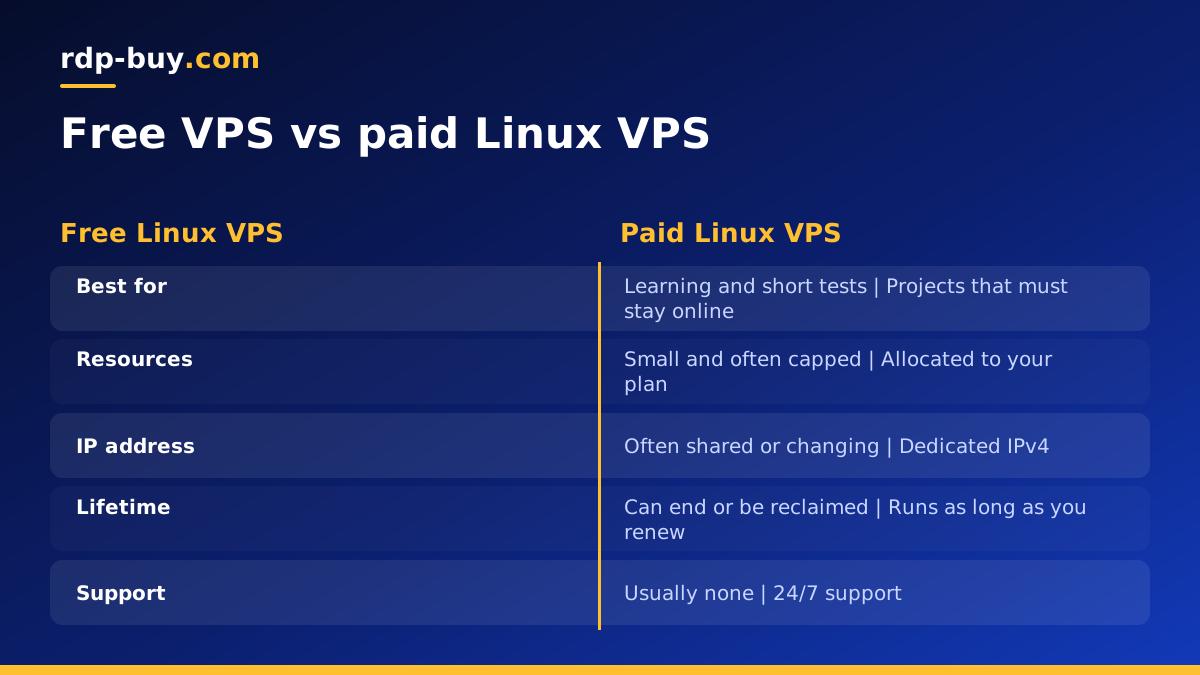
Can you really get a Linux VPS for free?
Yes, in a few limited forms. Free Linux servers usually come from one of four places: the free tier of a large cloud platform, a time limited trial or credit from a hosting company, a student or open source programme, or a small community project that hands out shared resources. Each one can be useful, but none of them is the same as a server you rent and control without conditions.
The honest summary is this: a free Linux VPS is good for learning commands, testing a script or trying a tool for a few days. It is rarely a good home for anything other people depend on, such as a website, a bot, a workflow tool or an AI agent that must stay online around the clock. For those, a modest paid Linux VPS is usually the safer choice.
The main types of free VPS offers
It helps to know what kind of offer you are looking at, because the catches are different for each.
- Cloud free tiers. Large platforms often include a very small virtual machine in a free tier. They normally require a card on file, apply strict usage limits, and can start charging automatically once you pass a limit or the free period ends.
- Trials and credits. Some hosts give new accounts a short trial or a block of credit. These are useful to test a provider, but the server is deleted or billed once the trial ends.
- Education and open source programmes. Students and maintainers of open source projects can sometimes get free resources. Eligibility rules apply and the resources are meant for that purpose.
- Community or no signup offers. Small projects sometimes offer free containers or shared servers. They can disappear without notice, may share resources heavily between users, and you have little visibility into who else can access the host.
The hidden limits of a free Linux VPS
Free servers have to save money somewhere. These are the limits people run into most often:
- Tiny resources. Very little memory is common, which is enough for a shell and a small script but not for a database, Docker stack or most web apps.
- Usage caps. Limits on CPU time, disk or outbound traffic can slow the server down or create a charge when exceeded.
- Idle reclaim. Some free tiers stop or reclaim instances that look idle, which breaks anything meant to wait for webhooks or run on a schedule.
- No dedicated IP. Shared or changing public addresses make it hard to point a domain, whitelist an IP or keep a stable connection.
- Restricted ports or uses. Mail, VPN and some network services are often blocked on free plans.
- Limited support. When something breaks, you are usually on your own or relying on a forum.
Security and privacy risks to think about
A free server still holds your code, keys and sometimes customer data. Before you put anything on one, think about who runs the platform and how you would recover if the server vanished tomorrow.
Avoid storing API keys, wallet keys or passwords on any free host you do not fully trust. Never reuse passwords there. Use SSH key login, turn off password login for SSH, enable a firewall and keep the system updated, exactly as you would on a paid server. Keep a copy of everything important somewhere else, because free resources can be withdrawn with little warning.
Be especially careful with offers that promise a free Windows or Linux server with no signup at all. If a service gives away compute with no visible business model, ask how it is paid for before you trust it with anything valuable.
Good uses for a free Linux VPS
Used for the right job, a free server is a great learning tool. It suits:
- Learning the Linux command line, SSH, users, permissions and package managers.
- Practising server hardening: firewalls, SSH keys and automatic updates.
- Trying a tool once before you decide whether it deserves a proper server.
- Running a throwaway test of a script, cron job or small API.
- Following a tutorial where nothing is lost if the server disappears.
When it is time to pay for a Linux VPS
The moment something you build needs to stay online, the economics change. A paid server costs a little each month, but it buys predictability: the resources are allocated to you, the server is not reclaimed for being idle, and the IP address stays yours.
These are the usual signs you have outgrown free hosting:
- Other people or systems rely on the service, such as visitors, customers, webhooks or a team.
- You run an automation tool such as n8n or an AI agent like OpenClaw or Hermes Agent that must run around the clock. See VPS for n8n or the AI agent hosting hub for setups built for that.
- You need Docker with several containers, a database or a reverse proxy, which need more memory than a free tier allows. The Docker VPS page covers that case.
- You need a fixed, dedicated IP address for a domain, a VPN or an API whitelist.
- You need a server in a particular country or city, close to your users.
- You have hit a usage cap or had a free instance stopped without warning.
What to check before you sign up for a free tier
If you still want to try a free server, read the terms before you enter any card details. Look for the exact limits on memory, disk, CPU time and traffic, and what happens when you reach them: does the server slow down, stop, or start billing you automatically?
Check how long the offer lasts and whether idle servers are reclaimed. Find out whether you get a public IPv4 address of your own, which ports are blocked and which regions you can choose. Set a billing alert if the platform allows it, so a forgotten test instance does not turn into a surprise charge.
Finally, note how you would delete everything when you are done. Free accounts are easy to forget, and a forgotten server with an old, unpatched system is a security risk for you and for others.
Making the move from free to paid smoothly
If you have been building on a free server, moving is simple if you prepare. Keep your configuration in files rather than in your head: shell scripts, a Docker compose file or an Ansible playbook. Store your code in Git. Export any databases with their standard dump tools.
On the new server, create a non root user, set up SSH keys and a firewall, install your packages or Docker, restore your data and test everything before you change your DNS records. Once the new server is working, point your domain at its dedicated IP address and shut down the free instance so nothing is left running in the background.
If you are still learning, our guide VPS how to use walks through connecting, securing and deploying on a new Linux server.
A low cost alternative to free hosting
If the reason you want a free server is budget, look at small paid plans before you settle for the limits of a free tier. The cheap VPS plans are designed for light workloads such as a bot, a small website or a single agent, and they come with the same essentials as larger plans.
Paying monthly also keeps the commitment small. You can start on a monthly plan, confirm it fits, and move to half yearly or yearly billing once you know the project will keep running.
Choosing a paid Linux VPS plan
When you are ready to move beyond a free server, you can buy VPS hosting at rdp-buy.com with full root access, a dedicated IPv4 address and a choice of 33 server locations. Billing can be monthly, half yearly or yearly, and you can pay by card, PayPal or crypto.
Servers are ready in minutes, so you can move your project the same day, and 24/7 support is available if you get stuck along the way. Pick a plan a little above what your project uses today, and resize later as it grows.
