 Sign in
Where to Buy VPS With Crypto: What to Check and How to Pay
If you want to know where to buy VPS with crypto, the short answer is: from a provider that treats crypto as a normal checkout option, not an afterthought. This guide covers what to check, how the payment works and how to buy VPS hosting with crypto without losing a payment.
Where to buy VPS with crypto: the short answer
Look for a provider that lists crypto alongside card and PayPal on its own checkout, issues a proper invoice for every order, and gives you the same server and support whichever way you pay. At rdp-buy.com, crypto is one of the standard payment methods, and you can order any Linux VPS plan with it.
Before you pay anywhere, it is worth understanding how a crypto checkout works and which details matter. A crypto payment cannot be reversed by your bank, so a careful order is a smooth order.
Why people pay for a VPS with crypto
There are plenty of ordinary reasons to pay for hosting in crypto. Some buyers keep most of their funds in crypto and would rather not convert to a bank currency first. Some live where international card payments are often declined, or where PayPal is not available. Others run crypto related workloads, such as nodes, trading bots or wallets, and simply prefer to keep everything in one ecosystem.
Crypto also avoids some of the friction of cross border card payments, such as unexpected declines or extra verification steps from a card issuer. For a server you want running in minutes, that can make a real difference.
Paying in crypto does not change your responsibilities, though. Hosting terms still apply, and you still need to use the server lawfully and keep it secure.
What to check before you pay a VPS provider in crypto
A crypto payment is final, so check the provider before you send anything.
- A real checkout. The provider should generate a payment request or invoice on its own site, with the amount and address for that order, rather than asking you to send coins to an address in a chat.
- Clear coin and network options. The checkout should show which coins and which networks it accepts. Sending a token on the wrong network is the most common way people lose a payment.
- Order status. You should be able to see when the payment is detected, when it is confirmed and when the server is being set up.
- The same plan and support. Crypto buyers should get the same plans, access and 24/7 support as anyone else.
- Full access and a dedicated IP. Confirm you get full root or administrator access and a dedicated IPv4 address, as you would with any other payment method.
- Billing cycle choice. Check whether you can pay monthly, half yearly or yearly, so you are not forced into a long term to use crypto.
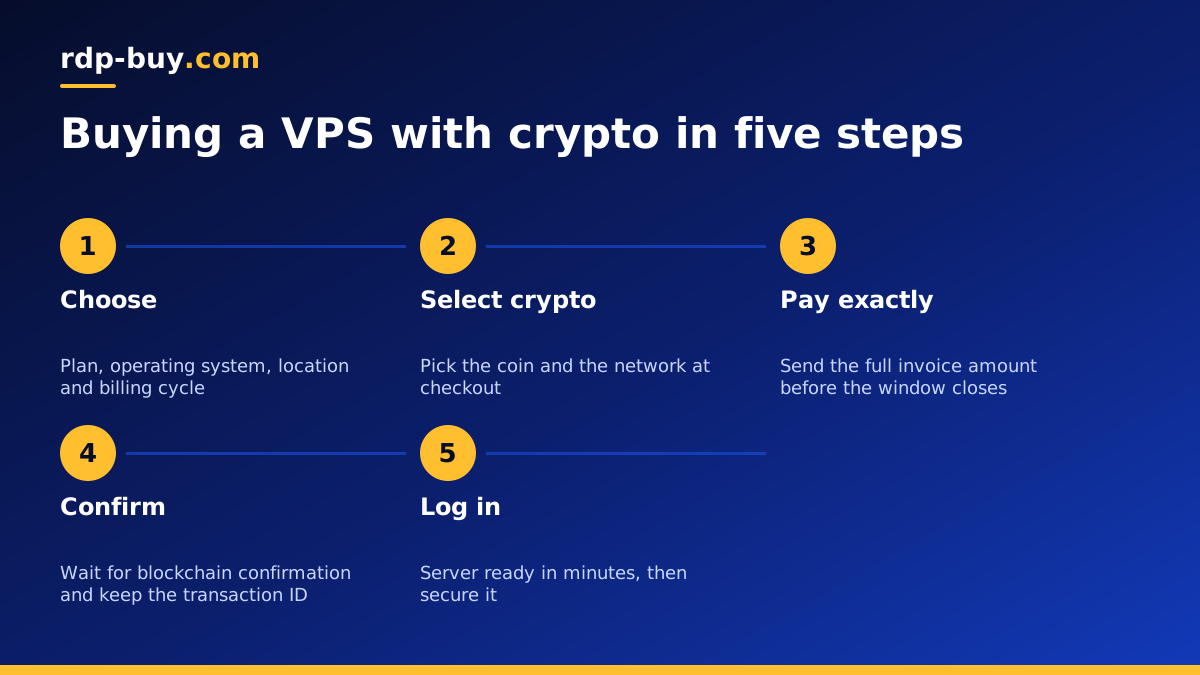
How a crypto VPS checkout works, step by step
The exact screens differ between payment processors, but the flow is usually the same:
- Choose your VPS plan, operating system and server location, then pick the billing cycle.
- Create your account or log in, and select crypto as the payment method.
- Choose the coin and the network you will pay from. Check the network twice.
- The checkout shows an amount and a receiving address, often with a QR code and a countdown during which the quoted amount is valid.
- Send the exact amount from your wallet or exchange account, allowing for any withdrawal fee your exchange deducts so the full invoice amount arrives.
- Wait for the payment to be detected and confirmed on the blockchain. The order then moves to setup, and your server details arrive once it is ready.
Mistakes that delay or lose a crypto payment
Most problems with crypto payments come from a handful of avoidable mistakes:
- Wrong network. The same token can exist on several networks. Sending on a network the checkout does not list can mean the payment is never credited.
- Short payment. Exchanges often subtract a withdrawal fee from the amount you enter. If less than the invoice arrives, the order may sit as partly paid.
- Expired quote. If you pay after the payment window closes, the rate may need to be recalculated. Start the checkout when you are ready to pay.
- Typing the address by hand. Always copy and paste or scan the QR code, and compare the first and last characters before you confirm.
- Paying an address from somewhere else. Only pay an address shown on the provider's own checkout for your own order.
Exchange or personal wallet: which to pay from
You can pay from an exchange account or from a wallet you control. Paying from your own wallet gives you more control over the network and the exact amount sent, and it keeps the transaction history in your hands.
Paying straight from an exchange is convenient, but check how it handles withdrawals: some exchanges batch payments, delay them for review, or deduct fees from the amount you send. If your exchange does any of that, move the funds to your own wallet first and pay from there.
Whichever you use, keep the transaction ID. If anything looks wrong, support can match your payment to your order much faster with it.
Crypto, card or PayPal: which payment suits you
Crypto is not always the best choice for every order, so it helps to compare it honestly with the other options before you check out.
Card payments are quick and familiar, and they suit buyers whose bank handles international payments without trouble. PayPal adds a layer between you and the merchant and is popular with buyers who already keep a balance there. Crypto suits people who already hold coins, who have trouble with card declines, or who simply prefer paying from their own wallet.
There is no difference in the server you receive. The plan, the dedicated IPv4 address, the full root or administrator access and the support are the same whichever method you use. Many customers pay the first order one way and renewals another, depending on what is convenient at the time. If you are unsure, choose the method you are most confident using correctly, because a smooth first payment gets your server online fastest.
Choosing the right VPS when paying with crypto
The payment method should not change how you choose the server. Start with the workload: a website, a VPN, a trading bot, a node, or an AI agent such as n8n or OpenClaw that must stay online around the clock. Then size the plan with a little headroom above what you need today.
Pick the location carefully. If your bot talks to an exchange or your users are in a particular region, choose a server close to them. You can see all 33 options on the server locations page, and the USA VPS plans cover several US cities.
If you need a Windows desktop rather than a Linux server, for example for a trading terminal, you can also buy RDP with crypto. And if crypto is not convenient this time, the same plans can be paid by card or PayPal.
After you pay: getting the server ready
Once your payment confirms, your server is usually ready in minutes. Log in with the details you receive, change the initial password, and set up SSH key login on Linux.
Turn on a firewall, apply updates and create a normal user before you install your software. If you run crypto related tools, keep wallet keys off the server whenever you can, and use API keys with the narrowest permissions your exchange allows. Our guide VPS how to use covers connecting and securing a new Linux server step by step.
Renewals and records
Crypto payments are not usually set up as automatic renewals, so note the renewal date for your server. You will normally receive an invoice before it is due, which you can pay in crypto again or with another method.
Choosing half yearly or yearly billing means fewer renewal payments to remember. Whatever cycle you choose, keep your invoices and transaction IDs together, which makes your own bookkeeping simpler too.
Ready to buy your VPS with crypto
When you are ready, choose a plan and buy a VPS with crypto at rdp-buy.com. Every Linux VPS includes full root access, a dedicated IPv4 address and a choice of 33 locations, with monthly, half yearly or yearly billing. The buy VPS with crypto page explains the checkout in more detail.
Servers are ready in minutes after payment confirms, and 24/7 support is there if a payment needs checking or you need help with setup.
