 Sign in
Linux Server Best Distro: How to Choose One for Your VPS
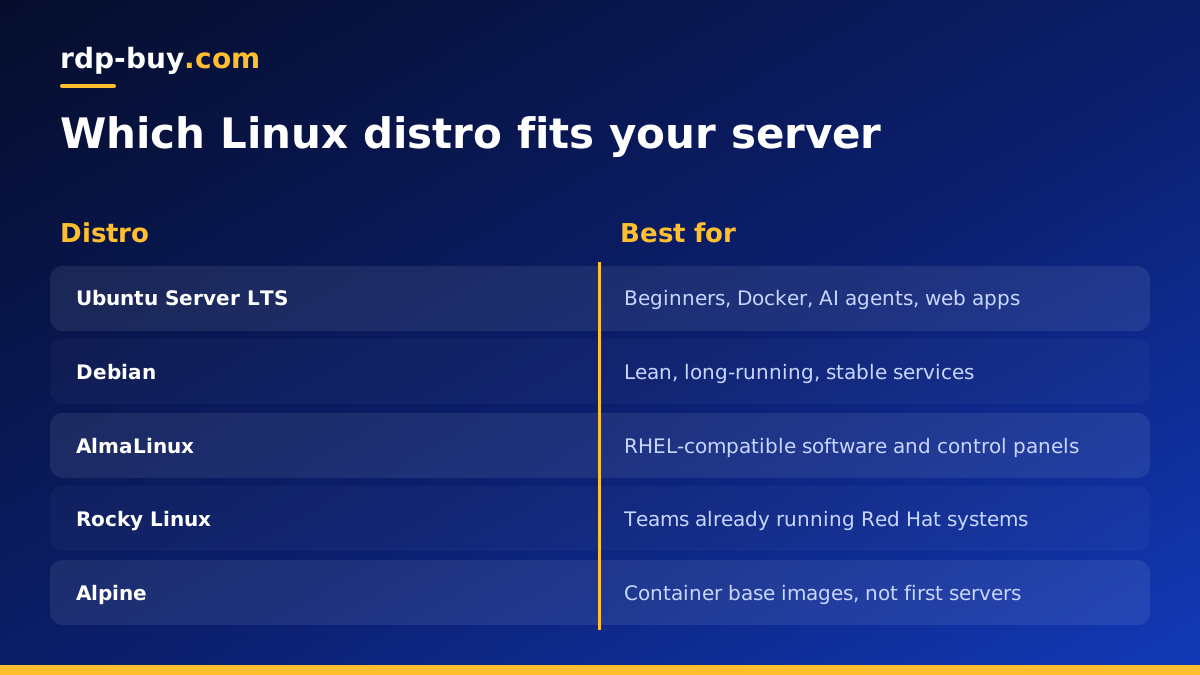
The best Linux server distro is the one with a long support window, packages your software expects, and documentation you can follow at two in the morning. For most people renting a Linux VPS, that means Ubuntu LTS or Debian, with AlmaLinux or Rocky Linux when the software asks for the Red Hat family.
What makes a Linux distro good for a server
A desktop distro is judged on how it looks and how new its apps are. A server distro is judged on almost the opposite: how little it changes, how long it receives security fixes, and how predictable it is when you come back to it after months of quiet running. When you buy VPS hosting, the operating system you pick on day one usually stays with that server for years, so the choice deserves a few minutes of thought.
Four qualities matter more than anything else. The first is the support lifecycle: a release that receives security updates for many years means you are not forced into a risky major upgrade every few months. The second is the package ecosystem: the software you plan to run should be available from official repositories or from its vendor with clear install instructions for that distro. The third is documentation and community: when something breaks, you want thousands of forum answers that match your exact system. The fourth is familiarity: a distro you already know is safer than a theoretically better one you have never used.
- Long term support: security fixes for years, not months.
- Stable packages: versions that do not shift under your applications.
- Good documentation: official guides plus a large community.
- Vendor support: tools like Docker, n8n and databases publish instructions for it.
Ubuntu Server LTS: the default choice for most VPS users
Ubuntu Server is the most common choice on cloud and VPS platforms, and for good reason. Its long term support releases arrive every two years and receive standard security maintenance for a long period, with optional extended coverage on top. Almost every tutorial for self-hosting, from web servers to AI agent frameworks, is written and tested on Ubuntu first.
Ubuntu also ships newer kernels and libraries than Debian at release time, which helps when you run recent software such as current Node.js or Python builds, container tooling, or GPU drivers. The trade-off is that Ubuntu makes some opinionated choices, such as snap packages for certain tools, which some administrators prefer to avoid. If you are unsure which distro to pick, Ubuntu LTS is the answer that will cause you the fewest surprises.
- Best for: beginners, developers, Docker hosts, AI agent stacks, web apps.
- Watch out for: snap packages if you prefer plain apt installs.
Debian: lean, conservative and very stable
Debian is the parent of Ubuntu and is known for a slow, careful release process. Packages in a stable release are tested for a long time before they ship and then stay fixed, receiving only security and bug fixes. That makes Debian a favourite for servers that should run untouched for long stretches, such as DNS, mail, reverse proxies and small databases.
A minimal Debian install is also lighter than Ubuntu, with fewer services running by default. That leaves more memory for your actual workload on a small VPS. The downside is that some packages in the stable repository are older, so for fast-moving software you will often install from the vendor's own repository or run it in Docker. For many experienced administrators, Debian plus Docker is the ideal combination: a stable base with current applications in containers.
- Best for: long-running services, minimal installs, people who value stability over new features.
- Watch out for: older package versions in the stable release.
AlmaLinux and Rocky Linux: the Red Hat family
Some software is built and certified for Red Hat Enterprise Linux. Control panels, certain commercial applications and many corporate environments expect a RHEL-compatible system that uses dnf packages and SELinux. AlmaLinux and Rocky Linux are free, community-run rebuilds that aim to match RHEL closely, and both have long support cycles.
If your team already manages RHEL machines, or a vendor's install guide only covers that family, choose one of these. Otherwise the learning curve is a little steeper for newcomers, because most beginner tutorials assume apt and Ubuntu paths. SELinux in particular adds a strong security layer but also confuses people who copy commands written for Debian systems.
- Best for: control panels, enterprise software, teams already on RHEL.
- Watch out for: SELinux rules and tutorials written for Debian-based systems.
Other distros worth knowing
Fedora Server tracks new technology quickly but has a short support life per release, so it suits labs more than production. Arch Linux is excellent for learning and for desktops, but its rolling updates are a poor fit for a server you want to forget about. Alpine Linux is tiny and popular as a base for container images, though running it as a full server OS means working with a different C library and init system. openSUSE Leap is solid and well engineered, with a smaller community in the hosting world.
None of these are wrong choices for experienced users, but for a first server or for anything business critical, the four distros above cover almost every case.
Match the distro to your workload
The quickest way to decide is to start from what you want to run, then pick the distro its documentation favours. Here is a simple guide:
- Docker and containers: Ubuntu LTS or Debian. Docker publishes official repositories for both. See our Docker VPS page.
- AI agents such as n8n, OpenClaw or Claude Code (by Anthropic): Ubuntu LTS, because most guides and install scripts target it. Our AI agent hosting hub explains the options.
- Web apps and reverse proxies: Debian or Ubuntu LTS.
- Control panels or vendor-certified software: AlmaLinux or Rocky Linux.
- Game servers: usually Ubuntu, since server tools and community scripts target it.
- Windows-only software: no Linux distro at all. You need a Windows server, explained in Windows or Linux server: which to rent.
First steps after installing your server distro
Whichever distro you choose, the first hour on a new server looks much the same. Doing these steps early prevents most of the problems people run into later:
- Update every package: apt update && apt upgrade on Ubuntu or Debian, dnf upgrade on AlmaLinux or Rocky.
- Create a normal user with sudo rights instead of working as root all the time.
- Set up SSH key login and turn off password login once keys work.
- Enable a firewall, such as ufw on Ubuntu or firewalld on the Red Hat family, and open only the ports you need.
- Turn on automatic security updates, with unattended-upgrades or dnf-automatic.
- Set the timezone and hostname so logs make sense.
- Take a note of the distro version and its end-of-support date in your calendar.
Can you change the distro later?
Switching distro on a running server is not an in-place upgrade. In practice you reinstall the server with the new operating system and move your data and configuration across. That is why it pays to keep configuration in files you can copy, such as Docker Compose files, and to back up data regularly. If you run your applications in containers, moving between Ubuntu and Debian is usually painless, because the containers do not care much about the host.
Major version upgrades within the same distro, such as moving from one Ubuntu LTS to the next, are supported, but always take a backup or snapshot first and read the release notes for anything your software depends on.
Choosing a VPS plan for your Linux distro
Once you know which distro you want, the plan matters as much as the operating system. Look at memory first, since databases, Docker containers and AI agents are usually limited by RAM before CPU. Then pick a location close to your users or to the APIs your software talks to. rdp-buy.com offers 33 server locations, full root access, a dedicated IPv4 address and servers that are ready in minutes, with monthly, half-yearly or yearly billing.
When you are ready, compare our Linux VPS plans, choose Ubuntu, Debian or a Red Hat compatible distro at checkout, and follow the first-steps list above. If you are not sure what you can run on it, our guide to what you can run on an RDP or VPS has ideas, and 24/7 support is there if you get stuck.
