 Sign in
MCP Host vs AI Agent: What Each Does and Where to Run Them
In the MCP host vs AI agent question, the short answer is that they are different layers: the host is the application that connects a model to tools through the Model Context Protocol, and the agent is the behaviour of planning and acting with those tools. This guide explains each part and when it makes sense to move your MCP servers and agents onto dedicated AI agent hosting.
A quick primer on the Model Context Protocol
The Model Context Protocol, usually shortened to MCP, is an open standard introduced by Anthropic for connecting AI applications to tools and data. Instead of every app writing its own integration for every service, a service can expose itself once as an MCP server, and any MCP compatible application can use it.
MCP describes three roles. Understanding them is the key to the MCP host vs AI agent question, because people often use these words loosely.
- Host: the AI application the user works with, such as a chat app, an IDE or a coding tool like Claude Code (by Anthropic). The host manages the model conversation and decides which servers to connect to.
- Client: a connector inside the host. Each client keeps one connection to one MCP server and passes messages back and forth.
- Server: a program that exposes capabilities to the host, such as tools the model can call, resources it can read and prompt templates it can use.
What an AI agent is
An AI agent is not a role in the protocol. It is a way of working. An agent takes a goal, uses a language model to decide on the next step, calls a tool, looks at the result and repeats until the goal is met or it needs help.
Agents can be built in many ways. Some are full applications with their own interface. Some are workflows in a tool such as n8n. Some are frameworks you run from the command line. What makes them agents is the loop of planning, acting and checking, not the technology underneath.
MCP gives agents a standard way to reach tools. An agent that speaks MCP can use any MCP server without custom code for each one, which is why the two terms so often appear together.
MCP host vs AI agent: the real difference
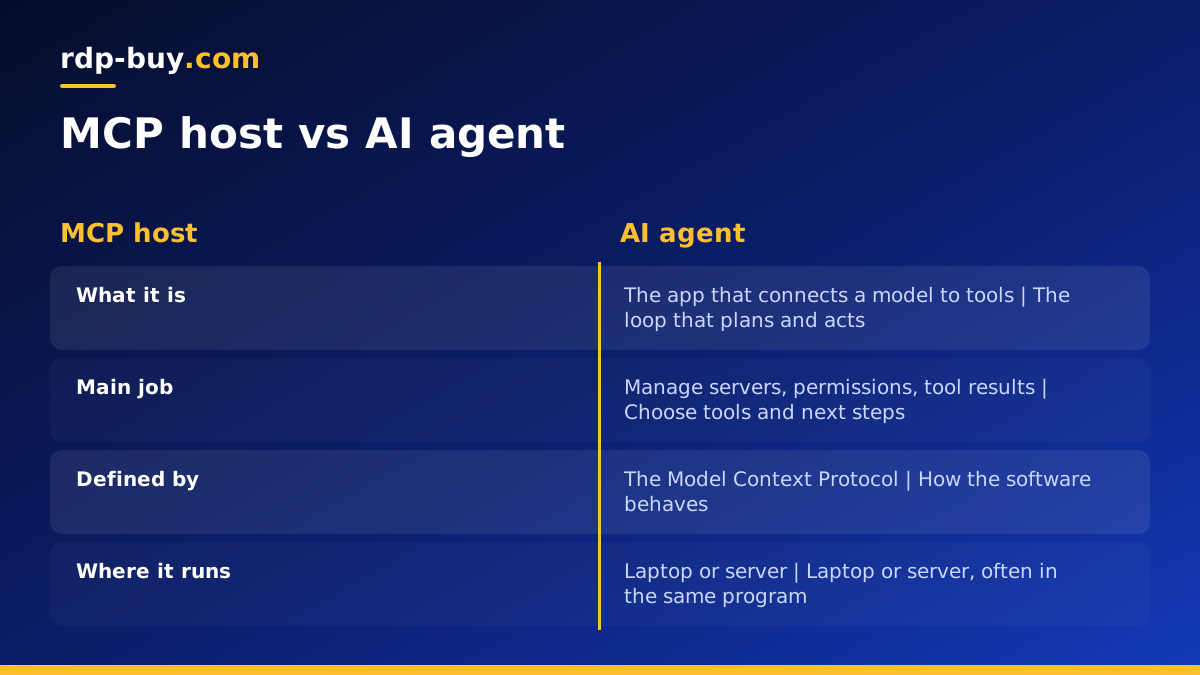
The simplest way to see the difference is to ask what each one is responsible for.
- The host is plumbing and control: it starts or connects to MCP servers, keeps track of which tools are available, asks the user for permission when needed and passes tool results back to the model.
- The agent is decision making: it chooses which tool to call, with what input, and what to do with the answer.
- They often live in the same program: a coding tool that runs an agent loop and connects to MCP servers is both a host and an agent at once.
- They can also be separate: a custom agent can act as its own MCP host, connecting to servers that run elsewhere.
Where MCP servers run: local or remote
MCP supports two main ways for a host to talk to a server, and they decide where the server can live.
With the stdio transport, the host starts the server as a local process on the same machine and talks to it through standard input and output. This is simple and private, but the server only exists while the host is running on that machine.
With the HTTP based transport, the server runs as a network service that hosts connect to over the internet or a private network. This lets one server be shared by several hosts and agents, and lets it keep running when no one is connected.
Local servers are fine for personal tools on your own computer. Remote servers are the right choice when an agent runs around the clock, when several people or agents need the same tools, or when the tool needs to sit close to a database or API.
When to run your agent and MCP servers on a server
If your agent only runs while you sit at your laptop, local MCP servers are enough. Once the agent needs to work on its own schedule, the setup changes.
An agent that watches an inbox, responds to webhooks, runs nightly jobs or works through long tasks needs a machine that is always on. Its MCP servers need to be always on too, or the agent loses its tools the moment your laptop sleeps. Moving both to a VPS solves that, and a dedicated IP address keeps webhooks and allowlists stable.
A server also helps with location. MCP servers that wrap a database or an internal API respond faster when they run close to that system, and agents that call hosted model APIs respond faster when the server sits near those APIs.
A practical setup on a Linux VPS
A common pattern is to run the agent and its MCP servers on one Linux VPS, each in its own Docker container, with a reverse proxy in front of anything that must be reached from outside.
- Prepare the server: update packages, create a user, add your SSH key, disable root password logins and enable a firewall.
- Install Docker: run each MCP server and the agent as separate containers, so one failure does not stop the others. A Docker VPS is set up for this kind of work.
- Keep internal servers internal: MCP servers used only by the agent on the same machine do not need a public port at all.
- Protect remote servers: any MCP server reached over the internet should sit behind HTTPS with authentication, never open without a login.
- Store secrets safely: keep API keys in environment files with tight permissions, not in images or repositories.
- Restart automatically: set containers to restart after crashes and reboots, and keep logs so you can see what the agent did.
Running Claude Code with MCP servers on a VPS
Claude Code is a good example of a host and an agent in one program. It runs an agent loop in your terminal and can connect to MCP servers to reach extra tools.
Running it on a VPS lets long sessions continue after you disconnect, especially inside a terminal multiplexer such as tmux. Local MCP servers then run on the same VPS, next to your code, and remote MCP servers can be added by URL. Our VPS for Claude Code page explains the setup. rdp-buy.com is not affiliated with Anthropic; we simply provide servers that suit this kind of workload.
Sizing a server for agents and MCP
Most MCP servers are small programs that pass requests to an API or database, so they need little memory. The agent itself usually calls a hosted model, so it does not need a GPU. What adds up is the number of containers, any browser automation and any local databases.
A single agent with a few MCP servers runs on an entry level Linux VPS. Several agents or a browser based MCP server need more memory. If you are combining agents with a workflow tool, see VPS for n8n for how those setups grow. Watch memory with docker stats for a week and upgrade if it stays high.
Choosing hosting for your agents and MCP servers
To sum up the MCP host vs AI agent question: the host connects the model to tools, the agent decides how to use them, and in many tools they are the same program. Where they run is a separate choice, and once an agent needs to work on its own, a server is the natural home for both.
rdp-buy.com servers come with full root access, a dedicated IPv4 address, 24/7 support and 33 locations, and are ready in minutes. Compare the options on our hosting for AI agents page and pick a plan that fits the agents and MCP servers you plan to run.
