 Sign in
Dedicated Server vs Community Server Palworld: The Differences
In Palworld, every community server is a dedicated server, but not every dedicated server is a community server: the difference is whether the world is listed publicly. This guide explains both, compares them with co-op hosting, and shows when it makes sense to run your world on a rented dedicated server.
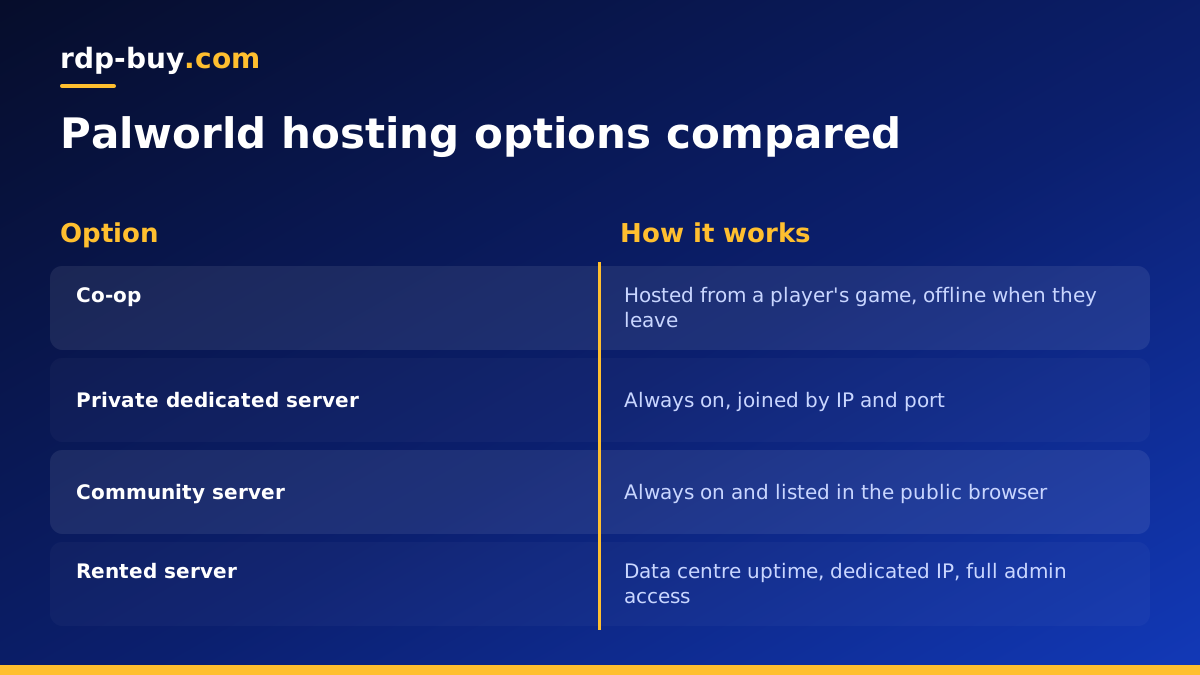
Three ways to play Palworld with friends
Palworld gives you three ways to share a world, and the names confuse many players because they overlap. Before comparing a dedicated server with a community server, it helps to see all three side by side.
Co-op means one player hosts the world from their own game. Friends join through an invite code, and the world only exists while the host is playing. A dedicated server is a separate server program, called PalServer, that runs the world on its own, with no player needing to be logged in. A community server is a dedicated server that has been launched with a public listing option, so it appears in the in-game community server browser for anyone to find.
- Co-op: hosted from a player's game, ends when they leave.
- Dedicated server: runs on its own around the clock, joined by IP address and port, optionally with a password.
- Community server: a dedicated server that is also listed publicly in the game's server browser.
What a Palworld dedicated server is
The Palworld dedicated server is a separate application you install through SteamCMD on Windows or Linux. It loads the world, simulates it and accepts player connections without a game client being open. Because it is independent of any player, the base keeps running, Pals keep working and friends can log in whenever they like, even if the person who set it up is asleep or away.
You control the server through a settings file. That is where you set the server name, the admin password, the server password, the player limit and many world rules such as experience rates, day length and death penalties. Private dedicated servers are joined by typing the server's public IP address and port, and you can hand out the password only to your group.
What a Palworld community server is
A community server is the same PalServer program started with the public lobby option enabled. When that option is on, the server registers itself with the community list inside the game. Anyone browsing community servers can see its name and description and join, unless you also set a password.
Community servers are how public Palworld groups grow. If you want strangers to discover your world, follow your rules and become regular players, listing it as a community server is the way. If the world is only for your friends, there is no need to list it, and keeping it private reduces the chance of griefers or cheaters turning up.
Dedicated vs community server: the real differences
Because both run the same software, the differences are about visibility and management rather than performance:
- Discovery: a private dedicated server is joined by IP and port only. A community server shows up in the public browser.
- Audience: private servers suit friends and small groups. Community servers suit public or semi-public groups that want new players.
- Moderation: a community server needs active admins, clear rules, and tools like the ban list. A private one rarely does.
- Password: both can use a password. A listed server with a password is a common middle ground for clubs that recruit through Discord.
- Resources: a busy public server usually holds more players at once, so it needs more memory and CPU than a quiet private one.
Why not just use co-op?
Co-op is the quickest way to play with a couple of friends, and for short sessions it is perfectly fine. Its limits show up as your group grows or plays at different times. The world is only online when the host is online, so nobody can progress alone. The host's PC carries the load of simulating the world and running the game at the same time, which can reduce performance for everyone. And if the host's internet connection is weak, every player feels it.
A dedicated server fixes all three. The world is always available, the host plays on equal terms with everyone else, and the server sits on a data centre connection with a stable dedicated IP address instead of a home router.
What a Palworld server needs
Palworld's server is known for using a lot of memory, and memory use tends to grow as the world gets larger and more Pals are working in bases. Rather than trusting a single number, check the current official server guide and community reports for your expected player count, then leave headroom on top. A few practical points:
- Memory first: RAM is the resource most Palworld servers run short of. Choose a plan with room to grow.
- Strong single core speed: the world simulation benefits from fast CPU cores, which is where a dedicated CPU helps.
- Fast storage: SSD or NVMe storage keeps saves and world loading quick.
- Location: pick a data centre near most of your players to keep latency low.
- Scheduled restarts: many admins restart the server on a timer to clear memory, combined with automatic backups of the save folder.
How to turn a dedicated server into a community server
If you already run a private Palworld dedicated server and want it listed, the change is small. The exact option names can change between game updates, so confirm them against the official documentation, but the process looks like this:
- Stop the server cleanly so the world saves.
- Open the server settings file and give the server a clear name and description that tell players what to expect.
- Decide on a server password: leave it empty for fully public, or set one for a recruited community.
- Set an admin password so you can use admin commands in game.
- Start the server with the community or public lobby launch option enabled.
- Make sure the game port is open in your firewall, then search for your server name in the in-game community list.
Hosting at home vs renting a server
You can run PalServer on a spare PC at home, but it has to stay on all the time, your home upload speed limits everyone, and you need to forward ports on your router and expose your home IP. Renting a server moves all of that into a data centre. You get a machine that is built to run around the clock, a dedicated IP that you can share with friends without revealing your home address, and full admin or root access to install and tune the server exactly how you like.
For a small private world, a well sized VPS can be enough. For a busy community server with many players and large bases, a dedicated CPU server gives the world simulation cores that are not shared with other customers. Our guide to what you can run on an RDP or VPS covers other game and app ideas too.
Choosing a server plan for your Palworld world
Start with the kind of world you want. Friends only, playing at different times: a private dedicated server. A public group that wants new members: a community server with moderation in place. In both cases plan memory generously and choose a location close to your players.
rdp-buy.com offers servers in 33 locations with full admin or root access, a dedicated IPv4 address, 24/7 support and monthly, half-yearly or yearly billing, ready in minutes. Compare plans and buy a dedicated server for your Palworld world, or read Windows or Linux server: which to rent if you are deciding which operating system to run PalServer on. rdp-buy.com is not affiliated with the developers of Palworld.
