 Sign in
Claude Code and VPS vs Laptop: Where Should Your Agent Run?
Claude Code (by Anthropic) runs happily on a laptop, but long tasks, unattended jobs and shared projects work better on a server that never sleeps. This guide compares the two setups honestly and shows when moving your agent to AI agent hosting on a VPS is worth it.
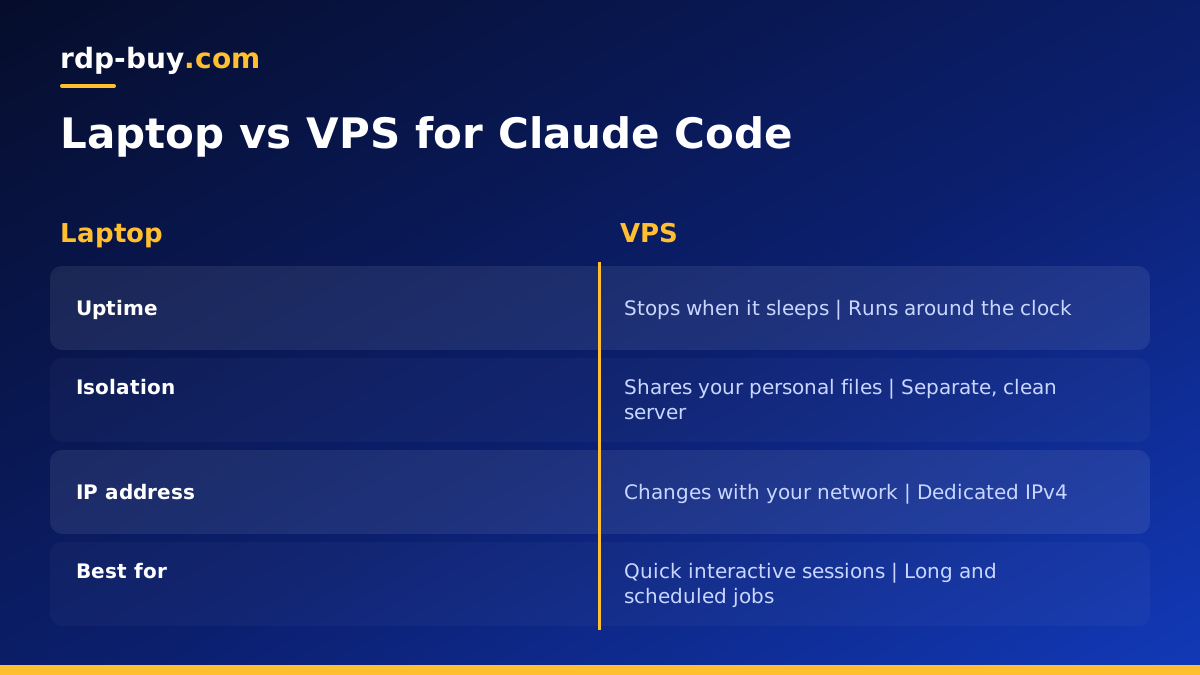
The short answer
If you use Claude Code (by Anthropic) for interactive coding sessions while you sit at your desk, your laptop is fine. The tool is a command line program that talks to Anthropic's API, so it does not need heavy local hardware. The picture changes when you want the agent to keep working while you are away, run on a schedule, operate on a codebase that lives on a server, or stay isolated from your personal files. In those cases a VPS is the more reliable and safer home.
Many developers end up using both: the laptop for quick, hands-on sessions, and a server for long-running or automated work. The rest of this guide explains the trade-offs so you can decide which pattern fits you, and links to a VPS for Claude Code if you choose the server route.
Running Claude Code on your laptop
The laptop setup is the simplest way to start. You install Claude Code, sign in, open a project folder and begin. Your editor, browser and files are all in one place, and you can watch every change the agent proposes. For learning the tool, exploring ideas and small edits, nothing beats it.
- Pros: zero setup beyond the install, direct access to local files and tools, easy to review changes in your editor.
- Cons: work stops when the lid closes or the Wi-Fi drops, the agent can reach your personal files and credentials, long tasks tie up your machine, and your home IP changes.
Running Claude Code on a VPS
On a VPS, Claude Code lives on a Linux server in a data centre. You connect over SSH, start the agent inside a terminal multiplexer such as tmux, and detach. The session keeps running when you disconnect, and you can reattach later from any device, including a phone. The server has a stable dedicated IP, so API allowlists and webhooks keep working, and it sits on data centre power and networking rather than your home connection.
The second big benefit is isolation. An agent that can run shell commands has real power. On a dedicated server, it can only touch what you put there: the project repository, the tools it needs and nothing else. Your browser sessions, password manager and family photos stay on the laptop.
- Pros: runs around the clock, survives disconnects, isolated from personal data, stable IP, reachable from anywhere, close to production systems.
- Cons: a little setup work, a monthly server bill, and you must secure SSH properly.
Side by side: the factors that matter
Here is how the two options compare on the points developers ask about most:
- Uptime: a laptop sleeps, travels and reboots for updates. A VPS is built to stay on.
- Long tasks: refactors, test suites and multi-step jobs can finish on a server while you are offline.
- Security: a VPS gives a clean boundary between the agent and your personal machine.
- Collaboration: teammates can SSH into the same server and see the same environment.
- Scheduling: cron or systemd timers on a server can start headless Claude Code jobs at fixed times.
- Speed of feedback: the laptop wins for quick, visual work where you want to see results in a local browser.
- Cost: the laptop is already paid for, while a server is an extra monthly item.
When a VPS is clearly the better choice
Some situations push strongly toward a server. If any of these describe you, moving Claude Code off your laptop will save time and reduce risk:
- You want the agent to work through a long task list overnight.
- Your code already deploys to a Linux server and you want the agent to work in the same environment.
- You run other agents or automations, such as n8n workflows, that call Claude Code or need it available.
- You work from several devices and want one persistent session.
- Company policy or common sense says an autonomous tool should not run on the machine that holds your personal accounts.
- Your home connection is unreliable or your laptop is often on battery.
How to move Claude Code to a VPS
The move is straightforward. These steps assume an Ubuntu LTS server, which is the most common choice:
- Order a Linux VPS with enough memory for your project and its tools, and pick a location near you or near your other services.
- Log in over SSH, update packages, create a non-root user and set up SSH key login.
- Install Node.js and Git, then install Claude Code following the official instructions on anthropic.com.
- Clone your repository onto the server and set up any language runtimes or databases it needs.
- Start tmux, run Claude Code inside it, and sign in.
- Detach with the tmux shortcut and reattach later to check progress.
- Push work to a branch and review it in your normal Git workflow before merging.
Security tips for an agent on a server
A server that runs an AI agent deserves the same care as any production machine. Keep the attack surface small and limit what the agent can damage:
- Use SSH keys only and disable password login.
- Run Claude Code as a normal user, not root, and grant sudo only if a task truly needs it.
- Store API keys in environment files with tight permissions, never in the repository.
- Keep a firewall on and open only SSH plus any ports your app really serves.
- Give the agent its own Git credentials with access only to the repositories it works on.
- Back up important data and review changes before deploying them.
A hybrid workflow that works well
You do not have to choose one place forever. A practical pattern is to keep using Claude Code locally for exploratory work, and push longer jobs to the server. Your editor can even open the remote folder over SSH, so you review the agent's changes with the same tools you use every day. Git becomes the bridge: the agent commits on the server, you pull locally, and nothing is lost if either machine goes offline.
For a deeper, step by step server install, read our guide to what you can run on a VPS and our tutorial on connecting to your server.
Picking a server for Claude Code
Claude Code itself is light, because the model runs on Anthropic's side. Size the server for everything around it: your build tools, test suites, databases and any containers. Memory is usually the first limit you hit. Location matters for responsiveness when you type over SSH, so pick a data centre near you, or near the systems the code talks to.
rdp-buy.com offers Linux servers in 33 locations with full root access, a dedicated IPv4 address, 24/7 support and monthly, half-yearly or yearly billing, and servers are ready in minutes. Browse our hosting for AI agents to compare plans, or go straight to the Linux VPS plans if you already know the size you need. rdp-buy.com is an independent host and is not affiliated with Anthropic.
