 Sign in
Silicon Valley VPS: Who Needs a Bay Area Linux Server
A Silicon Valley VPS puts your Linux server in Northern California, close to West Coast users, Bay Area tech companies and the many APIs that are served from the region. This guide explains who gains from that location, how to size a plan and how to buy a VPS in the USA without overpaying for resources you will not use.
What a Silicon Valley VPS actually is
A VPS, or virtual private server, is a slice of a physical machine that behaves like your own computer in a data centre. You get root access, your own operating system, a dedicated IPv4 address and resources that are reserved for you. When people search for a Silicon Valley VPS, they simply mean a VPS whose physical host sits in the San Francisco Bay Area rather than somewhere else in the country.
The software is the same wherever the server lives. What changes is the distance between your server and the people or services it talks to. Shorter distance usually means less delay for each request, which matters for anything interactive: a web app, a trading tool, a chat bot, an API backend or a remote development box you type into all day.
If you want the wider picture of US regions first, our USA VPS plans page lists every American location we offer, and the server locations page shows all 33 sites worldwide.
Who benefits from a Bay Area server
Location is a tool, not a badge. A Bay Area VPS is worth choosing when the work it does is centred on the West Coast or on services hosted there. These are the most common cases we see:
- Startups and SaaS teams on the West Coast who want their staging or production server near their own office and their first customers.
- Developers calling West Coast APIs, since many AI, payments and developer tool companies run their main endpoints from California. A server nearby keeps each round trip short.
- AI agent builders running n8n, OpenClaw, Hermes Agent or Claude Code (by Anthropic) who want the agent online around the clock and close to the model APIs it calls.
- Remote engineers who need a stable Linux box with a US IP address for testing, builds and long jobs that should not depend on a laptop staying awake.
- Businesses with Pacific audiences that serve users across California, the wider West Coast and onward toward Asia Pacific.
When another US city is the better choice
A Silicon Valley VPS is not automatically the best US location. If most of your visitors are on the East Coast, a New York or Atlanta server will usually feel faster to them. If your audience is spread across the whole country, a central city such as Dallas or Chicago keeps the worst case distance lower for everyone. If you serve Southern California specifically, Los Angeles may suit you better.
A good rule: put the server where the majority of its traffic comes from or goes to. For a website that is your visitors. For an automation or an AI agent it is usually the APIs and databases the agent calls most often. If you want to compare costs across US regions before deciding, our USA VPS price guide walks through how to match a plan to real needs, and the VPS Dallas guide covers the central US option in more detail.
How to size a Silicon Valley VPS plan
Location decides where the server runs. The plan decides how much it can do. Size it from the workload, not from a wish list. Start by writing down every service you plan to run, then check each one's memory and CPU needs in its own documentation.
For a single website or a small API, an entry plan is often enough. For several containers, a database and a reverse proxy together, move up a tier so that memory is not the bottleneck. For AI agents that only call remote model APIs, memory and reliable uptime matter more than raw CPU, because the heavy model work happens on the provider's side. If you plan to build software, run tests or process files, more CPU cores shorten those jobs.
Disk space is easy to underestimate. Logs, Docker images, database files and backups grow over time, so leave headroom. With monthly, half-yearly or yearly billing you can start smaller and upgrade later instead of guessing the perfect size on day one.
- Light use: one site, one bot or one agent with a small database.
- Medium use: several Docker containers, an n8n instance with many workflows, or a staging environment for a team.
- Heavy use: CI builds, data processing or many agents at once. At this point compare a dedicated CPU server as well.
Running AI agents on a Bay Area VPS
AI agents are one of the best reasons to rent a server instead of using a laptop. An agent that watches an inbox, runs workflows or waits for messages has to stay online all the time. A VPS keeps it running when your own computer is closed, and a fixed dedicated IP makes it easier to whitelist the server with the services it connects to.
For workflow automation, see our VPS for n8n page. For coding agents, the VPS for Claude Code page explains how a remote Linux box keeps long sessions alive. If you package everything in containers, a Docker VPS is the simplest base. The broader AI agent hosting hub compares all of these options in one place.
Practical tips: run each agent under a process manager or as a Docker service with a restart policy, keep API keys in environment files with tight permissions, and set up log rotation so a chatty agent does not fill the disk.
Setting up your server in the first hour
Servers are ready in minutes after you order, so you can be working the same day. A short checklist keeps the new machine safe from the start:
- Log in over SSH with the root details you receive, then create a normal user with sudo rights.
- Add your SSH key, disable password login and consider changing the default SSH port.
- Update the system packages and enable automatic security updates.
- Turn on a firewall and open only the ports your services need, such as web ports and SSH.
- Install Docker or your runtime of choice, then deploy your app or agent.
- Set up backups of anything you cannot rebuild, and test a restore at least once.
Paying for a USA VPS
You can pay by card, PayPal or crypto. If you prefer to keep your payment details separate from the server, read the buy VPS with crypto guide. If you want the lowest entry point to test the location first, the cheap VPS page lists the smaller plans. Choose the billing period that fits how sure you are about the project: monthly while testing, longer terms once the setup is settled.
Choosing your Silicon Valley VPS plan
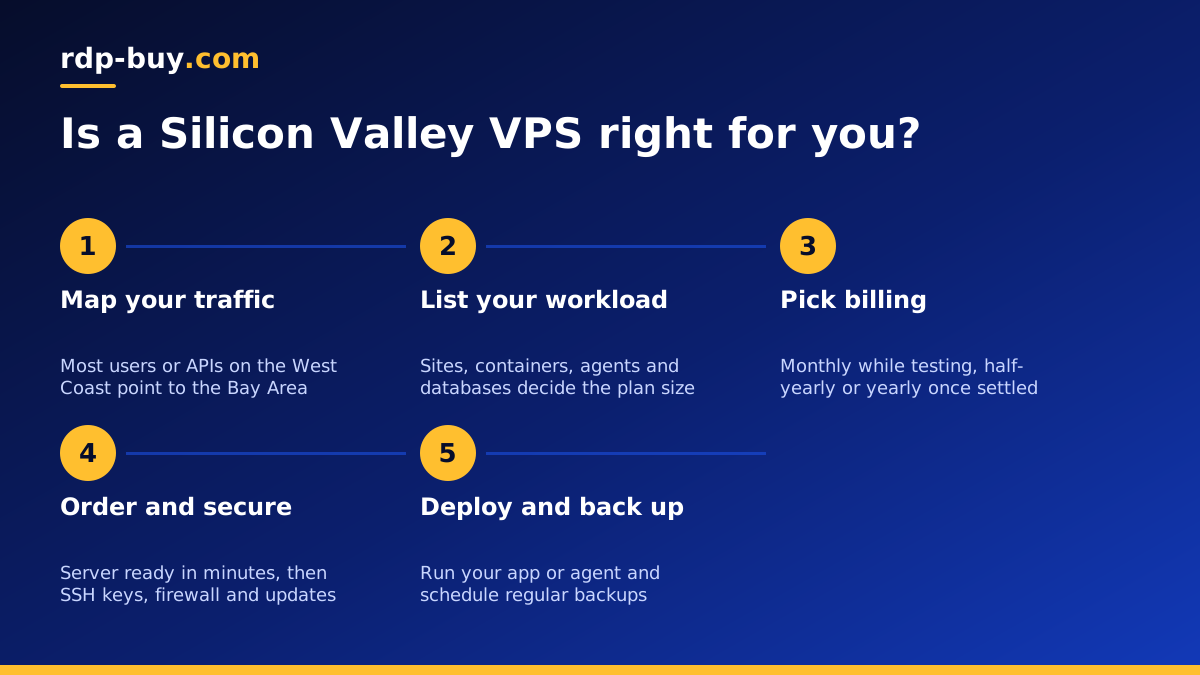
To pick the right plan, answer three questions. Where do most requests come from or go to? If the answer is the West Coast or West Coast APIs, the Bay Area is a strong fit. What will run on the server? Size memory and CPU from that list, with room for growth. How long is the project? Match the billing period to it.
Once you have those answers, open the US VPS order page, select the Silicon Valley location and the plan size, and pay with the method you prefer. You get full root access, a dedicated IPv4 address and 24/7 support if anything needs a second pair of eyes. If you later need a Windows desktop instead of Linux, compare the two in our RDP vs VPS guide.
