 Sign in
n8n Hosting for Free: What Works, What Breaks, When to Pay
Yes, you can run n8n without paying for hosting, because the self hosted Community Edition costs nothing to install, but every free setup has limits that show up once workflows need to run day and night. This guide explains each free option honestly and shows when moving to a small server for AI agent hosting and automation is worth it.
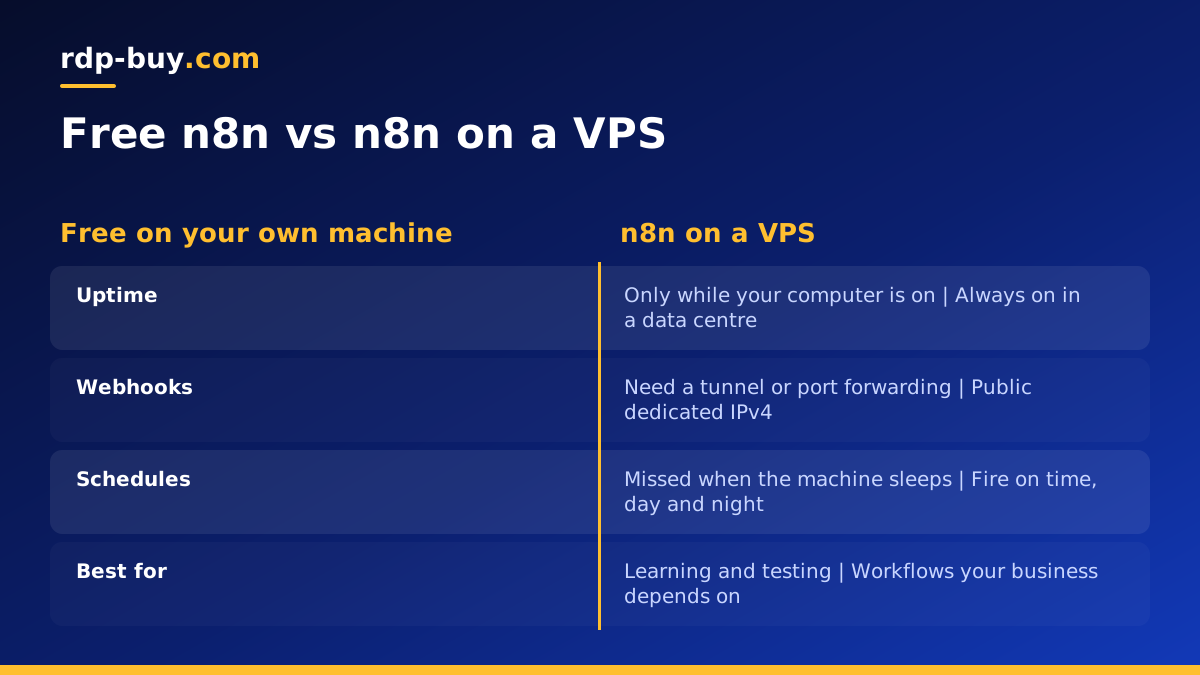
Is n8n hosting for free really possible?
n8n is a workflow automation tool that connects apps, APIs and AI models with a visual editor. The company offers a paid cloud service, and it also publishes a self hosted edition that you can install on your own machine. The self hosted Community Edition is free to use under the project's own licence, which you can read on n8n.io and docs.n8n.io. That is what people usually mean when they search for n8n hosting for free.
The catch is that the software being free does not make the computer it runs on free. Somebody has to supply the processor, memory, storage, power and internet connection, and the workflow only runs while that machine is on. So the real question is not whether n8n can be free, but which free machine you are willing to rely on, and what happens when it lets you down.
Below are the common free approaches, what they are good for and where they break. If you already know you need workflows running around the clock, you can jump to the section on choosing a plan, or look at our VPS for n8n page.
Option one: run n8n free on your own computer
The quickest way to try n8n is on your own laptop or desktop. With Node.js installed you can start it from the terminal, or run the official Docker image if you already use Docker. The n8n documentation lists both methods. Within a few minutes the editor opens in your browser and you can build your first workflow.
This is perfect for learning, testing nodes and building workflows before you deploy them. It is a poor fit for anything that has to happen on time. When your computer sleeps, scheduled triggers are missed. When you close the lid on the train, webhooks from other services have nowhere to land. And because your home connection usually sits behind a router without a public address, outside services cannot reach your n8n instance at all without extra work.
- Good for: learning n8n, prototyping, one off manual runs.
- Breaks when: the computer sleeps, restarts, travels or loses Wi-Fi.
- Webhooks: need a tunnel or port forwarding to receive outside requests.
- Data: lives on a personal machine with everything else you own.
Option two: an old PC or home server
Many people on forums suggest reusing a spare computer or a small single board computer as an always on n8n box. It is a reasonable hobby project and it teaches you a lot about running services. The software is still free, and you only pay for the electricity.
The weak points are the things a data centre handles for you. Home power cuts and router restarts take workflows down. Most home connections have an IP address that changes, so webhooks and integrations that expect a fixed address need a dynamic DNS service or a tunnel. Opening ports on a home router to expose n8n to the internet also puts your home network in the path of every scan and bot on the internet, which many people would rather avoid.
If you go this way, keep n8n behind a reverse proxy with HTTPS, turn on basic authentication or user management, and keep regular backups of the n8n data folder so a failed disk does not take your workflows with it.
Option three: free cloud tiers and trials
Some cloud platforms offer free trials or limited free tiers, and n8n's own cloud service has offered a trial period. These can be useful for a short test of how n8n behaves on a real server. They are rarely a long term home for automation, because free tiers tend to come with sleep timers, tight resource limits, credit that runs out or terms that change.
The bigger risk is quiet failure. If a free instance is suspended or put to sleep, your workflows simply stop and nothing tells you. For automations that send invoices, sync leads or run AI agents, finding out a week later is expensive in a way that has nothing to do with the hosting bill.
Where free n8n hosting breaks down
Whichever free option you start with, the same problems appear as soon as n8n matters to your work. It helps to know them in advance so you can decide when to switch.
- Missed schedules: cron and interval triggers only fire while the machine is running.
- Unreachable webhooks: outside services need a stable public address to send events.
- No fixed IP: APIs that allowlist addresses cannot trust a changing home IP.
- Resource ceilings: AI nodes, large datasets and many parallel runs need real memory.
- No support: when something fails at night, nobody else is watching it.
- Backups: credentials and workflow history are easy to lose on a single home disk.
The low cost alternative: self host n8n on a VPS
A small Linux VPS keeps the main benefit of self hosting, the free Community Edition and full control of your data, while removing the problems above. The server is always on, it has a dedicated IPv4 address for webhooks and allowlists, and you have full root access to install n8n exactly how you like.
The typical setup is Docker with Docker Compose, a reverse proxy that handles HTTPS for your domain, and a database volume that you back up on a schedule. A Docker VPS is ready for that kind of setup, and our guide on how to choose a server for n8n explains how to size it for your workflows.
Because you only pay for the server, not for each workflow, a single VPS can run n8n alongside other tools such as an AI agent or a small database, as long as the plan has the memory to match.
A simple path from free to always on
You do not have to choose on day one. A sensible order is to learn for free, then move once the workflows prove their value.
- Learn locally: install n8n on your computer and build workflows for free.
- Export your work: download workflows as JSON so they can move to any server.
- Order a small server: pick a Linux plan in a location near the APIs you call.
- Install with Docker: run n8n with a persistent volume and a reverse proxy for HTTPS.
- Import and test: bring in your workflows, re-add credentials and test each trigger.
- Back up: schedule copies of the n8n data and database off the server.
How to choose a plan once free is not enough
Size the server for what your workflows do. Simple app to app automations need very little. Workflows that process large files, call AI models in long chains or run many executions at the same time need more memory and CPU. Choose a location close to the services n8n talks to most; there are 33 to pick from.
Every plan comes with full root access, a dedicated IPv4 address and 24/7 support, and servers are ready in minutes. Billing is monthly, half-yearly or yearly, so you can start on a small plan and move up later. If you are watching cost closely, start with a cheap VPS and upgrade when executions start to queue.
When you are ready, compare plans on our hosting for AI agents hub, which covers n8n alongside other always on automation tools. You can pay by card, PayPal or crypto.
