 Sign in
VPS Atlanta GA: When a Georgia Linux Server Makes Sense
A VPS in Atlanta places your Linux server in the Southeast of the United States, close to users in Georgia, the Carolinas, Tennessee, Alabama and Florida, with a US IP address included. This guide covers who it suits, how it compares with other cities and what to check before you buy a US VPS there.
Why pick a VPS in Atlanta
Every request to your server has to travel from the user to the machine and back. The shorter that trip, the more responsive a website, API or remote session feels. That is why the city you choose matters as much as the plan size, and why a VPS in Atlanta is a natural choice when your audience is in the Southeast.
Atlanta is the largest city in its region and a common meeting point for business across the southern states. For a company whose customers are in Georgia and the neighbouring states, a server in Atlanta is simply close to the people it serves. It also sits on the eastern half of the country, so it is a reasonable choice for audiences that lean toward the East Coast but are not concentrated in the Northeast.
Like every US location, an Atlanta server comes with a dedicated IPv4 address that is recognised as American, which helps with US only services, local testing and partners who expect traffic from inside the United States.
- Southeast focus: close to users across Georgia and the surrounding states.
- Eastern half of the US: a sensible base for audiences that lean east.
- US IP address: a dedicated IPv4 for services that need an American address.
- Root access: run any Linux software, from web stacks to automation tools.
Who needs a VPS in Atlanta, Georgia
The best way to decide is to look at where your users and connected systems are. These are the situations where an Atlanta server is usually the right fit.
- Regional businesses: stores, clinics, schools and service firms whose customers are mostly in the Southeast.
- Local agencies: web and marketing agencies hosting client sites for southern businesses.
- Apps with southern users: mobile and web apps whose traffic data points to the region.
- Staging and testing: developers who want to see what American visitors see.
- Automation and agents: workflow tools and AI agents that call US services around the clock.
- Personal servers: a private VPN or remote workspace with a US IP for people based in the region.
Atlanta compared with other US locations
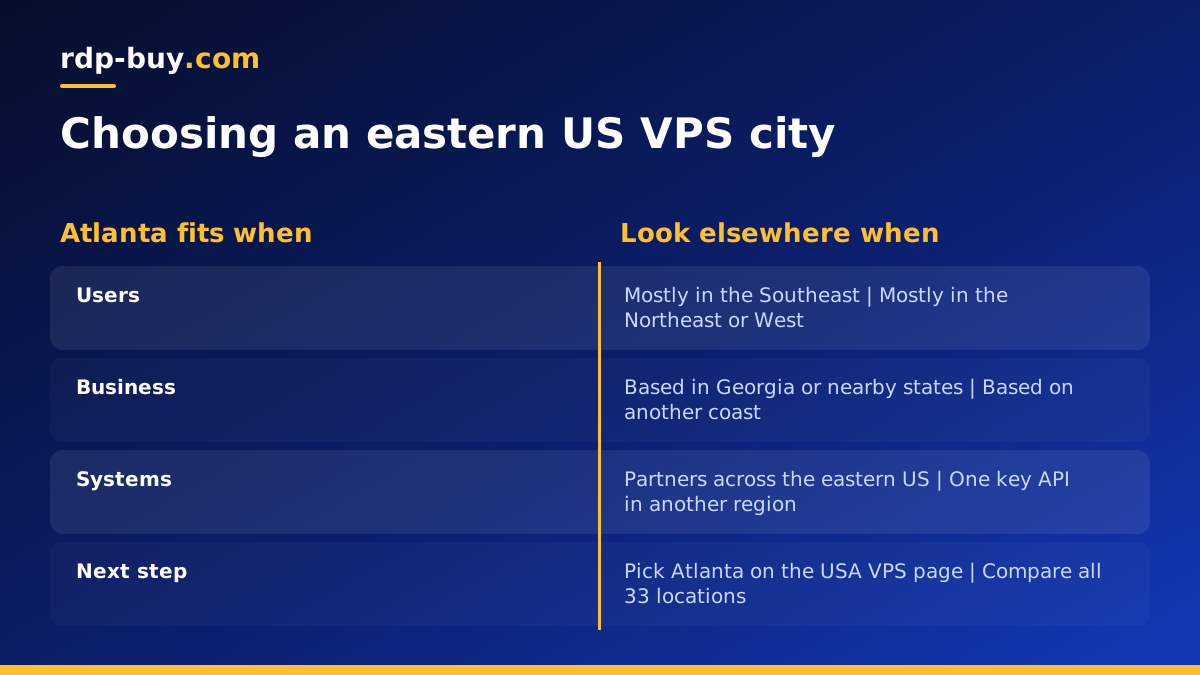
Atlanta is not the only good choice in the eastern United States, and the right answer depends on where your traffic comes from. If most users are in the Northeast, a New York server is closer to them. If they are mostly in Florida, a Miami server may suit better, and our guide to VPS in Miami explains when. If your audience is spread across the whole country, a central city such as Dallas or Chicago is a fair compromise, as covered in the Dallas VPS guide.
The key principle is to place the server nearest the thing it talks to most. Sometimes that is your customers, and sometimes it is a database, payment system or API you depend on. You can see every US and international option on the server locations page, and you are free to run servers in more than one city as you grow.
If you are still unsure, check your website analytics or app logs for the states your visitors come from. When the Southeast dominates, Atlanta is the obvious pick.
What to check in an Atlanta VPS plan
With the location settled, the plan needs to fit your workload and give you enough control to run it properly.
- Full root access: so you can install and configure anything without waiting on anyone.
- Dedicated IPv4: for DNS, SSL certificates, allowlists and reliable email sending.
- Enough memory: databases, caches and containers use memory before anything else.
- CPU for your work: builds, busy APIs and AI automation need more processing power.
- Storage with headroom: space for logs, uploads, backups and growth.
- Flexible billing: monthly while you test, half-yearly or yearly once settled.
- 24/7 support: help at any hour if the server stops responding.
First steps after you order
A fresh VPS is ready in minutes, and the first hour you spend on it decides how safe and maintainable it will be. Work through these steps before you deploy your project.
- Log in: connect with ssh root@your-server-ip using the details in your welcome email.
- Patch: install all operating system updates and reboot if the kernel changed.
- Add a user: create a normal user with sudo, add your SSH key and turn off password login.
- Firewall: open SSH and only the ports your application uses.
- Deploy your stack: web server, database, Docker or the tools your project needs.
- Set DNS: point your domain at the server's dedicated IP address.
- Enable HTTPS: issue a certificate through your web server or reverse proxy.
- Schedule backups: copy data off the server regularly and test a restore.
Running sites, automation and agents in Atlanta
For websites, an Atlanta VPS runs any standard Linux stack. Keep the operating system lean, cache dynamic pages, and let the web server deliver static files directly. If you later add a content delivery network, the Atlanta server becomes its origin.
For automation, the server's always on nature is the main benefit. Workflow tools like n8n, scheduled scripts and AI agents need a machine that never sleeps and a fixed IP that partners can trust. The VPS for n8n and AI agent hosting pages describe plans for those uses, and a Docker VPS suits people who run everything in containers.
If what you actually need is a Windows desktop, for example to run Windows only software, a Windows RDP is the better tool. Our post on RDP in Atlanta covers that option, and the guide on RDP vs VPS explains the difference.
Avoiding common Atlanta VPS mistakes
A few avoidable choices cause most early server problems. Choosing a city by name rather than by where users are is the first. Buying a plan with no spare memory is the second, because growth then forces a rushed upgrade. Leaving security until later is the third, since bots start probing new IP addresses quickly. Skipping backups is the fourth. Each one is easy to prevent if you plan for it before your project goes live.
How to choose your Atlanta VPS plan
List what the server will run and how many people or systems will use it. A small site, a personal VPN or one automation tool fits a modest plan. A busy store, a database heavy application or several containers needs more memory and CPU. Start on monthly billing if you are unsure, then move to a longer term once usage is clear.
Every plan includes full root access, a dedicated IPv4 address, 24/7 support and the choice of 33 locations, and you can pay by card, PayPal or crypto. When you are ready, choose Atlanta on our USA VPS hosting page, or compare every Linux plan on buy VPS.
