 Sign in
Bare Metal Cloud: What It Is and When to Choose It Over a VPS
Bare metal cloud means renting a whole physical server that you order and manage like a cloud service, with no virtualisation layer shared with other customers. This guide explains how it works, how it differs from a VM and a traditional dedicated server, and when it makes sense to buy a bare metal server instead of a VPS.
What is bare metal cloud?
Bare metal refers to a physical server with no hypervisor sitting between your operating system and the hardware. The processor, memory and disks belong to you alone. Bare metal cloud takes that physical machine and wraps it in the convenience people expect from cloud services: you choose a configuration from a portal, the server is provisioned with an operating system, and you get login details without speaking to a salesperson or waiting for hardware to be racked by hand.
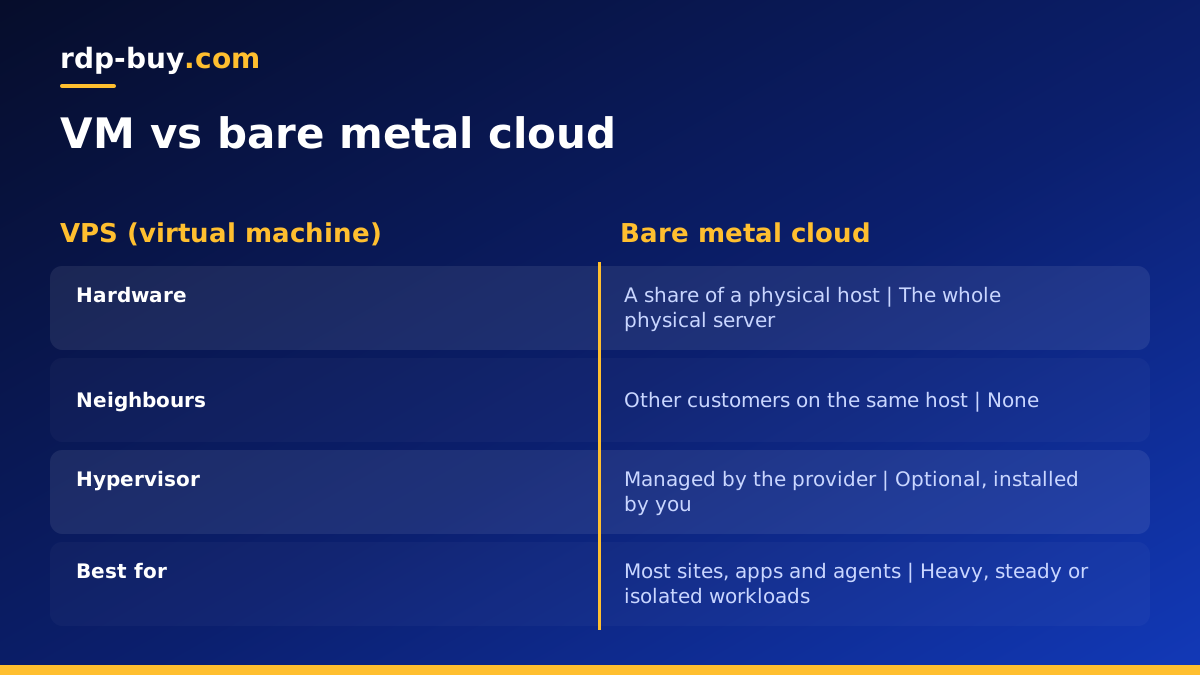
The word cloud here describes how you order and manage the server, not how the hardware is shared. A virtual machine in a typical cloud is a slice of a larger physical host, shared with other customers through a hypervisor. A bare metal cloud server is the whole host. You get the control and isolation of dedicated hardware with a simpler, faster buying process.
If you want to understand the hardware side first, our guide on what a bare metal server is covers the basics. This post focuses on the cloud style of buying and running one.
- Physical server: the whole machine is yours, not a share of it.
- No shared hypervisor: your operating system runs directly on the hardware.
- Cloud style ordering: pick a configuration, pay and receive access.
- Full control: root or admin access to install anything, including your own hypervisor.
Bare metal cloud vs a VM
A virtual machine, which is what a VPS is, runs on top of a hypervisor that divides one physical server into several isolated machines. That design is efficient and flexible, which is why VPS plans suit most websites, apps and automation tools. The trade off is that you share the physical host with other customers, and resources such as CPU time and disk activity can be affected by what your neighbours do.
A bare metal cloud server removes that layer. There are no neighbours, so performance depends only on your own workload. You also get access to hardware features that a VM may hide, which matters for some security tools, specialised software and running your own virtualisation platform.
For a deeper look at this comparison, see bare metal vs VPS. The short version: start on a VPS unless you have a specific reason to need the whole machine.
Dedicated server vs bare metal cloud
A traditional dedicated server and a bare metal cloud server are both single tenant physical machines, so the hardware idea is the same. The difference is mostly in how you get it and how you manage it.
Classic dedicated servers were often sold on long contracts, set up by hand and changed through support tickets. Bare metal cloud services aim to make the same hardware feel more like a cloud product: quicker provisioning, a self service portal, standard configurations and shorter billing terms. In practice the line between the two has blurred, and many providers now offer dedicated hardware with cloud style ordering.
There is also a related product worth knowing: a dedicated CPU server, which is a virtual machine with cores reserved only for you. It sits between a VPS and bare metal, and our guide to dedicated CPU server hosting explains when it is enough. For the full comparison of physical options, read bare metal server vs dedicated server.
Who needs a bare metal cloud server
Bare metal is not a better VPS for everyone. It suits workloads where sharing hardware is a real problem, or where you need control below the operating system.
- Your own virtualisation: running Proxmox or another hypervisor to build a private cloud, as covered in our bare metal with Proxmox guide.
- Steady heavy workloads: databases, build servers and data processing that keep the machine busy all day.
- Consistent performance: applications where unpredictable slowdowns from shared hardware are unacceptable.
- Isolation requirements: projects with policies that call for single tenant hardware.
- Many containers or agents: large Docker hosts or fleets of AI agents that would otherwise need several VPS plans.
- Licensing tied to hardware: software licensed per physical server or per socket.
When a VPS is still the better choice
For most new projects, a VPS is the sensible starting point. It is quicker to resize, simpler to replace and easier on the budget while you learn what your workload really needs. A website, a small store, a single n8n instance or one AI agent rarely needs a whole physical machine.
The usual path is to begin on a VPS, watch how the server behaves, and move to dedicated CPU or bare metal when you see clear signs: the server is busy all the time, performance varies in ways you cannot explain, or you need a hypervisor of your own. If you are at the start of that journey, compare our VPS plans and the dedicated server plans before jumping straight to bare metal.
How to evaluate a bare metal cloud plan
When you compare bare metal plans, look past the headline description and check what you will actually control.
- Hardware detail: the processor family, core count, memory and disk type should be stated clearly.
- Access level: full root or admin access, and ideally a way to reinstall the operating system yourself.
- Operating system choice: Linux distributions, Windows Server and the option to install a hypervisor.
- Dedicated IPv4: a fixed public address for DNS, allowlists and services.
- Location: a data centre close to your users or the systems the server works with.
- Billing terms: shorter terms help while you test, longer ones once the workload is settled.
- Support: hardware problems need a quick response, so check when support is available.
Getting started after your server is provisioned
A bare metal server arrives as a clean machine with an operating system and your login details. The first steps are the same as for any server, with a few extra points because you are responsible for the whole host.
Update the operating system, create a normal user, switch to SSH keys and enable a firewall before you install anything else. Check that all memory and disks are detected as expected. Decide early whether you will run workloads directly on the host or install a hypervisor and run virtual machines on top. Plan backups from day one, because a single physical machine has no other host to fall back on. Our bare metal server setup guide walks through these steps in order.
How to choose your bare metal server
Start from the workload. Write down what the server will run, how busy it will be through the day and whether you plan to split it into virtual machines. A private cloud with several VMs needs plenty of memory. A database or build server needs strong CPU and fast storage. A large container host needs a balance of both.
Then choose a location near your users, from 33 locations worldwide, and a billing term that fits: monthly, half-yearly or yearly. Every server includes full root or admin access, a dedicated IPv4 address and 24/7 support, and you can pay by card, PayPal or crypto. When you are ready, compare configurations on our bare metal server plans page, or check the server locations to pick the region nearest your users.
