 Sign in
VPS Dallas Guide: Picking a Central US Linux Server
A VPS in Dallas puts your Linux server in the middle of the United States, which suits Texas businesses, sites with visitors on both coasts and anyone who needs a US IP address. This guide explains who benefits, what to check before you buy a VPS in the USA, and how to set up a Dallas server properly.
Why choose a VPS in Dallas
Server location is one of the few decisions that affects every single request your server handles. The physical distance between a server and the people or systems that use it shapes how quickly pages load, how responsive an API feels and how smooth a remote session is. Choosing a VPS in Dallas is mostly about that distance.
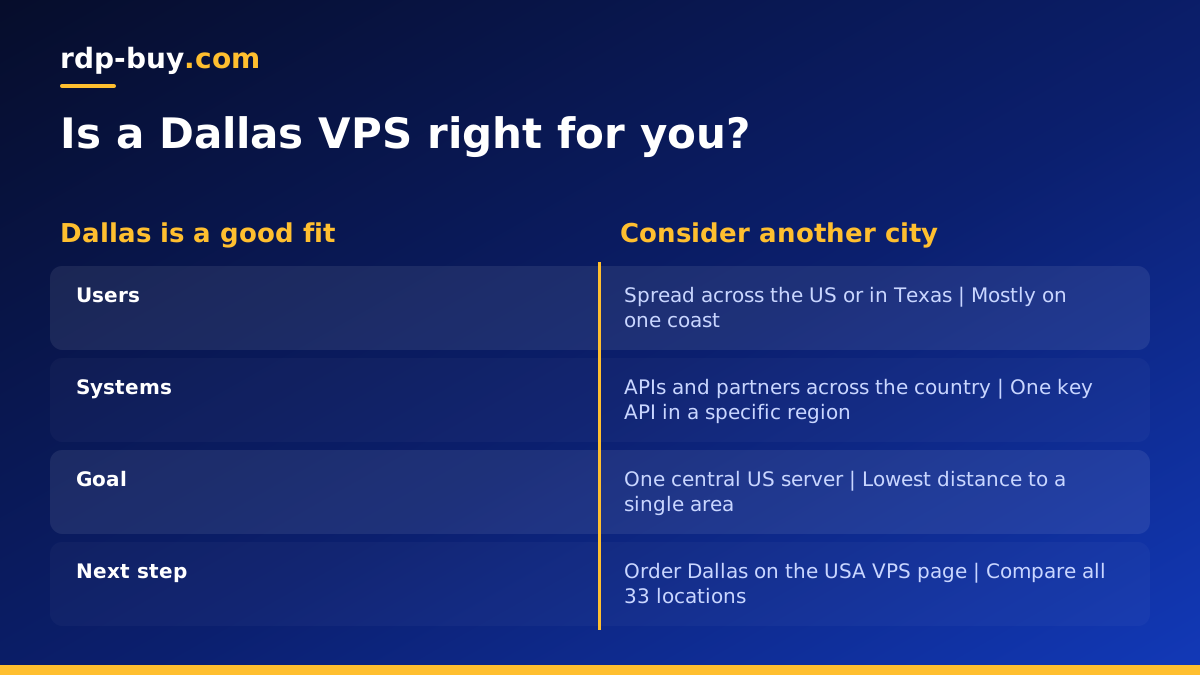
Dallas sits roughly in the centre of the country. For a business that serves customers across the United States rather than in one corner of it, a central location is a fair compromise: it is not right next to New York or Los Angeles, but it is not on the opposite coast from either. For businesses based in Texas and the surrounding states, it is simply close to home.
A Dallas server also gives you a US IP address, which matters for services that are only available in the United States, for testing how your site looks to American visitors, and for APIs or partners that expect traffic to come from a US address.
- Central position: a balanced choice when your users are spread across the country.
- Close to Texas: local customers and staff in the Dallas Fort Worth area and beyond.
- US IP address: a dedicated IPv4 that is recognised as American.
- Full control: root access to run any Linux software you need.
Who needs a VPS in Dallas, Texas
A Dallas VPS is not only for companies in Dallas. These are the most common reasons people choose it.
- Texas businesses: online stores, booking systems and customer portals whose customers are mostly in the state.
- National websites and apps: projects with visitors on both coasts that want one sensible central location.
- APIs and backends: services called by mobile apps used across the United States.
- Automation and AI agents: tools such as n8n or a coding agent that call US based APIs all day.
- Developers and agencies: staging servers for US clients, so testing reflects what American users see.
- VPN and remote access: a personal server with a US IP for reaching services while travelling.
Dallas or another US location?
Dallas is a strong default, but it is not automatically the best choice for everyone. The rule is simple: put the server as close as possible to the people or systems it talks to most.
If almost all your users are on the East Coast, a server in New York or Atlanta is closer. If they are on the West Coast, Los Angeles, Silicon Valley or Seattle fit better. If your workload talks to a specific API, database or partner system, choose the location nearest to that system rather than nearest to you. Our guides to a Midwest server and a West Coast Linux server cover those alternatives. The full list of US and international options is on our server locations page.
When you genuinely do not know where most of your traffic will come from, a central location like Dallas is a reasonable place to start. You can always add a second server elsewhere once real visitor data tells you where people are.
What to look for in a Dallas VPS plan
Once the location is decided, the plan itself is about matching resources to your workload and making sure you have the control you need.
- Root access: full control to install web servers, databases, Docker and anything else.
- Dedicated IPv4: needed for DNS records, SSL certificates, allowlists and mail.
- Memory: the resource most workloads run out of first, especially with databases or containers.
- CPU: matters for builds, busy APIs, image processing and AI automation.
- Storage: room for your application, logs, backups and future growth.
- Billing options: monthly to test, then half-yearly or yearly once you are settled.
- Support: someone to contact at any hour if the server will not boot or network access fails.
Setting up your Dallas VPS
A new Linux server is a blank machine. These first steps make it safe and ready for real work.
- Connect: log in with ssh root@your-server-ip using the details from your welcome email.
- Update: install all available operating system updates before anything else.
- Create a user: add a normal user with sudo, copy your SSH key to it and disable password login.
- Firewall: allow SSH plus only the ports your application needs, such as web traffic.
- Install your stack: a web server, database, Docker or whatever your project uses.
- Point your domain: create DNS records for your domain using the server's dedicated IP.
- Add HTTPS: issue a free certificate through your web server or reverse proxy.
- Back up: schedule copies of your data to a location outside the server.
Running websites, apps and agents from Dallas
For websites, a Dallas VPS works well with a standard Linux stack. Keep the server lean, put a cache in front of dynamic pages and serve static files directly from the web server. If you later add a content delivery network, the Dallas server becomes the origin that feeds it.
For automation, a central US server is a comfortable home for tools that call many American services. A workflow tool like n8n, a Docker based stack or an AI agent that runs on a schedule all benefit from being always on with a fixed US IP. Our VPS for n8n and Docker VPS pages describe plans set up for those uses.
If you need a Windows desktop rather than a Linux server, for example to run Windows only software, look at a Windows RDP instead. The guide on RDP vs VPS explains which suits which job, and our separate post on RDP in Dallas covers the Windows side.
Common mistakes when buying a VPS in Dallas
Most problems with a new server come from a few avoidable choices made at checkout. Knowing them in advance saves a migration later.
The first is choosing a location because it sounds familiar rather than because it is close to your users. Look at where your visitors, customers or connected systems actually are before you decide. The second is buying for today only. A plan with no spare memory leaves you nowhere to go when traffic grows or you add a database, so leave some headroom.
The third is skipping security on day one because the server is new and nobody knows about it yet. Bots find new IP addresses quickly, so set up SSH keys, a firewall and updates before you install anything else. The last is having no backups. A VPS is reliable, but a mistaken command or a broken update can still remove data, so copy what matters to somewhere outside the server on a regular schedule.
- Location by habit: pick by where users are, not by name recognition.
- No headroom: leave room in memory and disk for growth.
- Late security: lock the server down before you deploy anything.
- No backups: keep copies off the server and test restoring them.
Paying for a US VPS
You can pay for a Dallas VPS by card, PayPal or crypto. If you prefer to keep payments separate from your bank, see buy VPS with crypto for how that works. Whichever method you use, the server is ready in minutes after payment, so you can start setting it up straight away.
How to choose your Dallas VPS plan
Start by writing down what the server will run and roughly how many people or systems will use it. A small site, a personal VPN or a single automation tool fits a modest plan. A busy store, a database backed app or several containers need more memory and CPU. If you are unsure, start smaller on monthly billing and move up once you see real usage.
Every plan includes full root access, a dedicated IPv4 address, 24/7 support and a choice of 33 locations, so you can add servers in other regions later if your audience grows. When you are ready, compare plans and pick Dallas on our USA VPS page, or see all Linux plans on buy VPS.
