 Sign in
RDP New York: Windows Desktops for East Coast Work and Trading
An RDP in New York gives you a Windows desktop on the US East Coast that stays on around the clock, with a US IP address and full admin access. This guide explains who gains most from a New York server, how it compares with other cities and how to buy USA RDP in New York and set it up well.
What an RDP in New York gives you
RDP stands for Remote Desktop Protocol. With an RDP server you connect from your own computer, tablet or phone and see a full Windows desktop that runs in a data centre rather than on your desk. Programs keep running when you disconnect, so trading platforms, business software and automation tools stay online while your own device is off.
Choosing New York as the location places that desktop in the largest city on the East Coast. The physical distance between your server and the systems or people it works with shapes how responsive everything feels, so a New York RDP is mainly about being close to what matters on the eastern side of the country.
You also get a dedicated IPv4 address in the United States, which matters for services that are only available to US addresses, for consistent logins to accounts and for partners who allowlist the addresses they accept.
- Always on: Windows keeps running after you close the Remote Desktop window.
- East Coast position: close to users and services in the Northeast.
- US IP address: a dedicated IPv4 that is yours alone.
- Full admin access: install and configure any Windows software.
Who needs RDP in New York
New York is a common choice for several very different groups of people. These are the most typical.
- Traders: New York is home to major US stock exchanges, and some brokers run trading servers in the region. A nearby Windows desktop can run your platform all day and night.
- Forex and expert advisor users: people who need MetaTrader or similar platforms running continuously, close to their broker's servers.
- Northeast businesses: companies in New York, New Jersey, Pennsylvania and New England that want a shared Windows workspace.
- Remote teams: staff who need the same desktop and software wherever they log in from.
- US software access: people outside the US who need Windows apps or websites that expect a US address.
- Automation: browser automation, scheduled tasks and AI tools that must keep running on Windows.
New York RDP for trading
Traders are one of the main reasons people pick a New York server. A trading platform on a home computer depends on your power, internet connection and the computer never restarting for updates at the wrong moment. Moving the platform to a Windows server in a data centre removes those weak points, and choosing a city near your broker's servers keeps the path between them short.
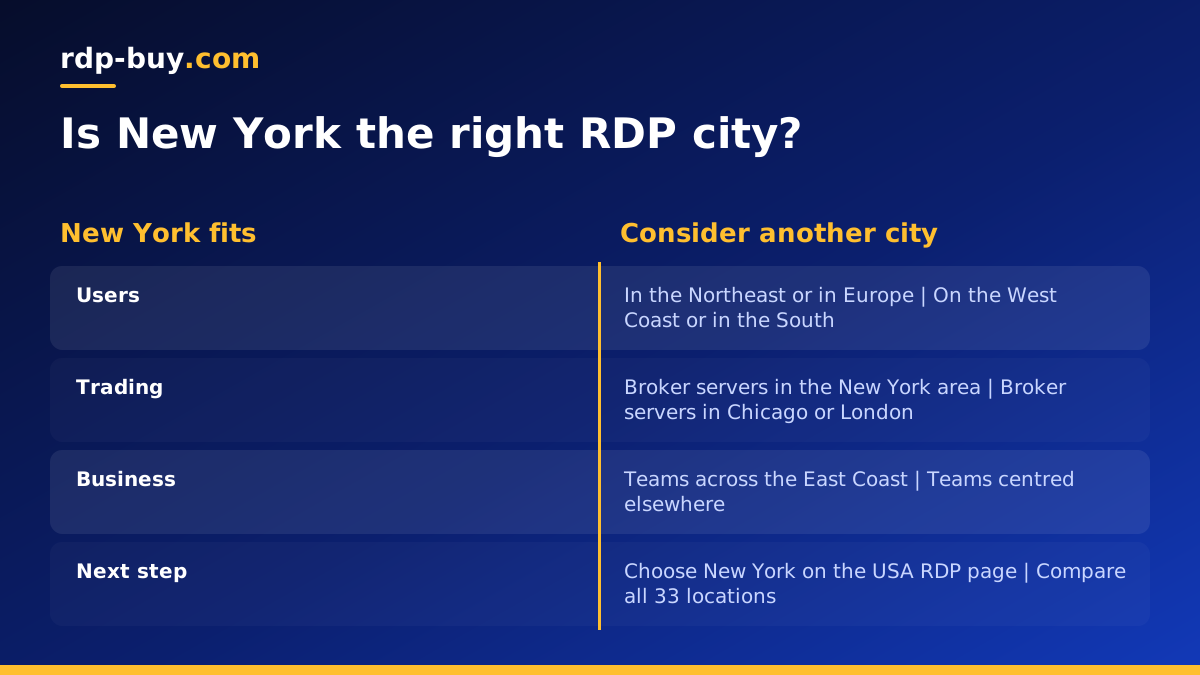
Before you pick New York, check where your broker's trading servers actually are. Many brokers publish this or will tell you if you ask. If their servers are in the New York area, a New York RDP is a natural fit. If they are elsewhere, for example in London or Chicago, a server in that city may suit better. Our forex RDP page covers trading setups in more detail, and our post on a New York server for forex traders looks at the Linux side.
Never treat a server location as a guarantee of trading results. It reduces technical risks such as disconnections and restarts, but your strategy and your broker still decide the outcome.
New York or another US city?
The best location is the one nearest the people and systems your desktop works with. New York suits the Northeast. For the Southeast, Atlanta or Miami are closer, as our guides to RDP in Atlanta and RDP in Miami explain. For futures trading or a central position, Chicago is worth a look in our Chicago RDP guide. For the West Coast, Los Angeles, Silicon Valley or Seattle are closer.
If you are outside the United States and simply need a US IP address, choose the US city nearest to you. For users in Europe that is usually the East Coast, which makes New York a common choice. You can see every option on the server locations page.
Choosing a plan size for a New York RDP
Plan size depends on what you run and how many people log in. A single trading platform needs less than a desktop running several platforms, browsers and spreadsheets at the same time. Browsers are often the biggest memory users on a remote desktop, so count the tabs you usually keep open.
If several people will share the server, each active user adds load. Our guide on which RDP plan you need walks through typical setups. If you are unsure, start on monthly billing and upgrade once you see how the server copes.
- Light use: one platform or one business app, used by one person.
- Medium use: several programs and a browser open together.
- Heavy use: many platforms, automation tools or several users at once.
Setting up your New York RDP
Your server is ready in minutes after payment. These steps get it ready for real work.
- Connect: open Remote Desktop Connection on Windows, or the Windows App on Mac, and enter the IP address and login from your welcome email. Our guide on how to connect to your RDP server has full steps.
- Change the password: set a long, unique password for the administrator account.
- Install updates: run Windows Update and set active hours so restarts happen when you are not trading.
- Install your software: trading platforms, business apps and a browser you trust.
- Set programs to start automatically: so your tools come back after a restart.
- Review security: follow our RDP security best practices, including firewall rules and account lockout.
Paying for an RDP in New York
You can pay by card, PayPal or crypto, with monthly, half-yearly or yearly billing. If you prefer not to use a bank card, see buy RDP with crypto or buy RDP with PayPal. The Windows licence is included in Windows prices, so there is nothing extra to arrange before you start.
How to choose your New York RDP plan
Confirm that New York is the right city by checking where your users, broker or key services are. Then pick a plan sized for the programs you will run at the same time, and start on monthly billing if you want to test first.
Every plan includes full admin access, a dedicated IPv4 address, the Windows licence, 24/7 support and setup in minutes, across 33 locations. When you are ready, choose New York on our US RDP server page, or compare every Windows plan on buy RDP.
