 Sign in
USA RDP for Ecommerce Sellers: Run Your Store From a US Desktop
Online sellers who sell into the United States often run their store, ad accounts and supplier tools from a single USA RDP: a Windows desktop in an American data centre that stays on all day. This guide explains when that makes sense, what to look for, and how to set the server up so your team can rely on it.
Why ecommerce sellers use a USA RDP
A USA RDP is a Windows server located in the United States that you open with a remote desktop app. It behaves like a normal PC: you install a browser, your spreadsheets, your listing tools and anything else you need. The difference is that it lives in a data centre, has its own US IP address and never needs to be switched on by you.
For a seller, that brings a few practical benefits. Your store dashboards and ad platforms see one consistent location and address instead of a mix of home, office and travel connections. Long jobs such as bulk listing uploads, report downloads or price checks keep running when you close your laptop. And when you hire a virtual assistant or a second team member, you can give them a login to the same desktop rather than setting up a new machine.
If you sell mostly to American buyers, it is natural to buy RDP in the USA so that the server sits close to the marketplaces, payment providers and shipping tools you use every day.
Tasks that fit well on a US Windows desktop
Most of what an online seller does on a computer can move to the server. Common examples include:
- Managing seller dashboards and storefronts from one stable US address, so logins come from a place you control.
- Running ad campaigns and checking how ads and search results appear to US shoppers.
- Bulk listing and inventory tools that run for a long time and should not stop when your laptop sleeps.
- Repricing and reporting scripts that you are allowed to run, scheduled to work overnight.
- Shared access for assistants, with separate Windows users so everyone has their own login.
- Keeping files in one place, such as product images, invoices and spreadsheets, so they are not scattered across personal devices.
What a USA RDP will not do for you
A server is a tool, not a loophole. Marketplaces and ad platforms have their own rules about who may hold an account, how many accounts one person may run and where the business is based. A US IP address does not change any of those rules, and you should always follow the terms of every platform you sell on. Use the RDP to work more reliably, not to hide who you are.
It is also worth knowing that an RDP does not replace your store hosting. If you run your own website, that usually lives on a web host or a Linux server. Our guide to the difference between RDP and VPS explains when a Linux VPS is the better home for a website and when a Windows desktop suits the work better.
Choosing the right US city for your store
We offer US servers in New York, Los Angeles, Dallas, Chicago, Miami, Atlanta, Seattle, Silicon Valley and Honolulu, plus many more countries across our 33 server locations. For most sellers the choice comes down to where your team and your key services are.
If your warehouse partners, suppliers or most of your buyers are on the East Coast, New York, Atlanta or Miami are natural picks. If you work closely with West Coast partners or ship from there, Los Angeles, Seattle or Silicon Valley fit better. If your customers are spread across the country, a central city such as Dallas or Chicago is a balanced choice. You also connect to the server yourself, so think about where you and your assistants are when you log in.
What to check before you buy
Ecommerce work tends to grow, so plan for a little more than today's needs.
- Enough memory for many browser tabs. Seller dashboards, ad managers and spreadsheets are heavier than they look. If several people will log in at once, size up. Our guide on which RDP plan you need helps you estimate this.
- A dedicated IPv4 address. Every plan includes one, so the reputation of your address is yours alone.
- Full administrator access. You can install any tool, create users and change settings yourself.
- A licence you do not have to manage. The Windows licence is included in Windows prices.
- Support when you need it. Support is available 24/7, which matters when you sell across time zones.
- Billing that suits your plans. Choose monthly, half-yearly or yearly billing depending on how long you expect to need the server.
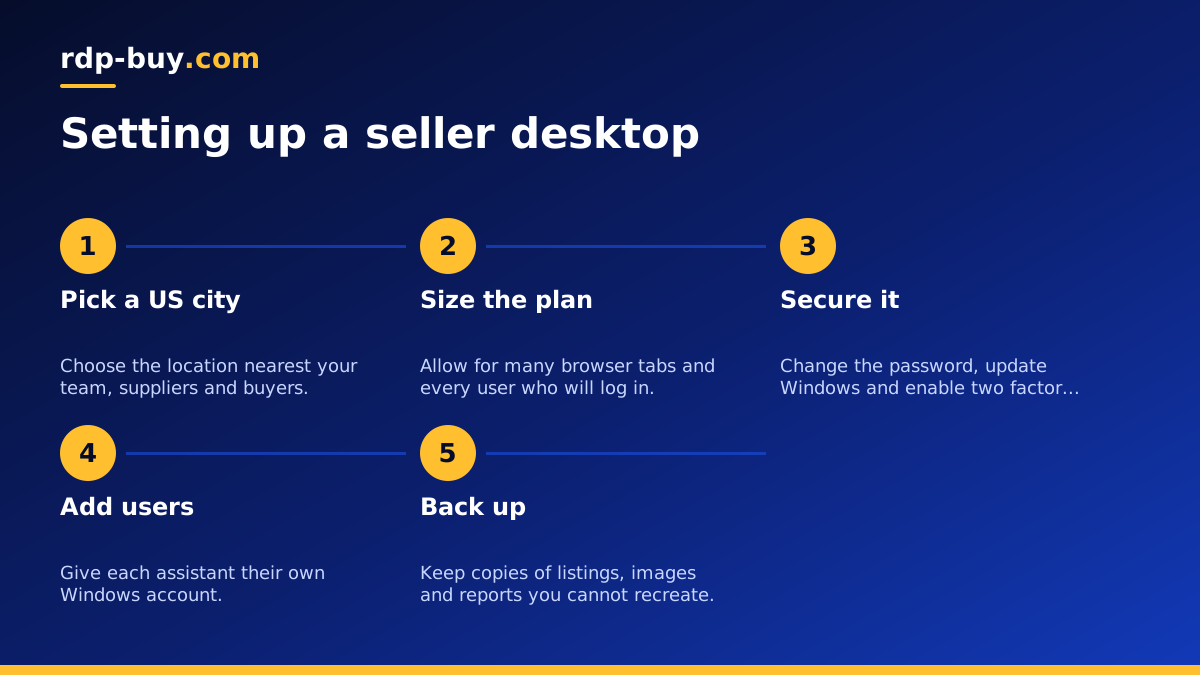
Setting up your seller desktop step by step
Once you order, the server is ready in minutes. Connect with the Remote Desktop app using the IP address and login details you receive. Our guide on how to connect to your RDP server covers Windows, Mac and phones.
Start with security. Change the administrator password to a long, unique passphrase and run Windows Update. Then create a separate Windows user for each person who will work on the server, so you can see who did what and remove access when someone leaves. Give assistants standard user rights rather than administrator rights unless they truly need to install software, so one mistake cannot change the whole server.
If you also want to run other jobs on the same machine, such as a small database for orders or an automation tool that moves data between your store and your spreadsheets, check our list of what you can run on an RDP or VPS to see what fits comfortably alongside your daily seller work.
Next, install one browser and sign in to your seller accounts from there. Save passwords in a proper password manager rather than in plain files on the desktop, and turn on two factor authentication for every account that offers it. Finally, organise folders for listings, images and reports, and set up a regular backup of anything you cannot easily recreate.
Paying for your server
You can pay by card, PayPal or crypto. Many sellers prefer to keep business costs on a card or PayPal for easier bookkeeping: see buy RDP with a card or buy RDP with PayPal. If you would rather pay in crypto, buy RDP with crypto walks through the checkout.
Picking your US RDP plan
Write down who will use the server and what they will open each day. One person managing a single store fits a smaller plan. A small team with several marketplaces, ad accounts and tools running together needs more memory and CPU. When unsure, pick the next size up, since a slow desktop costs more in lost time than it saves.
When you are ready, browse the US RDP server plans, choose the city closest to your business, and pick a billing period. If you are just testing the idea, start on monthly billing or look at the cheap RDP range, then move up as your store grows.
