 Sign in
VPS New York Forex: When an East Coast Server Helps Traders
A VPS New York forex setup makes sense when your broker's trade server is on the US East Coast: the shorter the distance, the faster your orders arrive. This guide explains how to check where your broker is, when New York is the right choice and how to buy a VPS in the USA that is ready for your trading platform.
Why location matters for a forex VPS
A forex VPS keeps your trading platform and Expert Advisors running around the clock on a server in a data centre, so trades are not interrupted by your home power, internet or computer. That alone is why most automated traders use one.
The second reason is distance. Every order travels from your platform to your broker's trade server. The physical distance between the two adds delay, and in fast markets that delay can mean a different fill price. You cannot change where your broker is, but you can choose where your VPS is.
New York is one of the world's main financial centres, and many brokers, banks and liquidity providers run trade servers in data centres in and around the city. If your broker is among them, a server on the US East Coast puts your platform close to the place your orders are matched.
How to find where your broker's server is
Before you choose New York, confirm where your broker's trade server actually is. Guessing from the broker's head office address is not enough, because many brokers run servers in a different city from their offices.
- Check the broker's help pages: many brokers list their trade server locations or recommend a VPS region.
- Ask support: a short message asking which city hosts the live trade server usually gets a direct answer.
- Look at the server name: in MetaTrader, the server name sometimes hints at the region, though this is not always reliable.
- Test from a server: once you have a VPS, the ping shown in the platform's status bar tells you how close you are.
When a New York VPS is the right choice
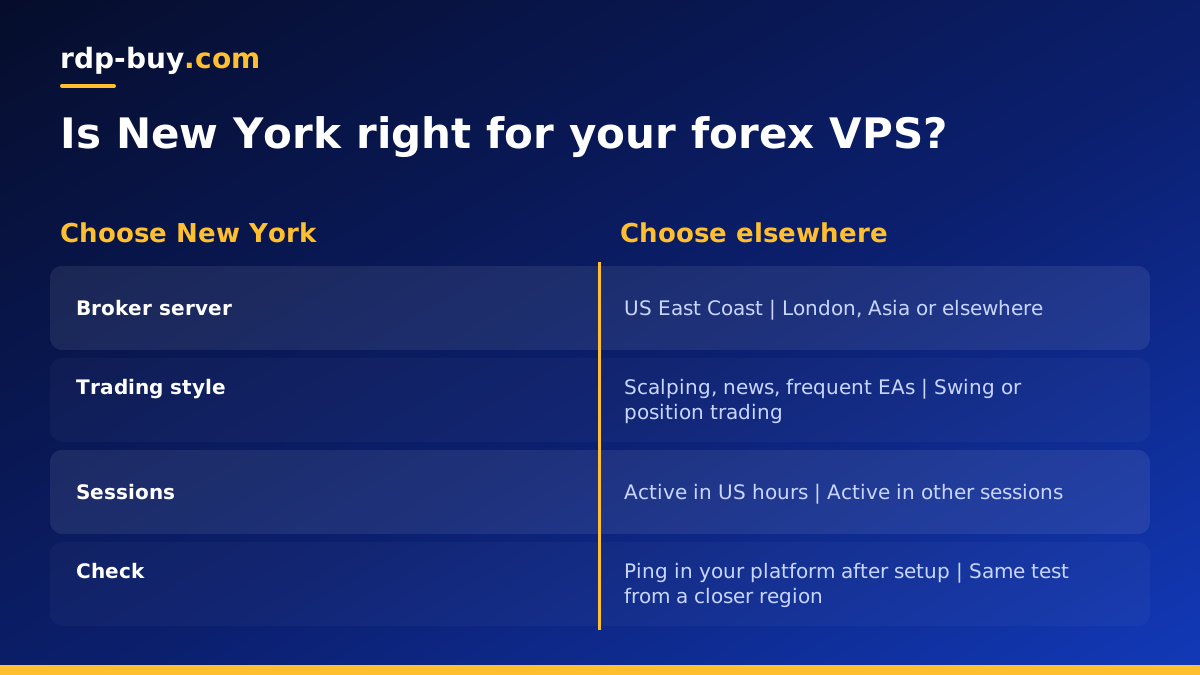
A VPS near New York is a strong choice in these situations:
- Your broker's trade server is on the US East Coast: this is the main reason, and it outweighs everything else.
- You trade US sessions heavily: scalpers and news traders who are active during US hours benefit most from low delay.
- You use several US based brokers: an East Coast server can sit reasonably close to all of them.
- Your strategy is sensitive to execution: EAs that trade often or on short timeframes feel the difference more than swing strategies.
When another location is better
New York is not automatically the best forex VPS location. If your broker's trade server is in London, a European location will usually serve you better. If it is in Asia, choose a server in that region. Placing a server in New York for a broker in another continent adds delay rather than removing it.
Swing traders and position traders who place few orders and hold them for days gain little from shaving delay. For them, uptime and stability matter far more than the exact location, and a server near home may be easier to work with.
rdp-buy.com has 33 server locations, including US options, listed on the server locations page. Pick the one closest to your broker, not the one with the most famous name.
Windows or Linux for forex trading
MetaTrader 4 and MetaTrader 5 are Windows applications, as are many other retail trading platforms. A Windows server is the simplest way to run them: you connect with Remote Desktop, install the platform from your broker and leave it running. For this, a US RDP server or our forex RDP plans are the natural fit, with the Windows licence included in Windows prices.
A Linux VPS suits traders who run their own code: Python bots that talk to a broker API, data collectors, or tools that sit alongside the trading platform. It needs no Windows licence and is managed over SSH with full root access. Some traders use both, a Windows server for the platform and a Linux VPS for their own tools.
Sizing a VPS for trading
Trading platforms do not need large servers, but they do need steady ones. Memory is the main resource, because each terminal, chart and indicator uses some.
One platform with a couple of EAs runs on an entry level plan. Several accounts or brokers, each with its own terminal, need more memory. Running backtests or optimisation on the live server needs more CPU cores, and is often better done on a separate machine so it does not slow live trading.
Leave headroom for the operating system and updates. A server running at its limit is most likely to struggle during busy sessions, which is exactly when you need it to respond. Our guide to VPS price for MT5 goes deeper on sizing.
Setting up your platform on the server
Once your server is ready, setup takes one short session.
- Connect: use Remote Desktop for Windows or SSH for Linux with the IP address and login details you receive.
- Secure the server: change the password, run updates and keep Network Level Authentication on for Windows.
- Set the time zone: match it to your trading so logs are easy to read. Platform charts use the broker's server time regardless.
- Install the platform: download it from your broker, log in and copy across your EAs, indicators and templates.
- Check the ping: look at the connection status in the platform to confirm you are close to the trade server.
- Start automatically: set the platform to open when Windows starts, and disconnect by closing the Remote Desktop window, not by signing out.
Keeping a trading server reliable
A forex VPS is only useful if it is running when the market moves. A few habits keep it that way.
Schedule Windows updates for the weekend, when forex markets are closed, rather than letting them restart the server mid week. After any restart, log in and confirm that the platform reopened, that it is connected to the broker and that each EA shows as active.
Keep an eye on memory during your busiest sessions. If usage climbs close to the limit, close charts you no longer need or move some accounts to a second server. Keep a copy of your EAs, settings and templates off the server too, so you can rebuild quickly on a fresh machine or a new location if you ever need to.
What to check before you buy
Compare forex VPS offers on what they include. You need full administrator or root access to install your platform and tools, a dedicated IPv4 address so broker logins stay consistent, and 24/7 support because markets open on Sunday evening and problems do not wait for Monday.
rdp-buy.com includes all three on every plan, with servers ready in minutes and monthly, half-yearly or yearly billing. You can pay by card, PayPal or crypto. Monthly billing is a good way to test a location before you commit for longer.
Choosing your New York area server
To sum up: a VPS New York forex setup is worth it when your broker's trade server is on the US East Coast and your strategy is sensitive to execution. Confirm the broker's location first, choose Windows for MetaTrader, size for the terminals you run, and test the ping once the server is live.
If your own tools run on Linux, choose a US VPS in the region closest to your broker. If you run MetaTrader, compare our Windows options on the Windows RDP plans page, then pick the location that gives you the lowest ping to your broker.
