 Sign in
VPS Honolulu: When a Hawaii Linux Server Is the Right Pick
A VPS in Honolulu places your Linux server in the middle of the Pacific, on US soil, between the American mainland and Asia Pacific. This guide explains who that location helps, who should pick a mainland city instead, and how to buy a US VPS sized for the work you actually do.
Why choose a VPS Honolulu location at all
Most people think of US servers as East Coast, West Coast or central. Honolulu is different. It is part of the United States, so a server there has a US IP address and sits under US jurisdiction, yet it is physically far closer to Hawaii's own residents and closer to many Pacific islands than any mainland city.
Distance is the main thing a server location changes. Every request travels to the server and back, and fewer miles usually means a quicker response. For a site or tool used mainly by people in Hawaii, a mainland server adds an ocean crossing to every click. A VPS Honolulu plan removes that crossing for local users.
You can see Honolulu alongside the other American sites on our USA VPS plans page, and every one of our 33 sites is listed on the server locations page.
Who a Hawaii server helps most
A Honolulu VPS is a specialist choice. It shines when the people or systems it serves are in or near Hawaii. Typical buyers include:
- Hawaii businesses such as tour operators, shops, clinics and agencies that want their website, booking system or internal tools near their customers and staff.
- Local developers and agencies who host client sites for Hawaii brands and want quick page loads on the islands.
- Remote workers living in Hawaii who need an always on Linux box for builds, scripts or automations without relying on a mainland region.
- Projects with a Pacific audience that want a US based server placed between the mainland and Asia Pacific.
- Automation and AI agents that serve island users, for example a booking assistant or a support bot that replies to local customers.
When a mainland US city is a better fit
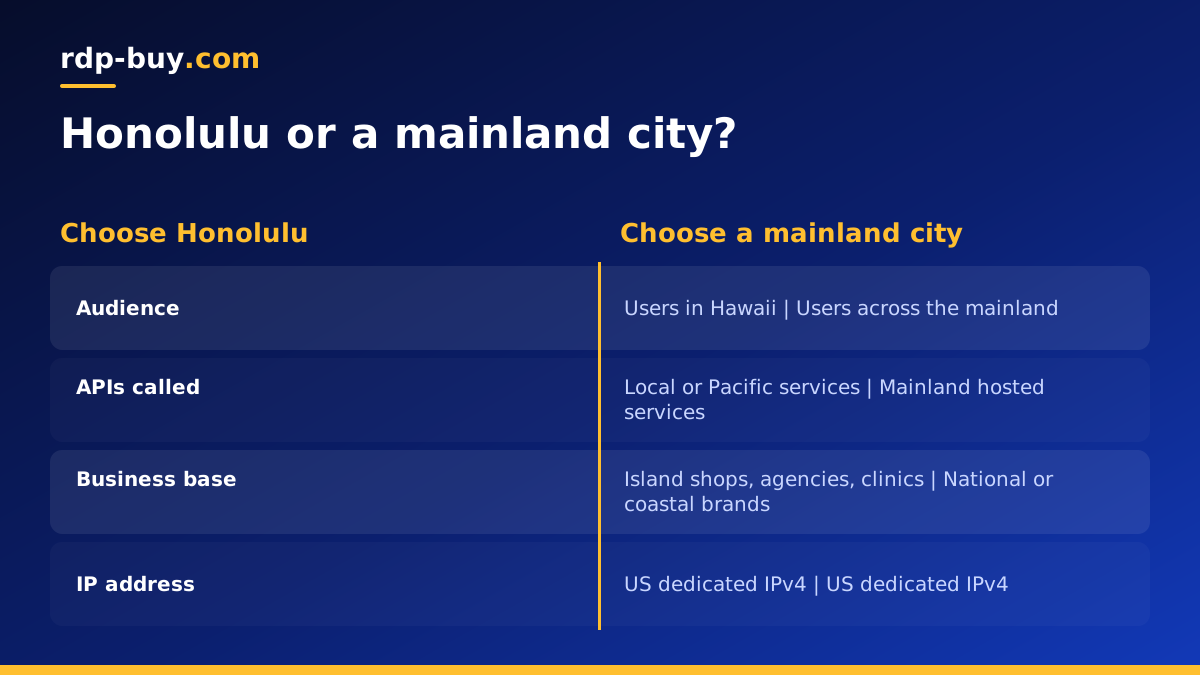
Be honest about where your traffic comes from. If most of your users are on the mainland, a Honolulu server makes their requests cross the ocean, which is the opposite of what you want. In that case choose a city near the bulk of your audience: Los Angeles, Silicon Valley or Seattle for the West Coast, Dallas or Chicago for the centre, New York, Atlanta or Miami for the East.
The same logic applies to automations and AI agents. An agent that mostly calls model APIs and SaaS tools hosted on the mainland may respond faster from a West Coast server, even if you personally live in Hawaii. You manage the server over SSH from anywhere, so your own location matters less than the location of the services it talks to.
If you are unsure, start on a monthly plan in the location you think is right, measure how it feels for real users, and move if needed. Our USA VPS price guide helps you match plan size to real needs once the region is settled.
What you can run on a Honolulu VPS
With full root access, a Honolulu VPS runs anything a normal Linux server can. Common uses include:
- Websites and online stores built on WordPress, static site generators or custom frameworks.
- Booking systems, customer portals and small business databases.
- Docker stacks with a reverse proxy, an app container and a database container. See the Docker VPS page.
- Workflow automation with n8n, so that forms, emails and spreadsheets stay in sync without a laptop running. The VPS for n8n page covers this.
- AI agents such as OpenClaw, Hermes Agent or Claude Code (by Anthropic), kept online all the time. The AI agent hosting hub compares the options.
- A personal VPN or proxy endpoint with a US IP address for your own devices.
Sizing the plan for island workloads
Location and size are separate decisions. Pick the size from the software you plan to run. A single small business website or one automation fits comfortably in an entry plan. A store with a database, a few containers and regular backups needs a step up, mainly for memory. Several agents, heavy imports or build jobs call for more CPU cores and more disk.
Plan for growth in storage. Images, logs, database files and backup archives grow every month. Leaving headroom means you will not need an emergency upgrade during a busy season. Because billing can be monthly, half-yearly or yearly, you can begin on the plan that fits today and upgrade as traffic grows.
If you need a Windows desktop rather than Linux, for example to run Windows only accounting or trading software, compare our RDP vs VPS guide before you order.
Questions to ask before you order a Honolulu VPS
A few minutes of planning saves a migration later. Before you order, work through these questions with whoever owns the project, whether that is you, a client or a small team.
First, who opens the site or app most often? Check your analytics, booking records or customer list. If the large majority are on the islands, Honolulu is the obvious location. If the split is closer to even with the mainland, think about which group is more valuable to keep fast, or consider running a second server on the West Coast later.
Second, what does the server connect to? A store might connect to a payment gateway, an email service and a shipping tool. An agent might connect to a model API, a calendar and a messaging app. Most of those services are hosted on the mainland, but they handle each call quickly, so the effect is usually small for a website. For chatty automations that make many calls per task, it is worth testing both a Honolulu and a West Coast server before you commit to a long term.
Third, who will maintain the server? A VPS gives you full root control, which also means you are responsible for updates, security and backups. If that is new to you, keep the setup simple: one Docker stack, automatic updates, and a backup job that copies data off the server. Our support team is available 24/7 for questions about access and the server itself.
Fourth, how long will the project run? A seasonal campaign suits monthly billing. A long running business site is usually better on half-yearly or yearly billing so you do not have to think about renewals every month.
First steps after your Honolulu server is ready
Servers are ready in minutes, and a short setup routine protects the machine from day one:
- Connect over SSH with the root login you receive and create a separate user with sudo rights.
- Install your SSH key and switch off password logins.
- Run system updates and enable automatic security patches.
- Turn on a firewall and allow only the ports you use.
- Point your domain to the dedicated IPv4 address and install a free TLS certificate for HTTPS.
- Schedule backups and store a copy somewhere other than the server itself.
How to pay and order
We accept card, PayPal and crypto. If you would rather not use a card, the buy VPS with crypto page explains the steps. If you want to start small and test how Honolulu performs for your users, look at the cheap VPS plans first.
Picking the right VPS in Honolulu
Use this short test. If most of your users, customers or staff are in Hawaii, a Honolulu VPS is the natural choice. If the server mainly serves mainland visitors or calls mainland APIs, pick a mainland city instead. Then size the plan from your software list and choose a billing period that matches how settled the project is.
When you are ready, go to the USA VPS order page, choose Honolulu, select the plan and pay with card, PayPal or crypto. You get root access, a dedicated IPv4 address and 24/7 support, and you can begin setup within minutes.
