 Sign in
What Is VPS Web Hosting? Meaning, Uses and How to Buy
VPS web hosting means your website runs on a private virtual server with its own resources and its own operating system, instead of sharing one account setup with many other sites. This guide explains the meaning in plain language and shows when it makes sense to buy VPS hosting for a site.
What VPS web hosting means
VPS stands for virtual private server. A hosting provider takes a powerful physical machine and divides it into several separate virtual machines using software called a hypervisor. Each virtual machine behaves like an independent computer. It has its own operating system, its own share of processor, memory and disk, and its own login. When you host a website on one of these machines, you are using VPS web hosting.
The word virtual tells you the server is not a whole physical box. The word private tells you the part you rent belongs to you alone. Other customers may run on the same hardware, but they cannot see your files, and you cannot see theirs. You also control what gets installed, which is the biggest practical change compared with cheaper forms of hosting.
A helpful way to picture it is housing. Shared hosting is a room in a shared flat: cheap, but the kitchen is shared and the landlord sets the rules. A VPS is an apartment: your own front door, your own keys, and your own choice of furniture, inside a larger building. A dedicated server is the whole house.
How VPS hosting differs from shared hosting
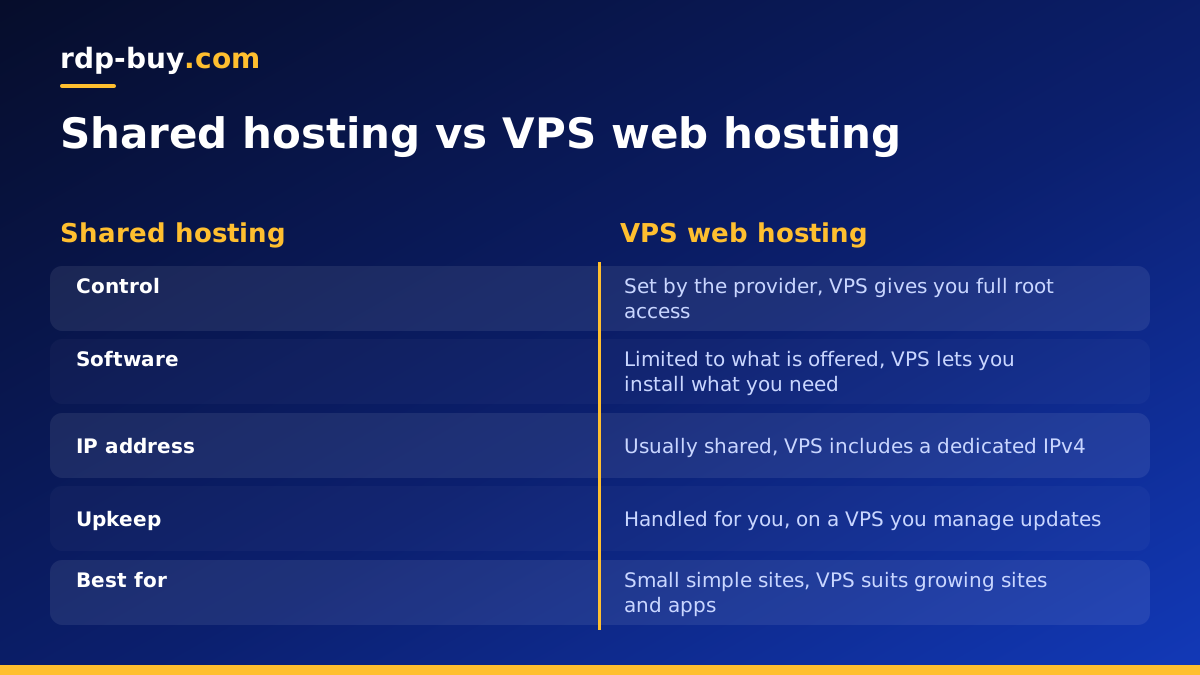
On shared hosting, many websites sit in one operating system under one web server configuration. The provider manages everything, and you usually get a control panel, a file manager and a database. That suits a small brochure site. It stops suiting you when you need something the shared setup does not allow.
Here are the differences a site owner notices first:
That last point matters. If you never want to touch a command line, a VPS may be more work than you want, although control panels can soften this a lot.
- Control: on a VPS you have full root access on Linux, so you choose the web server, the PHP or Node version, and any background services.
- Isolation: a neighbour's traffic spike or badly written script is far less likely to drag your site down, because your resources are allocated to your server.
- Address: you get a dedicated IPv4 address rather than sharing one with an unknown number of other sites.
- Responsibility: nobody patches the system for you unless you arrange it. Freedom comes with upkeep.
What you can host on a VPS
A website is only the start. Because a VPS is a full server, it can run nearly anything that runs on Linux. Common uses include:
If you want a wider list, our guide on what you can run on an RDP or VPS covers more options. Many owners begin with one website and later add a small app or an automation tool on the same server.
- WordPress and other content management systems, often several sites on one server
- Online stores that need steady performance during busy periods
- Web apps written in Node, Python, PHP or Ruby, with their databases
- Staging copies of a site for testing changes before they go live
- Background jobs, bots and automation tools that must stay online all day
- Docker containers, which make it simple to run several services side by side
When a website is ready for a VPS
You do not need a VPS for every site. A small personal page with a handful of visitors can stay on shared hosting for years. The move makes sense when you notice one or more of these signs:
A useful test is to ask what is actually holding you back. If the answer is a slow theme or oversized images, moving servers will not fix that alone. If the answer is a limit you cannot change, a VPS removes it.
- Pages feel slow at busy times and the cause is not your own code or images
- Your host limits or suspends the site because of resource use
- You need software, a language version or a background process the shared plan forbids
- You are hosting sites for clients and want them separated from other customers
- You need a stable, dedicated IP address for an integration or an allowlist
- You want to run more than a website, such as a queue worker or a scheduled task
What to look for in a VPS web hosting plan
Plans are usually described by four numbers and a location. Each one affects a website differently.
Processor cores. These handle dynamic work, such as PHP building a page or a database answering a query. A busy store or a site with logged in users leans on the processor more than a simple blog.
Memory. This is often the first resource a website runs out of, because the web server, the database and any cache all live in it. If you plan to run several sites or Docker containers, favour more memory.
Storage. Look at the type of disk as well as its size. Remember to leave room for backups, logs and uploaded media, which grow quietly over time.
Bandwidth terms. Read how traffic is measured and what happens if a site gets busier than expected, so a good month does not become a surprise.
Location. Choose a server near your visitors, because distance adds delay to every request. Our list of server locations covers 33 places, so you can match a site to the country where most of its readers live.
Windows or Linux for web hosting
Most websites run on Linux, because the usual stack of Nginx or Apache, PHP and MySQL or MariaDB was built with it in mind. Unless you have a clear reason otherwise, a Linux VPS is the natural choice. Windows makes sense if your site is built on ASP.NET or depends on software that only runs on Windows. Our guide to choosing a Windows or Linux server walks through this choice in more detail.
Setting up a website on a new VPS
Once your server is ready, usually within minutes of ordering, the first steps are the same for most sites:
Skipping the security steps is the most common mistake new VPS owners make. Public servers receive automated login attempts all the time, so key based login and a firewall should come before anything else.
- Log in over SSH with the details you receive, then update the system packages.
- Create a normal user with sudo rights and switch to SSH key login.
- Turn on a firewall and open only the ports you need, which are normally SSH, HTTP and HTTPS.
- Install a web server and database, or use a control panel if you prefer a graphical setup.
- Point your domain name at the server's IP address with an A record.
- Install a free TLS certificate so the site loads over HTTPS.
- Set up automatic backups stored somewhere other than the server itself.
How to choose your plan and buy
Start with what you run today rather than what you might run in several years. Estimate what the site needs, pick the smallest plan that covers it comfortably, and allow a little room to grow. Choose the location closest to your audience, decide between Linux and Windows, and select a billing term. At rdp-buy.com you can pay monthly, half-yearly or yearly, so monthly works well for a first test and a longer term suits a server you know you will keep.
When you are ready, compare the Linux VPS hosting plans and order the one that fits. If keeping costs down is the priority, see the cheap VPS options. You get full root access, a dedicated IPv4 address and 24/7 support if something needs attention.
