 Sign in
Buy Dedicated Server USA: When a US Machine Is Worth It
Before you buy a dedicated server in the USA, it helps to know whether your workload truly needs one. This guide covers the signs that it does, how to pick a US city and how to buy a dedicated server sized for what you run.
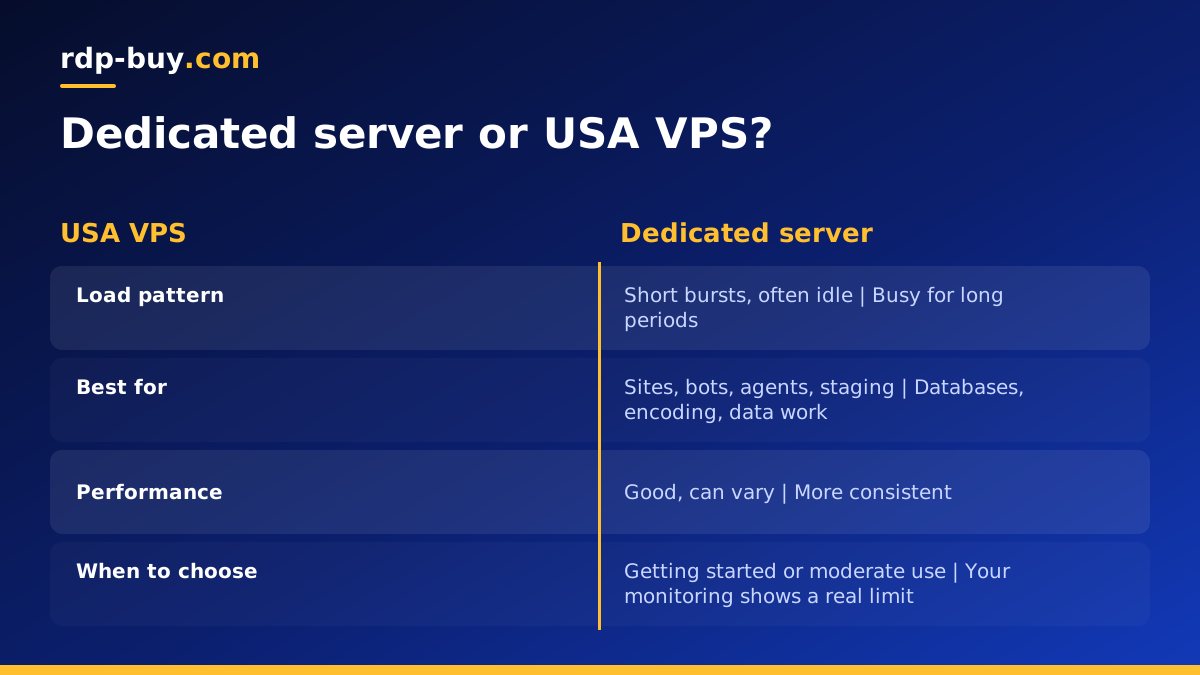
What you get with a dedicated server
Hosting terms are used loosely, so it is worth being precise. A standard VPS shares a physical machine with other customers, with your portion divided up by software. A dedicated CPU server reserves processor capacity for you. A bare metal server gives you an entire physical machine with no neighbours at all.
The practical difference is consistency. On a shared system, your performance can vary with what others are doing. With dedicated resources, what you measure today is much closer to what you will see tomorrow. That predictability matters more than raw power for many serious workloads.
If you want the details of each type, read about what a dedicated CPU server is and what a bare metal server is. In this guide, we focus on deciding whether you need one, and where in the United States it should go.
Signs your US project needs dedicated resources
Moving up is justified by evidence, not by a feeling that bigger is better. Look for these signals in your own monitoring:
- Your processor sits busy for long periods, rather than in short bursts.
- Response times vary during the day, with no matching change in your traffic.
- Your database is the bottleneck, and tuning queries has stopped helping.
- You run steady compute jobs, such as encoding, data processing or heavy builds.
- A client or contract requires isolated hardware for their workload.
- Downtime has become costly, so that predictable performance is worth paying for.
When a USA VPS is still the better buy
Plenty of projects never need a dedicated server. Business websites, small apps, bots, staging servers and most AI agents run well on a VPS. If your load comes in short bursts and your server is idle most of the time, dedicated capacity would mostly go unused.
Before upgrading, check that the problem is really the hardware. Slow pages are often caused by unindexed queries, oversized images or missing caching, and none of these is solved by a bigger server. Fix what is cheap to fix first. If you simply need more memory or disk, a larger VPS is often the simple answer. Our comparison of dedicated servers and VPS goes through the decision, and the USA VPS page lists the smaller options.
Why the United States for your server
Put the server close to the people and systems it serves. If your customers are in America, a machine there reduces the distance for every page and API call. If it connects to other infrastructure in a US region, keeping them together avoids long trips for each database query.
Compliance can also point to the USA. Some clients prefer or require that their data stays in the country. Check your contracts and the regulations for your industry, since those rules are about legal obligations and not about performance, and they outrank everything else in this guide.
Do not assume the USA suits everyone, though. A dedicated server is a larger commitment than a VPS, so if most of your users are in Europe or Asia, put it there. See the full list of server locations before you decide.
Choosing a US city
The country is large, and the choice of city does matter. Consider where your traffic comes from rather than where your company is registered. Your web analytics will show you where visitors are. For a mainly eastern audience, New York, Atlanta or Miami are natural choices. For a western audience, Los Angeles, Silicon Valley or Seattle make sense. For a national audience, a central city such as Dallas or Chicago balances the distance to both coasts.
If you run a replica or a backup server, consider placing it in a different region. Two machines in distant cities means that a local problem does not take out both. For a global audience, serve static content from a CDN so that the main server handles only what it must.
How to size a dedicated server
Size from measurements. If you are moving from a VPS, you already have useful data. Look at your processor and memory use during your busiest period, and how they have been growing. Then think about the next year, instead of buying for a future that may not arrive.
Different workloads stress different parts:
- Databases want memory first, so that active data stays cached, and then fast storage.
- Encoding and data processing want processor cores above all.
- Web and API servers usually need a balance, with more memory if there are many workers.
- Virtual machines need enough memory for all of them combined, and may suit bare metal.
- Storage heavy projects should be sized by data growth, plus room for backups.
Moving to your new US server
A careful move limits downtime. Lower your DNS time to live a day or so before the move, so that changes take effect faster. Build the new server from your deployment scripts, restore a recent copy of your data, and test using a hosts file entry. Then schedule the cutover for your quietest period.
For the switch itself, stop writes to the old database, take a final copy, restore it on the new server and update DNS. Keep the old server available until you are confident. Lay out the steps on paper beforehand, including how you would roll back. Our guides on buying a dedicated server and moving a database off a VPS add further detail.
After the move, compare your numbers with the old server. If performance has not improved, the bottleneck was somewhere else, and that is useful to learn.
Running a dedicated server responsibly
With full root or admin access, the machine's care is mostly in your hands. Before it goes live, set up monitoring for processor, memory, disk and service health, along with alerts that reach a real person. Decide who handles an alert at night, because a server that matters to customers will not always fail during office hours.
Create a simple maintenance routine. Apply security updates on a regular schedule, review logs for anything unusual, and check that backups have run. Backups should go to a different location from the server, and you should restore one from time to time to prove that it works. Write down how the server is configured, or better, keep that configuration in version control, so that someone else could rebuild it. These steps take very little time once they are routine, and they are what turn a powerful machine into a dependable one.
Should you consider bare metal instead?
A dedicated CPU plan suits most buyers who need consistency. Bare metal makes sense when you need the whole physical machine, for example to run your own virtualisation with Proxmox, to meet a strict isolation requirement, or to run very steady heavy workloads. Our guide to bare metal and dedicated servers compares the two, and you can see the options on the bare metal server page.
Picking your dedicated server plan
To sum up: confirm with real data that hardware is your bottleneck, choose the USA if your users or your systems are there, pick the city closest to your traffic, and size for your busiest hour with reasonable growth. Monthly billing suits a period of testing, while half-yearly and yearly options suit a stable production server.
When your numbers point to dedicated resources, compare the plans for dedicated CPU servers and choose your US location at checkout. You get full root or admin access, a dedicated IPv4 address, 24/7 support and payment by card, PayPal or crypto, with servers ready in minutes.
