 Sign in
USA VPS for n8n: Host US Client Automations on Your Own Server
A USA VPS for n8n puts your workflows on a server in America, close to the US apps they talk to and available around the clock. This guide covers when a US location matters and how to buy a USA VPS that suits your automations.
Why location matters for n8n at all
n8n is a workflow automation tool that connects apps, APIs and AI models. Each workflow is a chain of steps: a trigger fires, data moves between services, and something useful happens at the end. Most guides to self hosting concentrate on installation, and we have plenty of those. This one is about a question they skip: where should the server actually be?
Every step in a workflow is usually an API call to another company's service. A workflow with many steps makes many trips between your server and those services. If your server is on the other side of the world from them, each trip takes longer, and a long workflow can feel noticeably slower. When the services are mostly American, a server in the United States shortens those trips.
Location also affects where your data is processed. If you handle information for US clients, keeping the automation in America can make conversations with them simpler. It can also help you reach any service that is only offered in the United States, in line with its terms.
Who should choose a USA VPS for n8n
A US server tends to be the natural choice in these situations:
- Agencies building automations for American clients, where the CRMs, ad platforms and shops involved are used by US businesses.
- AI workflows calling US based model APIs, since long runs of model calls benefit from a shorter path.
- Workflows triggered by American customers, such as form submissions and shop orders.
- Teams spread across the country who need one central editor they can all reach.
- Businesses based outside America who run mostly US software and want their automations near it.
When a location outside the USA is smarter
If your clients and apps are mainly in Europe or India, a US server sends your data on a long journey for no gain. In that case, choose somewhere closer, such as Germany or the UK, or another location near your services. For anyone working under strict data residency rules, the required region decides the matter, regardless of speed.
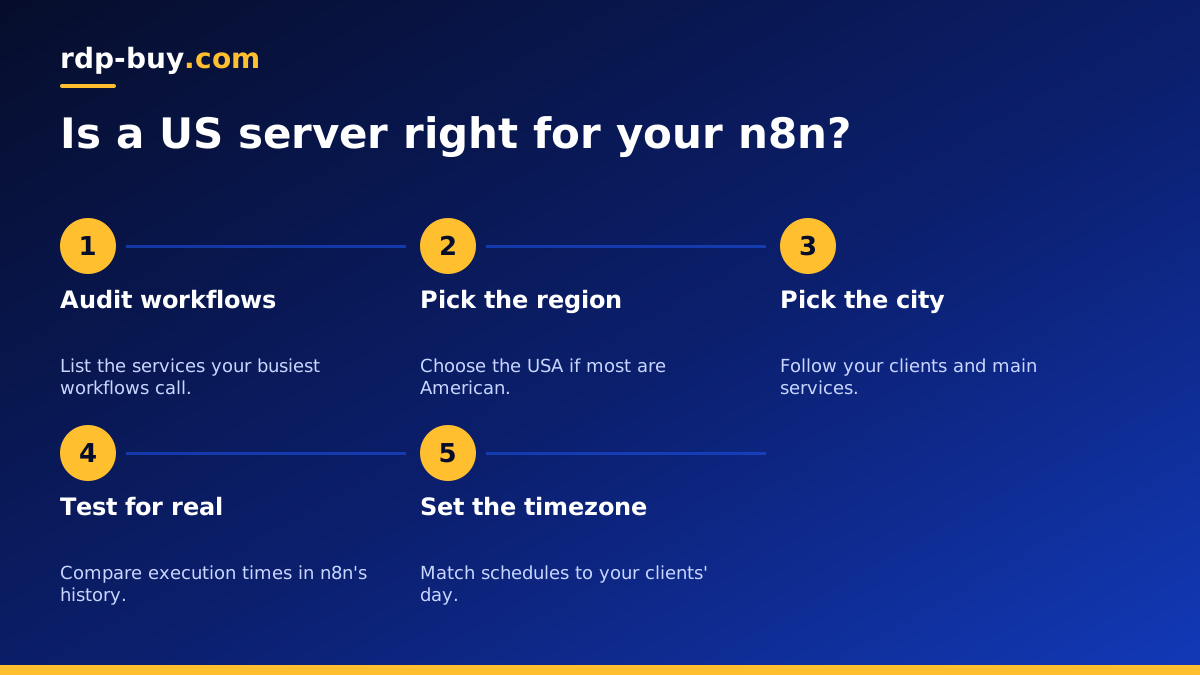
It is worth listing the services your busiest workflows touch. Open your five most used workflows and note what each node calls. If most of those services are American, choose the USA. If it is an even mix, choose the location closest to your most frequent trigger, or to the slowest step. The VPS for n8n page and the list of server locations will help you compare.
Which US city suits your workflows
Inside the country, follow the same logic. If your main services run in a particular region, get close to them. Many providers do not publish this clearly, so do not worry too much. A practical alternative is to look at your clients. East coast clients suggest New York or Atlanta. West coast clients and technology companies suggest Silicon Valley or Los Angeles. A nationwide spread suggests somewhere central, such as Dallas or Chicago.
You can test this yourself. Start a server on monthly billing, import a real workflow, run it a few times, and read the execution times in n8n's history. That gives you real evidence from your own workload. If you later want a different city, moving is simple as long as you have exported your workflows and kept your data backed up. Our guide on choosing a USA VPS region gives more detail.
Sizing a server for n8n
n8n itself is modest. What uses resources is how much data passes through it and how many workflows run at the same time. Big spreadsheets, files and long AI responses are held in memory during execution, so memory is the first number to consider.
Use these rules when choosing a plan:
- Light workflows that run a few times an hour fit on a small plan.
- Use PostgreSQL rather than the default SQLite once your workflows run often or matter to the business.
- Busy setups benefit from queue mode, with separate workers, which needs more memory and a Redis service.
- Limit how long execution history is kept, or the database will steadily grow.
- Plan extra disk if your workflows save files.
A short setup path on your US server
We have a complete step by step n8n guide, so here is the short version. Use the official docs at docs.n8n.io for the current commands.
- Update the server, create a normal user and add your SSH key.
- Point a subdomain at your dedicated IPv4 address.
- Install Docker and create a Compose file for n8n and PostgreSQL.
- Put a reverse proxy in front for HTTPS, because webhooks and OAuth logins expect it.
- Set the timezone variable so that scheduled workflows fire at the time your US clients expect.
- Set the encryption key and keep a safe copy, since stored credentials cannot be read without it.
- Back up the database and export your workflows on a schedule.
Time zones and reliability for American clients
Time zones trip up many people. A workflow scheduled for nine in the morning fires according to the server's or workflow's timezone setting, and that may not match your client's. n8n lets you set a default timezone and override it per workflow, which matters if you have clients on both coasts. Daylight saving changes are another reason to use a named timezone rather than a fixed offset.
Reliability comes from a few simple habits. Create an error workflow that sends a message to you when anything fails, otherwise problems go unnoticed. Add retries to steps that call flaky APIs. Keep an eye on disk use, and update n8n on a regular schedule after reading the release notes. If you run workflows for clients, consider a small status check that confirms your webhook is responding, so that you know of a problem before they do.
If you manage automations for several businesses, think about separation early. One server per client, or at least one n8n instance per client, keeps credentials apart and makes it easier to hand a project over. Check the n8n licence as well, since selling hosted access to others can have conditions. Our guide on self hosting n8n for clients explains the agency approach.
Moving existing workflows to your new server
If you already use n8n on a laptop or a server elsewhere, moving is a short job when done in the right order. Export your workflows and credentials using the n8n command line, or copy the database along with the encryption key. Import them on the new server, then keep every workflow switched off until you have checked them.
Next, update anything that points at the old address. That includes webhook URLs registered with other services and the OAuth redirect addresses in your app settings. Turn workflows on one at a time, starting with the least important, and watch the first few executions. Only shut down the old copy once everything has run cleanly, so that the same trigger is never handled twice.
Buying your USA VPS for n8n
To decide quickly: list the services your workflows call, choose the USA if most are American, then pick the city closest to your clients. Choose a plan based on the data moving through your workflows rather than their number. Begin on monthly billing if you want to test, and change to half-yearly or yearly once it is settled.
You can compare plans for USA VPS hosting now and choose your city at checkout. Each server includes root access, a dedicated IPv4 and 24/7 support, and is ready in minutes, so your webhook URLs can be live today. For a wider look at running AI workflows, see our AI agent hosting page.
