 Sign in
USA VPS for Developers: A Staging Server for US Projects
A USA VPS for developers is a Linux server in the United States where you can stage, test and demo work before it reaches production. This guide shows when one earns its place, how to set it up, and how to buy a USA VPS that matches your stack.
Why developers rent a US Linux server
Sooner or later, the phrase "it works on my machine" stops being good enough. A project needs somewhere that behaves like the real world: a public address, a proper domain, HTTPS, and a Linux environment that resembles production. That is what a small VPS provides, and it is usually the first piece of infrastructure a developer or small team rents.
The US part matters when your users, clients or the services you integrate with are in America. A staging server close to those services behaves more like your production environment will. Testing from the same region exposes issues that a local machine can hide, such as assets that load slowly from a distant source or third party calls that behave differently across regions.
With root access, you decide what runs on it. You are not limited to the languages a shared host supports. Node, Python, Go, PHP, databases and containers can all sit on the same box if you want them to.
Five jobs a USA VPS for developers does well
Most developers begin with one of these needs, then find that the same server handles the others too.
- Staging environment: a copy of your app that clients and teammates can open in a browser before you release.
- Webhook receiver: a public, stable endpoint for payment, messaging and repository events, which a laptop cannot provide reliably.
- Client demos: a link you can send to an American client, on an address that stays the same.
- Self hosted tools: a private Git service, an error tracker, a status page or a CI runner.
- Background jobs: scheduled scripts and workers that should run whether or not you are at your desk.
Choosing a US region for your project
Place staging where production is, or where production will be. If your live site runs on the east coast, a staging server there means you are testing under similar conditions. If you have not launched yet, choose based on where most of your users will be.
Your API dependencies are the second factor. If your app makes many calls to a payment service, a database provider or an AI API, being in the same part of the country as those services helps keep each request short. The server locations page shows what is available, and you can read about the regional decision in our USA VPS region guide.
Your own location matters less than you might expect. You mostly work over SSH and in a browser, both of which cope well with distance. Choose for your users and services first, then yourself.
Sizing a developer VPS
Developers often oversize. A staging server gets a fraction of production traffic, so its main job is to fit your stack in memory. Add up what runs together: the app, the database, a cache, a reverse proxy, and any workers.
A few practical rules help:
- Memory comes first. Databases and Node or Python processes are the usual consumers.
- Building on the server is heavier than running on it, so consider building in CI and shipping an image.
- Docker adds convenience but also disk use, because old images and logs accumulate. Clean up regularly.
- Plan more disk if you keep copies of a production database for testing.
- If you are unsure, start small and move up when your monitoring shows a real need.
A first hour setup that holds up
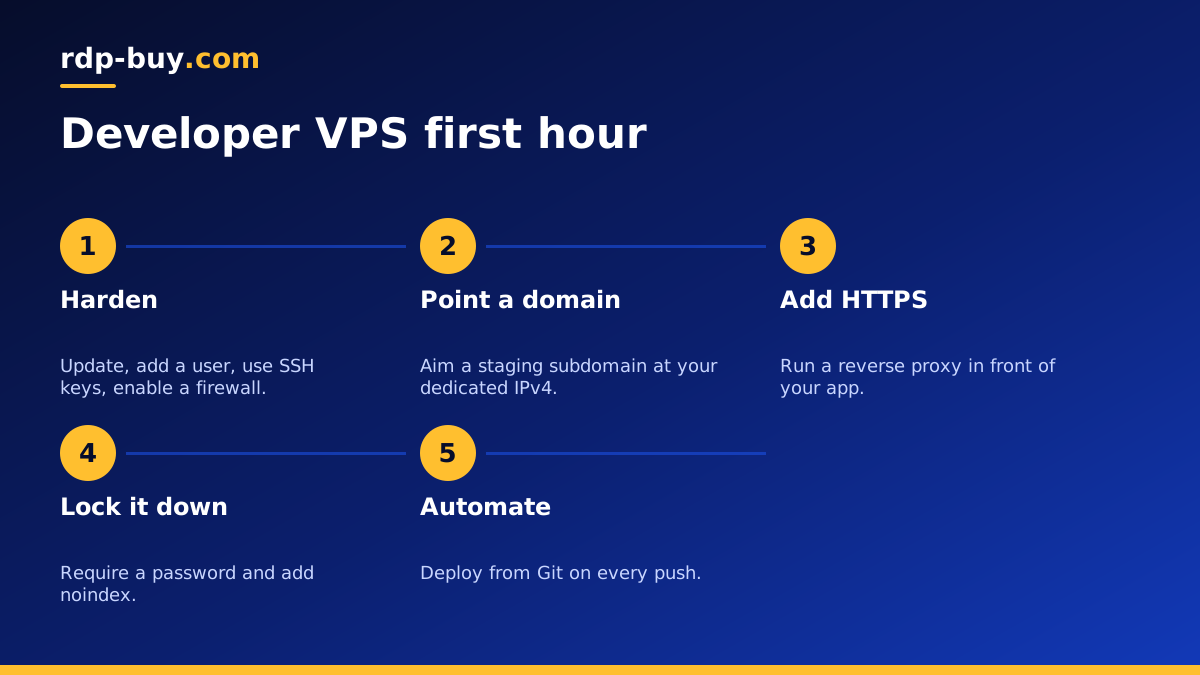
Servers are ready in minutes, so you can finish this in one sitting. Our guide on Linux server best practices covers each point in more depth, and these are the steps that matter most:
- Log in as root, update packages, and create a normal user with sudo.
- Add your SSH key and turn off password logins.
- Enable a firewall that allows only SSH, HTTP and HTTPS.
- Point a staging subdomain at your dedicated IPv4 address.
- Install a reverse proxy such as Caddy or Nginx and enable HTTPS.
- Install Docker if you deploy with containers.
- Set up automatic security updates and a basic backup.
Keeping staging safe and honest
A staging server is public by default, which surprises people. Search engines can index it, and strangers can stumble on unfinished work. Protect it with HTTP basic authentication or an IP allowlist, and add a noindex header. Without these, your staging site can end up competing with your real site in search results.
Never copy production data to staging without thinking it through. Real customer records on a less protected server are a serious risk. Use generated data, or anonymise a copy before it leaves production. Keep staging credentials separate from production ones, including API keys. Use the test or sandbox keys that most payment and messaging providers offer.
Finally, try to keep staging similar to production. Using the same operating system, database version and environment variable names means that a passing test actually tells you something.
Deploying to your US server
You do not need a complicated pipeline to begin. Many solo developers start by pulling from Git over SSH and restarting a service. The next step up is a repository workflow, such as a GitHub Action, that connects to the server over SSH using a deploy key whenever you push to a staging branch.
Containers make this cleaner. Your pipeline builds an image, pushes it to a registry, and the server pulls and restarts it. If a release goes wrong, you can return to the previous image in moments. The Docker VPS page and the guide to choosing and setting up Docker hosting are useful here.
You can also work directly on the server. Our guide to VS Code Remote SSH shows how to open a remote folder in your editor as if it were local, which is handy for debugging issues that appear only on the server.
Watching the server after launch
A server you forget about will eventually surprise you. Disk is the most common cause: logs, old container images and database dumps grow quietly until something fails. Set up log rotation, and add a scheduled job that prunes unused images. A simple uptime check that sends you a message when the site stops responding is enough for most staging servers.
Backups deserve a thought too, even for staging. You may not need the data, but rebuilding the setup takes time. Keep your server configuration in version control, ideally as a Compose file or a short setup script. When the whole environment can be recreated from a repository, a broken server becomes a minor annoyance. It also makes it easy to move to a bigger plan or another city, because you are rebuilding from a known recipe rather than from memory. Our VPS backup guide covers the options.
Which USA VPS plan to choose
Choose the plan by adding up your stack, not by guessing. For one small app with a database, a modest plan will usually do. For several client projects on one box, or heavier workers, give yourself more memory. Monthly billing suits a short project, while half-yearly or yearly billing suits a server that will stay in your workflow.
When you are ready, compare plans for USA VPS hosting and choose the city closest to your production environment. You get full root access and a dedicated IPv4 address, payment by card, PayPal or crypto, and 24/7 support. If your project needs a Windows environment instead, such as testing on desktop browsers, read the comparison of Linux and Windows VPS before you order.
