 Sign in
Cheapest VPS in the World: Why the Lowest Price Rarely Wins
There is no single cheapest VPS in the world, because the lowest offers change constantly and rarely match a real project's needs. This guide explains what ultra low plans leave out and how to find a low price that holds up when you buy VPS hosting.
Is there really one cheapest VPS?
The honest answer is no. Any page claiming to name the single cheapest server is out of date almost as soon as it is published. Prices move with promotions, sellers launch limited batches that sell out quickly, and regional offers come and go. The rock bottom plans you read about are often small allocations, available for a short time, with specifications that suit only very light tasks.
There is a further catch. Cheapest only means something once you say cheapest for what. A plan with a tiny amount of memory in a location far from your users may have the lowest figure on the page, but it may not run your software at all. A server you cannot use costs more than a slightly dearer one that does the job, however small the bill.
So the useful question is not which VPS is cheapest in the world. It is which VPS is the lowest cost plan that fully meets your needs. That question has an answer you can find, and the rest of this guide shows how.
How ultra low prices are possible
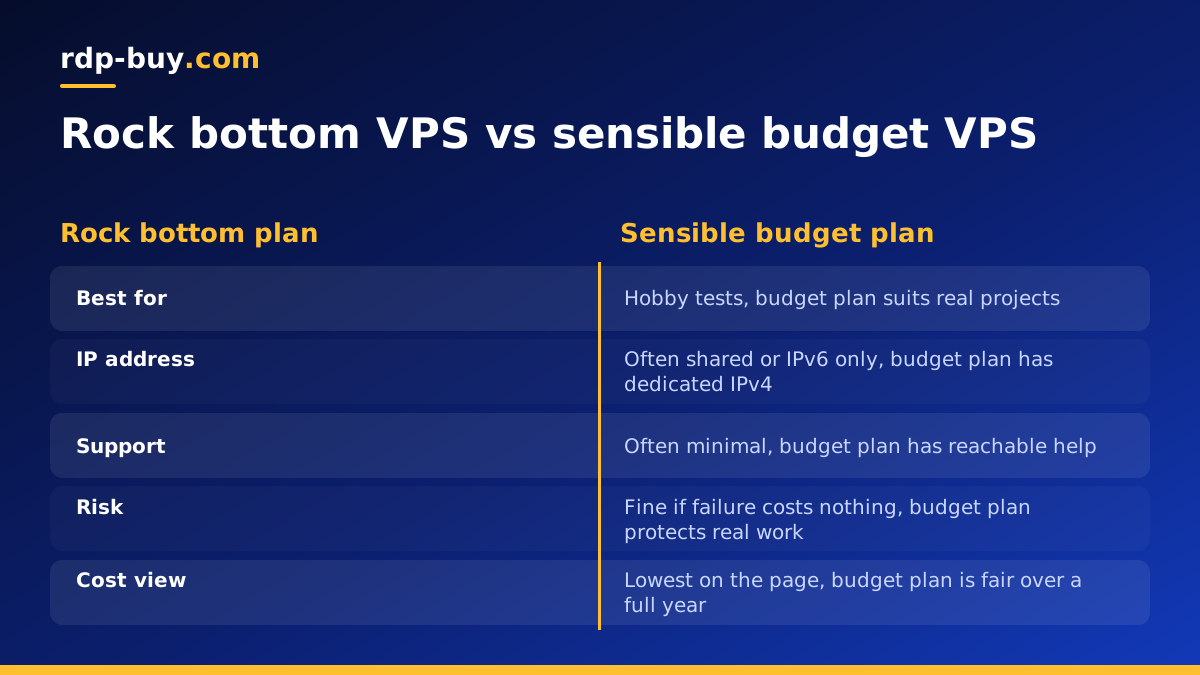
Knowing how sellers reach very low figures helps you judge what you are buying. None of the methods below is automatically bad, but each one has a trade off.
- Very small specs: a tiny amount of memory or disk keeps the cost down, but limits what you can install.
- Heavier sharing: more customers on each physical host brings the cost per customer down, and it can mean more competition for resources.
- Older hardware: machines from earlier generations cost the seller less, but each core usually does less work.
- IPv6 only or shared IPv4: skipping a dedicated IPv4 address saves money, but some services and visitors will not be able to connect easily.
- Long prepayment: the figure shown may require paying for a long term upfront.
- Introductory rates: a low first term can be followed by a much higher renewal.
- Minimal support: self service only, or slow ticket responses, reduces the seller's costs.
- Limited locations: the deal may exist only in one region, which may not be near your users.
The real cost of a cheap server
The figure on the page is only part of what you pay. Before you decide, think about the costs that do not appear on the invoice.
Your time. If you spend a weekend fixing a problem that a better plan would not have had, the saving has gone. Moving a live project to a new server because the first one disappointed you also takes real effort.
Downtime. For a personal experiment, a few hours offline is an inconvenience. For a shop, a client site or a running automation, it means lost sales or missed work.
Extras. Backups, snapshots, an IPv4 address and an operating system licence are sometimes paid add ons. Add them up, and a low plan may stop being low.
Renewal. Work out the cost across a full year, including any step up after the first term. Our VPS price comparison method gives you a simple way to do this.
Risk of a seller closing. Prepaying for a long period at an unsustainably low price puts your money and your data at risk. If a deal seems too good to last, avoid paying far in advance, and keep your own backups.
When a very cheap VPS is fine
A rock bottom server can be a great buy when failure costs you nothing. Good uses include:
In these cases, the risk of an outage is low, and you can rebuild from notes in an afternoon. Go with the low price, and enjoy it.
- Learning Linux and practising commands
- A personal VPN or a small proxy for your own use
- A test server for a short experiment
- A small bot or a script for a hobby project
- A monitoring node that watches your other servers
- A secondary DNS server or a small backup target
When to spend a little more
Move up a level if any of the following applies:
Our guide on when cheap VPS hosting works looks at this line in more detail.
- The server earns money, directly or indirectly
- It holds customer data or anything you cannot lose
- A client depends on it
- It runs a trading platform or an automation that must not stop
- You need steady performance, not just the lowest figure
- You need a dedicated IPv4 address for integrations or allowlists
- You want a person to answer when something goes wrong
How to find your lowest sensible price
Here is a simple process that gets you close to the lowest real cost for your project:
Most people who follow this end up on a plan that is not the lowest in the market, but is one of the lowest that truly works for them. That is the real target.
- Write down the minimum memory, processor and disk your software needs, and add a small margin.
- Choose the region closest to your users or services. Filter out everything else.
- List three or four plans that meet both conditions.
- Work out each plan's twelve month total, including renewals and any extras you need.
- Check the seller's terms, contact options and refund policy.
- Buy the shortest term of your preferred plan, and test your real workload.
- Once you are satisfied, compare the saving from a longer term with the risk of committing.
Keep your costs low after you buy
Your choice of plan is not the only way to spend less. A few habits help you get more from a small server:
You may be able to stay on a smaller plan for far longer than you first expected. Linux makes this especially easy, since it needs no licence and can run with very little overhead.
- Choose a lightweight Linux distribution and skip the desktop environment.
- Remove services you do not use, so that more memory stays free.
- Use Nginx with caching for websites, so that each visit needs less work.
- Add a modest swap file as a safety net on small plans, while watching that it is not in constant use.
- Move large static files to where they cost less to serve.
- Check usage with htop every so often, and resize only when real numbers demand it.
Payment and billing tips for budget buyers
If you are buying on a tight budget, consider how you pay as well as what you pay. Monthly billing lets you test without a large upfront payment. Half-yearly or yearly billing can make sense once a project is settled. Crypto can be useful if you lack a card that works internationally, and our guide on how to buy VPS with crypto walks through that process. Always check the final figure at checkout before you confirm.
Choosing your plan
Rather than chasing a headline number, pick the lowest plan that fits your job and leaves a little headroom. Our cheap VPS page lists the entry level options, and our full range of VPS hosting plans is there if your project needs more. Every plan comes with full root access, a dedicated IPv4 address, 24/7 support and a choice of 33 locations, and servers are ready in minutes. So you can start small, measure what you really use, and grow only when your numbers say so.
