 Sign in
USA VPS for Python Scripts: Keep Your Code Running 24/7
A USA VPS for Python scripts gives your code a machine that never sleeps, a dedicated US IP address and full control over the environment. This guide shows who benefits, how to choose a USA VPS plan, and how to set up scripts so they keep running without you.
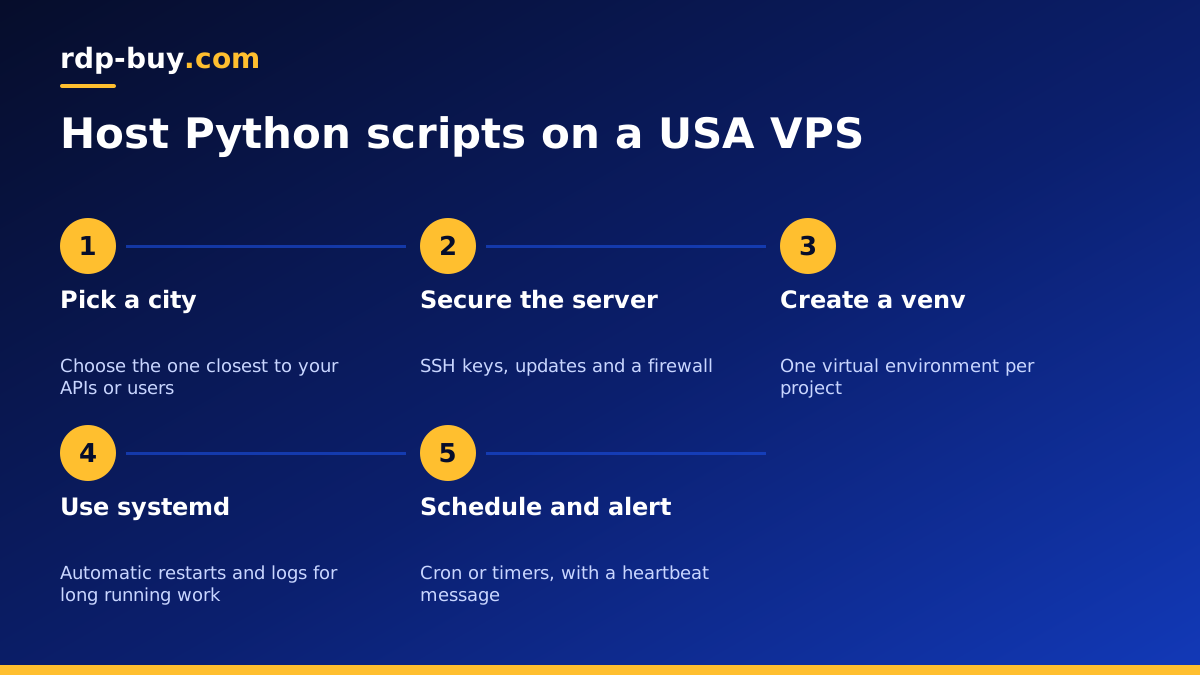
Why move Python scripts off your laptop
Plenty of useful Python code starts on a personal computer: a report that runs each morning, a script that syncs two systems, a small bot that checks for changes. It works fine until the laptop lid closes, the Wi-Fi drops or a system update restarts the machine overnight. A job that must run every day cannot depend on a device you carry around.
A VPS fixes this by giving the script a permanent home. The server stays on around the clock, with a stable connection. You can log in from anywhere, change a file, restart a process and log out again, while the code keeps working in the background.
Why choose a US server for Python work
Location matters when your script talks to something else, and much of what Python scripts talk to is based in the United States. There are three good reasons to pick a US server:
The US is a big country, so choose the city closest to what matters most. Our guide to picking a US city for your server explains the thinking, and the same logic applies to Linux servers. As a rough rule, choose the East Coast for services and users there, and the West Coast for the Pacific side.
- Nearby APIs: many SaaS tools, payment platforms and data services run from US regions. A server in the same part of the world cuts delay on every call, and that adds up across thousands of requests.
- A US IP address: some services show different content by country, or expect US based clients. A dedicated US IPv4 gives you a stable, consistent address you can also add to allowlists.
- US users: if your script powers a web app or API for American customers, running it close to them keeps responses quick.
What kinds of scripts suit a VPS
Almost anything written in Python will run happily on a Linux server. Common examples are:
If you do collect public web data, read the site's terms and respect its limits. A dedicated IP belongs to you, so its reputation is your responsibility too.
- Scheduled reports that pull data and send a summary by email
- Data pipelines that move records between APIs and databases
- Monitoring scripts that check your websites and raise alerts
- Telegram or Discord bots that wait for messages
- Web apps built with Flask, FastAPI or Django
- Small AI scripts that call hosted models and act on the results
- Trading tools that read market data, as long as you follow your broker's and data provider's rules
How to size the server
Most scripts need far less than people expect, because they spend most of their time waiting on a network. Think about these three factors:
Memory. This is usually the deciding factor. Libraries such as pandas load data into memory, so a script handling large files needs a larger plan. Plain API scripts use very little.
Processor. One or two cores are fine for scripts that mostly wait. If you run heavy calculations or process lots of data in parallel, add cores. Python's global interpreter lock limits threads on processor heavy work, so that work is often split across multiple processes.
Disk. Allow space for virtual environments, logs and any data you store. Logs can quietly fill a small disk, so rotate them.
If you are not sure, run your script locally with a tool that shows peak memory, then pick a plan comfortably above that figure.
Set up the environment properly
Once your US server is ready, log in over SSH, and do basic security first: update the packages, create a normal user, add an SSH key, and turn on a firewall. Our guide on securing a new Linux server has the full list.
Then set up Python the clean way:
Keep each project in its own virtual environment. That way, upgrading a library for one script cannot break another.
- Install Python and venv through your package manager, or use a version manager if you need a specific release.
- Create a folder for your project, and pull your code from Git.
- Create a virtual environment inside the folder with python3 -m venv .venv.
- Install dependencies from a pinned requirements.txt file, so each deploy matches your testing.
- Store API keys in an environment file with restricted permissions, never in the code itself.
Keep long running scripts alive with systemd
For a bot or a service that must always run, do not rely on leaving a terminal open. Use systemd, which is already part of most Linux distributions. You create a small unit file that describes your script: the user to run it as, the working directory, the path to the Python binary in your virtual environment, and the environment file. Set Restart=on-failure so the process comes back if it crashes, and enable the service so it starts on boot.
Once it is running, systemctl status tells you whether it is healthy, and journalctl -u followed by your service name shows its logs. Because systemd handles restarts and logs, you can stop worrying about the process and focus on what it does. Our guide on keeping an agent running around the clock uses the same approach for AI tools.
Schedule jobs with cron or timers
Scripts that run at set times do not need to stay in memory. Use cron or a systemd timer instead. In cron, call the Python binary inside your virtual environment directly, followed by your script's full path, and send the output to a log file. Remember that US servers are often set to UTC, so check the time zone before you schedule anything, and write down what the job's time means in local terms.
A common mistake is a job that fails silently. Make scripts exit with an error code when something goes wrong, and arrange an alert, such as an email or a chat message, so you find out at once rather than days later.
Logging, monitoring and backups
A server you do not watch can fail without warning, so add a few simple habits:
With these in place, rebuilding on a new server takes minutes of real work rather than days of guesswork.
- Use Python's logging module rather than print statements, and include timestamps.
- Set up log rotation, so that logs cannot fill your disk.
- Send yourself a heartbeat message from important jobs. If it does not arrive, you know something is wrong.
- Keep your code in a Git repository, so that the server is never the only copy.
- Back up any data your scripts produce to storage away from the server.
Windows or Linux for Python
Linux is the better choice for most Python work, since the tools above come ready to use. Choose a Windows server if your script drives desktop software, for example automating Excel or a trading terminal. In that case, a USA RDP server is more suitable, because you get a full desktop session. See our guide on RDP or VPS for US servers if you are torn between them.
Choosing your USA plan
Start with one small server and put your scripts on it. Pick the city nearest the services you call or the users you serve, then choose the plan that fits your memory needs. Billing can be monthly, half-yearly or yearly, so a first test need not lock you in.
When you are ready, compare the USA Linux VPS plans. You get full root access, a dedicated IPv4 address, 24/7 support, and a server ready in minutes. All our server locations, including every US city we offer, are listed in one place.
