 Sign in
USA VPS for Website Hosting: Serve American Visitors Well
If most of your readers or customers are in the United States, hosting your website on a USA VPS puts it close to them and gives you a server you fully control. This guide covers when a VPS is worth it, how to choose a US city and plan, and how to get a site online step by step.
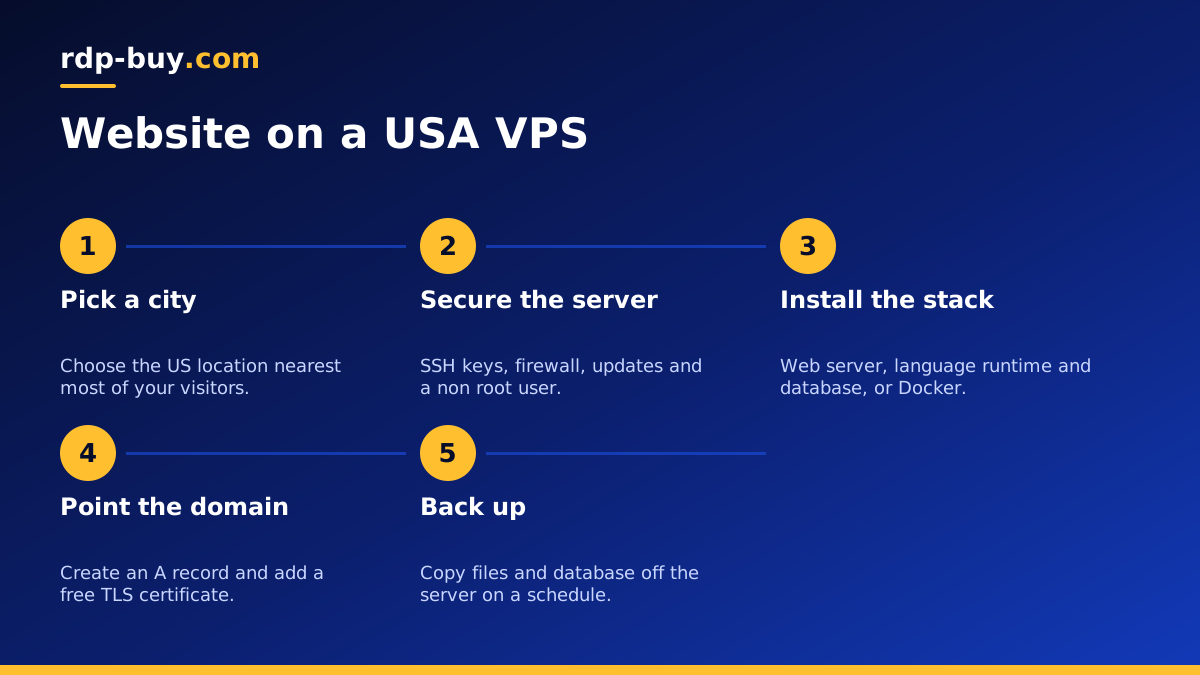
Why host a website on a USA VPS
A VPS, or virtual private server, is a slice of a physical server with its own operating system, memory, storage and IP address. Unlike shared hosting, nothing about your site's performance depends on what other customers on the same machine are doing with their own sites, because your resources are reserved for you.
Location matters for websites because every page load travels between the visitor and the server. When the audience is American, a server in the United States keeps that trip short, and a US IP address also helps search engines and visitors see the site as a natural fit for the US market. That is why many site owners choose to buy a US VPS rather than host far away from their readers.
A VPS also gives you full root access. You choose the web server, the PHP or Node version, the database and every setting, which matters as soon as your site outgrows the limits of a basic hosting account.
When a VPS is better than shared hosting
Shared hosting is fine for a small brochure site. A VPS starts to make sense when one or more of these is true:
- Your traffic is growing and pages slow down at busy times.
- You run several sites and want them in one place you control.
- You need specific software, such as a newer language version, a search engine, a queue worker or a cache that shared hosting does not allow.
- You want a dedicated IP address for your site and your outgoing email reputation.
- You run background jobs such as imports, feeds or scheduled tasks that shared hosts often stop early.
- You care about isolation, so another customer's hacked site cannot affect yours.
Picking the right US city
We have US servers in New York, Los Angeles, Dallas, Chicago, Miami, Atlanta, Seattle, Silicon Valley and Honolulu, part of our 33 server locations. The rule is simple: put the server near the bulk of your visitors.
If your audience is mainly on the East Coast, choose New York, Atlanta or Miami. For West Coast audiences, Los Angeles, Seattle or Silicon Valley fit better. If visitors come from all over the country, a central city such as Dallas or Chicago keeps every region at a fair distance. Honolulu suits sites aimed at Hawaii and the Pacific.
A content delivery network can also cache images and static files close to visitors, but your pages, logins, carts and database queries still come from the server itself, so its location still counts.
Sizing a VPS for your website
There is no single right size, because a plain blog and a busy online shop with many plugins have very different needs. Think about these factors when you pick a plan:
- Memory is the most common limit. A database, a web server and PHP workers all use it, and a site with many plugins uses more.
- CPU matters for dynamic pages, search, image resizing and checkout traffic.
- Storage should cover your files, database, logs and a few local backups, with room to spare.
- How many sites you will host on the same server, since each adds to the load.
Step by step: putting a website on your US VPS
Once you order, the server is ready in minutes and you receive the IP address and root login. If you have not chosen a system yet, our guide on which Linux distribution to choose helps, and most site owners pick a long term support release of Ubuntu or Debian.
Connect over SSH and secure the basics first: create a normal user with sudo rights, add your SSH key, disable password logins for root, turn on a firewall that only allows SSH, HTTP and HTTPS, and install updates. Our checklist of Linux server best practices covers each step.
Next, install your stack. A common choice is Nginx or Apache as the web server, PHP for WordPress and similar apps, and MariaDB or MySQL for the database. If you prefer containers, Docker lets you run each site in its own isolated set of services, and our Docker VPS page explains that approach.
Then point your domain at the server by creating an A record with your VPS IP address at your domain registrar. Once the record is live, request a free TLS certificate with Let's Encrypt so the site loads over HTTPS. Our guide on launching a website with a VPS and a domain goes into more detail on the DNS side.
Finally, upload your site or install your CMS, test it from a browser, and set up automatic backups of both files and the database to somewhere outside the server.
Keeping your site fast and safe
A server you control is a server you maintain. Apply security updates regularly, keep your CMS, themes and plugins current, and remove anything you no longer use. Turn on a page cache so repeat visits do not hit the database every time, and use an object cache if your CMS supports it.
Watch your disk space and logs, because a full disk is one of the most common reasons a site goes down. And test restoring a backup at least once, so you know it works before you need it. Support is available 24/7 if something on the server side goes wrong.
A note on email and when to upgrade
Many site owners are tempted to run their own mail server on the same VPS. It is possible, but sending email that reliably reaches inboxes takes careful setup of SPF, DKIM, DMARC and reverse DNS, plus ongoing attention to reputation. For most small sites it is simpler to send transactional email through a dedicated email service and keep the VPS focused on serving pages.
Over time, watch how the server behaves at your busiest hours. If memory is regularly full, pages slow down during traffic peaks or the database struggles, it is time to move to a larger plan. Because you control the whole server, upgrading usually means moving to a bigger VPS, or for very heavy sites, a dedicated server with guaranteed CPU cores. Planning for that early, with clean backups and a simple setup you can repeat, makes the move painless.
It also helps to keep a short written record of how you built the server: which packages you installed, which settings you changed and where your backups go. That note turns a future migration or a rebuild after a mistake into a calm afternoon instead of a stressful night.
Choosing your USA VPS plan
Start from your current traffic and the software you run, then add room for growth. A single small site fits a modest plan, while a store, a membership site or several sites together need more memory and CPU. Billing can be monthly, half-yearly or yearly, so you can test first and commit later.
When you are ready, compare the US VPS hosting plans and pick the city closest to your visitors. If budget is the main concern, the cheap VPS range is a sensible starting point, and you can pay by card, PayPal or crypto, including through buying a VPS with crypto.
