 Sign in
Bare Metal Server vs VM: What Changes Without a Hypervisor
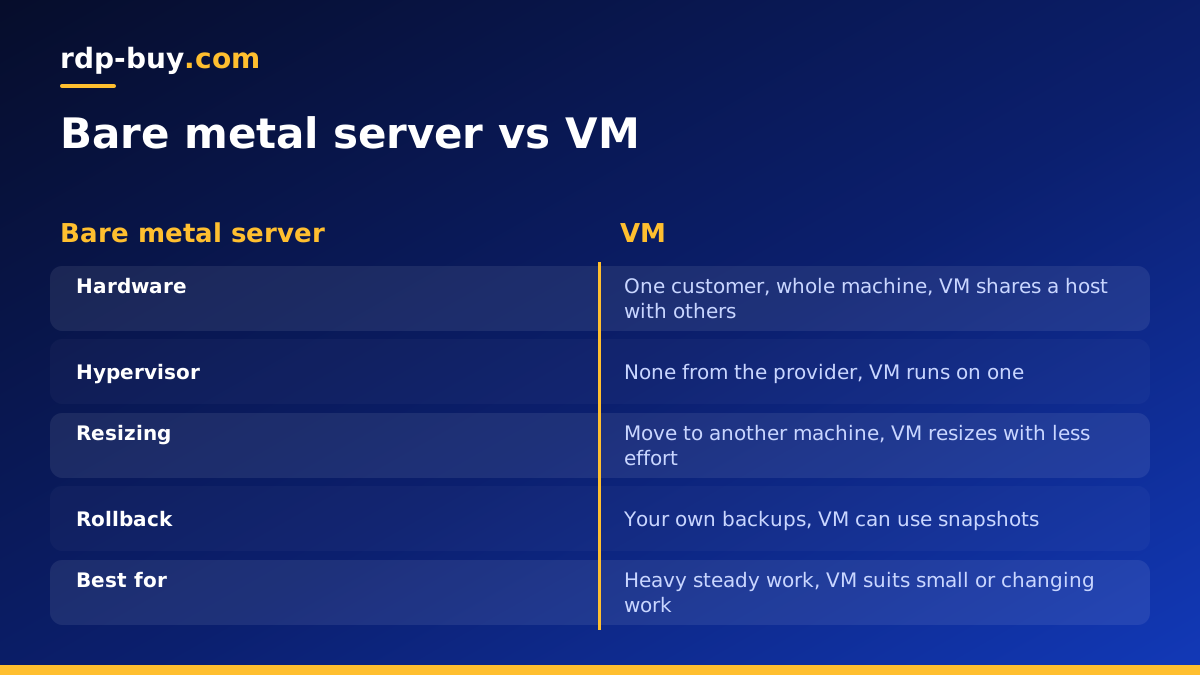
A bare metal server gives one customer an entire physical machine, while a VM is a software defined computer that shares hardware with others. If your workload needs every core, direct device access or steady timing, a bare metal server is usually the right pick, and otherwise a VM is simpler and easier to resize.
The short answer
Choose a VM when you want flexibility: quick provisioning, easy resizing, snapshots, and a lower commitment. Choose bare metal when the hardware itself matters: consistent performance under sustained load, access to the physical disks and processor features, licensing tied to physical sockets, or your own hypervisor. Most small projects are happy on a VM. Most projects that outgrow one do so for a specific, measurable reason, and that reason should drive the decision rather than a general feeling that physical hardware must be better.
What a VM actually is
A virtual machine runs on top of a hypervisor, a thin software layer that divides a physical host into several isolated guests. Each guest believes it has its own processor, memory, disk and network card. In reality, the hypervisor schedules those guests onto shared hardware and translates their requests.
This design has real strengths. A VM is a set of files plus a configuration, so it can be copied, snapshotted and restored. Hardware failure on the host can often be handled by moving guests elsewhere. Resources can be divided finely, so you pay for a small slice rather than a whole machine.
Virtual private servers are VMs sold as a hosting product. If you are comparing the terms, our guide on the difference between a VPS and a VM clears up how they relate.
What bare metal actually is
Bare metal means no provider hypervisor sits between your operating system and the hardware. Your operating system boots directly on the machine, and every core, every stick of memory and every disk belongs to you. Nobody else runs on that server.
You can still virtualize on it. Plenty of teams rent a bare metal machine and install their own hypervisor, which means they get VMs under their own control rather than the provider's. Our walkthrough of a Proxmox private cloud on bare metal shows how that works.
So the real question is not whether virtualization is bad. It is who controls the layer, and whether you need that layer at all.
Bare metal also changes your duties. The provider looks after the physical machine, but the operating system, the firewall, the updates and the backups are yours. There is no host level snapshot to fall back on unless you build one, so a written rebuild plan is part of owning this kind of server. Teams that treat it like a large VPS usually learn this during their first serious disk problem.
Where the two differ in practice
Performance consistency. Modern hypervisors are efficient, and for many tasks the overhead is small. The bigger difference is predictability. On a shared host, other guests compete for caches, disk queues and memory bandwidth. On bare metal, the only workload slowing yours down is your own. Applications that care about steady response times, such as busy databases, feel this most.
Hardware access. A VM sees virtual devices. Bare metal sees the real ones. This matters for low level disk tuning, processor features, and anything that wants direct device access.
Provisioning and resizing. A VM can usually be created quickly and resized with little effort. Changing a physical machine means moving to a different machine, so sizing at the start deserves more thought.
Recovery. Snapshots make it easy to roll back a VM. On bare metal, you rely on your own backups and rebuild process, so plan them before you need them.
Isolation. Hypervisors separate guests well, but a single tenant machine removes the question altogether. Some compliance reviews and security policies prefer that, so check what yours actually asks for.
Licensing. Some commercial software is licensed by physical socket or core. In those cases, a machine you fully control can make the arithmetic easier, but always read the vendor's terms.
Workloads that suit bare metal
Bare metal earns its place when a workload is heavy, steady and sensitive to interference:
A common thread is utilization. If a machine stays busy around the clock, the case for owning all of it gets stronger. If it sits idle most of the day, you are paying for capacity you do not use.
- Large databases that keep disks and memory busy all day
- Virtualization hosts, where you run your own Proxmox or similar platform
- Container clusters that want full use of the machine's resources
- Data processing, rendering and compilation jobs that run for hours at full load
- Software licensed per physical socket or core
- Workloads with policies that call for single tenant hardware
Workloads that suit a VM
VMs fit anything small, uneven or still changing:
If you are in this group, the flexible route is to buy a VPS and resize it later. Moving to physical hardware makes sense once you can point to a real limit.
- Websites, blogs and small online stores
- Development and staging servers
- Automation tools, bots and small APIs
- Lightweight AI agents that mostly call hosted model APIs rather than doing heavy local computing
- Projects where you are not yet sure how much capacity you need
- Short lived environments that you create and then throw away
How to test which one you need
Rather than guessing, measure the workload you already have. On your current server, watch these signals during a normal busy period:
If a bigger VM clears the problem, stay virtual. If the numbers stay uneven even with spare capacity, physical hardware becomes the logical next step. A related comparison worth reading is bare metal vs VPS, which looks at the same choice from a hosting plan angle.
- Processor steal time: tools such as top report a steal value on Linux. A value that stays high suggests your VM is waiting for time on a shared host.
- Disk latency and queues: iostat shows whether your disks are the bottleneck.
- Memory pressure: if the system swaps regularly, you need more memory, which a bigger VM may solve.
- Variation: compare fast periods with slow ones. A workload that is fine at night but erratic by day may be meeting noisy neighbours, or may simply be busier. Check before blaming the host.
Dedicated CPU: the middle ground
There is an option between the two. A dedicated CPU server keeps the convenience of a virtual platform while reserving processor cores for you, which reduces competition for compute. If your main complaint is inconsistent processor performance rather than disk access or licensing, this can solve the problem without moving to a full physical machine. See the dedicated CPU server plans if that sounds like your situation.
Choosing your plan
Work through three questions in order. First, is there a specific limit you can measure, or do you only suspect one? Second, will the machine stay busy most of the time? Third, do you need something only physical hardware offers, such as your own hypervisor or socket based licensing? Two or more yes answers point towards physical hardware.
From there, pick a location close to your users or data, decide on Linux or Windows, and choose monthly, half-yearly or yearly billing based on how sure you are about the project. You get full admin or root access, a dedicated IPv4 address and 24/7 support. When the case is clear, buy a bare metal server sized for the work you measured, and leave some headroom for growth.
