 Sign in
Dedicated Server vs Non Dedicated: Game Hosting Explained
In multiplayer games, a dedicated server runs the world on its own machine, while a non dedicated server runs inside one player's game. This guide explains how each model works, the trade offs for your group, and when it is worth renting a dedicated server instead of hosting from your own PC.
What dedicated and non dedicated mean in games
Every multiplayer session needs one place that keeps the official state of the world: where players stand, what they have built, what is in each chest. The question is where that place runs.
A dedicated server is a separate program, usually without graphics, whose only job is to run the game world. Players connect to it, but nobody plays on it directly. It can run on a home PC, but it is normally hosted on a server in a data centre so it stays online around the clock.
A non dedicated server is any setup where the world runs inside a player's own game. The most common form is the listen server: one player clicks host, their game becomes the server, and friends join them. Many survival and co-op games call this hosting a world, opening to friends or co-op mode. A related model is peer to peer, where players' games share the work between them with no single server at all.
How a listen server works
On a listen server, the host's computer does two jobs at once. It renders the game for the host player and it simulates the world for everyone. Every other player sends their actions to the host, and the host sends back the updated state.
This is convenient. There is nothing to rent and nothing to install, and for a small group playing together in the evening it often works well. The drawbacks show up as the group grows or plays at different times. The world only exists while the host is playing, so nobody can log in when the host is offline. The host's computer carries the extra load, which can lower their frame rate. The host's home connection, especially its upload capacity, limits how smooth the game feels for everyone else. And the host often has an advantage because their actions do not travel over the internet.
How a dedicated server works
A dedicated server separates the world from any single player. The server program runs on its own machine and keeps ticking whether anyone is connected or not. Every player, including the owner, joins as a normal client.
That separation brings several benefits. The world is available at any hour, so players in different time zones can drop in whenever they like. Nobody's gaming PC carries the extra load. Every player connects over the same kind of path, which feels fairer. The owner can install mods, change settings, schedule restarts and keep backups without interrupting anyone's play. For games with persistent worlds, such as survival and building games, this is often the difference between a world that grows for months and one that stalls when the host is busy.
Dedicated server vs non dedicated: side by side
The right model depends on your group, your game and how much effort you want to put in.
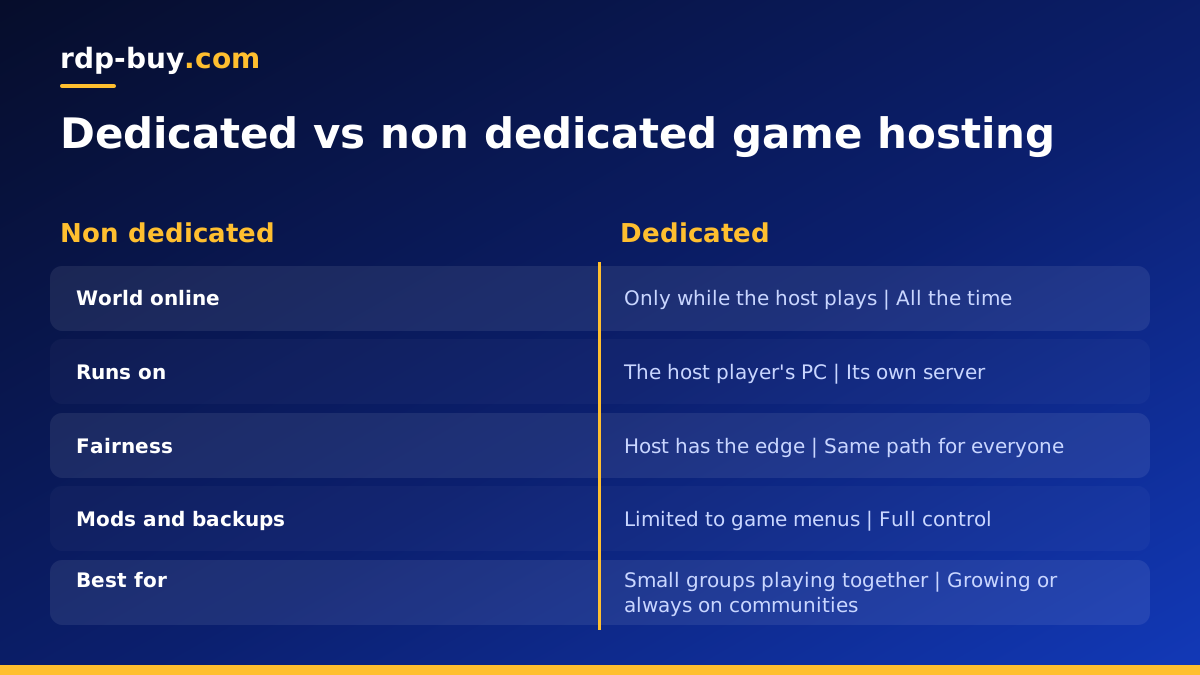
- Availability: a dedicated server is online all the time. A non dedicated world is online only while the host plays.
- Performance: a dedicated server has its own resources. A listen server shares the host's PC and home connection.
- Fairness: on a dedicated server everyone connects the same way. On a listen server the host has the shortest path.
- Control: a dedicated server gives full control over mods, settings, restarts and backups. A listen server offers the options inside the game menu.
- Effort: a listen server needs no setup. A dedicated server needs installing and some upkeep.
- Group size: listen servers suit small groups. Dedicated servers suit larger or growing communities.
When non dedicated hosting is enough
There is no need to rent anything if your situation looks like this: a small group of friends, everyone plays at the same time, the host has a strong PC and a stable connection, and the world does not need to exist when the host is away. Many co-op games are designed for exactly this, and some do not offer a dedicated server option at all.
If that describes you, enjoy the simplicity. Just keep a copy of the save file somewhere safe, because on a listen server the world lives on the host's computer and nowhere else.
When a dedicated server is worth it
Groups usually move to a dedicated server when one of these becomes true.
- Players want to log in at different times, without waiting for the host.
- The host's frame rate drops because their PC is running the world as well as the game.
- Players far from the host complain about lag, and a central location would suit everyone better.
- You want mods, custom rules, scheduled restarts or automatic backups.
- The community is growing beyond a handful of friends, or you run it for a streamer audience or a clan.
Running a dedicated game server on rented hardware
Most games that support dedicated servers publish a server build, often through SteamCMD, that runs on Windows, Linux or both. Hosting it on a rented server means it stays online without your home PC, has its own dedicated IPv4 address that players can save, and sits in a data centre location you choose.
The basic steps are similar for most titles. Pick a server location central to your players. Install the game's server files with SteamCMD or the developer's tool. Open the game's ports in the firewall. Set the server name, password and world settings in its configuration file. Run it as a service so it restarts automatically after a crash or a reboot, and schedule regular backups of the save folder.
For a game specific example, see our guide on Palworld dedicated server vs community server. If you prefer to manage the server with a familiar desktop, a Windows server with full admin access works well, and our guide on Windows or Linux helps you choose.
Moving an existing world to a dedicated server
Many groups start on a listen server and only later decide to move. In most games you can bring the existing world with you, so nobody loses progress.
Start by making a full copy of the host's save folder while the game is closed. Install the dedicated server build on the new machine and start it once so it creates its own folders, then stop it. Copy the save files into the server's save location, and check whether the game expects a specific world name or ID in its configuration file. Some games store the host's character differently from other players' characters, so read the developer's notes or community guides for your title before you switch, and test with the host's account first.
When the world loads correctly, share the server's IP address and password with your group, keep the old save as a backup, and set up automatic backups on the new server from day one.
Choosing a dedicated server for your game
Game worlds simulate many times every second, so they prefer steady processor time over bursts. That is why a server with cores reserved for you is a good match: the world runs at the same pace whether it is a quiet morning or a busy evening. Choose more memory for large worlds, many players or heavy mod packs, and pick a location close to the middle of your player base.
On rdp-buy.com you can buy a dedicated server with full root or administrator access, a dedicated IPv4 address, a choice of 33 server locations, 24/7 support and monthly, half-yearly or yearly billing. Servers are ready in minutes, so your group can be playing on its new world the same day. For smaller groups or lighter games, a VPS may be enough to start.
