 Sign in
RDP Honolulu: Who Needs a Hawaii Windows Server and Why
An RDP server in Honolulu is a full Windows desktop hosted in Hawaii, on US soil and close to island users. This guide explains who that location suits, how it compares with mainland cities, and how to buy a US RDP server that fits your daily work.
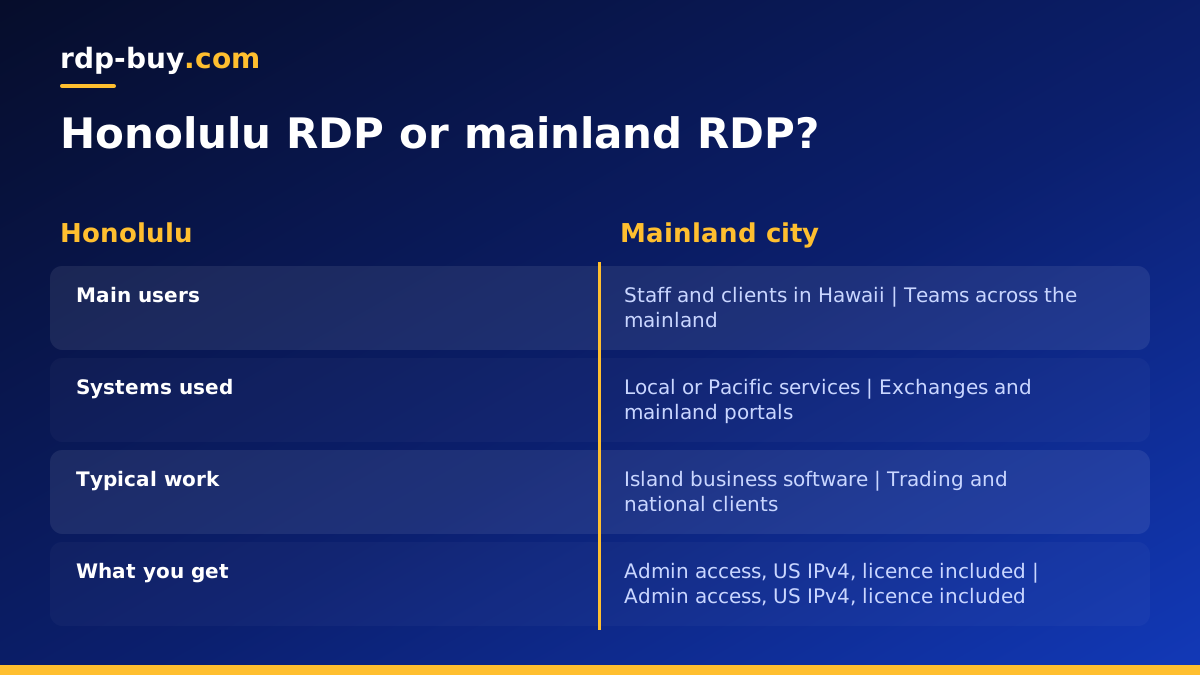
What an RDP Honolulu server gives you
Remote Desktop Protocol lets you control a Windows computer from anywhere. When you rent an RDP, the computer lives in a data centre and you reach it from your laptop, tablet or phone. You get full administrator access, a dedicated IPv4 address and a Windows licence that is already included in the price.
With RDP Honolulu, that Windows machine is in Hawaii. Programs you run on it connect to the internet from Honolulu with a US IP address. For people and businesses on the islands, that means the desktop and everything on it sits close by instead of across the Pacific.
Honolulu is one of several American cities on our USA RDP plans page. If you want to compare it with every option worldwide, the server locations page lists all 33.
Who benefits from a Windows desktop in Hawaii
A Honolulu RDP is most useful when the desktop works with people or systems in Hawaii. These are the groups that tend to choose it:
- Small businesses on the islands that run Windows accounting, point of sale back office or booking software and want staff to reach it from any location.
- Accountants, bookkeepers and agencies serving Hawaii clients who need a shared Windows workspace that does not live on one office PC.
- Remote workers in Hawaii who need a Windows environment for work tools while using a Mac, Chromebook or tablet at home.
- Staff who travel between islands or to the mainland and want the same desktop, files and settings wherever they log in.
- Teams automating local tasks, such as a browser automation that updates listings or a desktop assistant that answers island customers.
Honolulu or a mainland US city
Location should follow the work. If the desktop mainly talks to Hawaii based systems, or if most of the people who share it are on the islands, Honolulu is a natural home. If the desktop spends its day on US exchanges, mainland client portals or West Coast cloud tools, a mainland city is usually closer to those systems.
For trading, that usually means New York or Chicago, since many US markets and brokers have infrastructure in those regions. For general business tools hosted in California, Los Angeles or Silicon Valley may be the better choice. Our guides on RDP in New York and RDP in Seattle describe two mainland options in detail.
Remember that RDP traffic itself is light. You can comfortably use a mainland desktop from Hawaii, and a Honolulu desktop from the mainland. The decision is about what the server connects to all day, not only where you sit.
What you can run on a Honolulu RDP
Because it is a normal Windows machine with admin rights, you can install almost any Windows software. Popular uses include:
- Office suites, accounting packages and line of business apps that only run on Windows.
- Trading platforms and charting tools that need to stay open all day. See forex RDP for trading specific plans.
- Browser based work with a stable US IP address, such as managing ads, marketplaces or client dashboards.
- Scheduled tasks and scripts that should run even when your own computer is off.
- AI tools and desktop agents that need a Windows environment. The Windows RDP for AI agents page explains how to keep them running.
- Development and testing for Windows apps.
How to choose the plan size
Windows needs a base amount of memory before you open any program, so plan for that first. Then add up what you actually use at the busiest point of the day.
One person using office apps, email and a browser fits an entry plan. Several users sharing the desktop, or one person keeping a trading platform, a browser full of tabs and a spreadsheet open together, needs more memory. Automation that drives several browser windows, development work, or heavy data processing benefits from more CPU cores as well.
If several people will share the server, add memory for each extra person and give everyone a separate account. For a full list of typical workloads, the guide which RDP plan do you need is a quick reference.
Setting up and securing the desktop
Servers are ready in minutes after payment. You receive an IP address, an administrator username and a password. Connect with Remote Desktop Connection on Windows or the Microsoft remote desktop app on Mac, iOS or Android. The step by step guide is how to connect to your RDP server.
Then spend ten quiet minutes on security before installing your software:
- Replace the starting password with a long, unique passphrase stored in a password manager.
- Run Windows Update until it reports that the system is current.
- Keep the Windows firewall and Defender enabled.
- Give each person their own user account rather than sharing the administrator login.
- Keep copies of important files off the server, for example in cloud storage or on a local drive.
Why a hosted desktop beats an office PC for this job
Some small businesses expose an office PC to the internet so staff can reach it remotely. That works until the power goes out, the internet drops or the router changes its settings. It also opens the office network to the outside world.
A hosted RDP avoids those problems. It lives in a data centre, has its own dedicated IPv4 address, and stays online when the office is closed. If something goes wrong with access, 24/7 support is there to help. And because billing can be monthly, half-yearly or yearly, it fits both a short project and a permanent setup.
If you are deciding between a Windows desktop and a Linux server, read Windows or Linux server: which to rent.
Paying for a Hawaii RDP
We accept card, PayPal and crypto. Details are on the buy RDP with card, buy RDP with PayPal and buy RDP with crypto pages. If you just need a modest desktop for a handful of tasks, start with the cheap RDP plans and upgrade when needed.
Picking your Honolulu RDP plan
Ask three questions. Who uses the desktop, and where are the systems it connects to? If the answer is mainly Hawaii, choose Honolulu. What is the heaviest workload it will run? Size memory and CPU for that moment. How long do you need it? Use monthly billing for a trial and a longer term once the setup is settled.
When you are ready, visit the USA RDP order page, select Honolulu, choose a plan and pay by card, PayPal or crypto. Your Windows desktop, with admin access, a dedicated IPv4 address and the licence included, will be ready in minutes.
