 Sign in
Dedicated CPU Server: What It Is and When You Need One
A dedicated CPU server reserves processor cores for you alone, so your workload never waits behind another customer's busy hour. This guide explains how it works, how it compares with shared VPS plans, and when it makes sense to buy a dedicated server with dedicated cores.
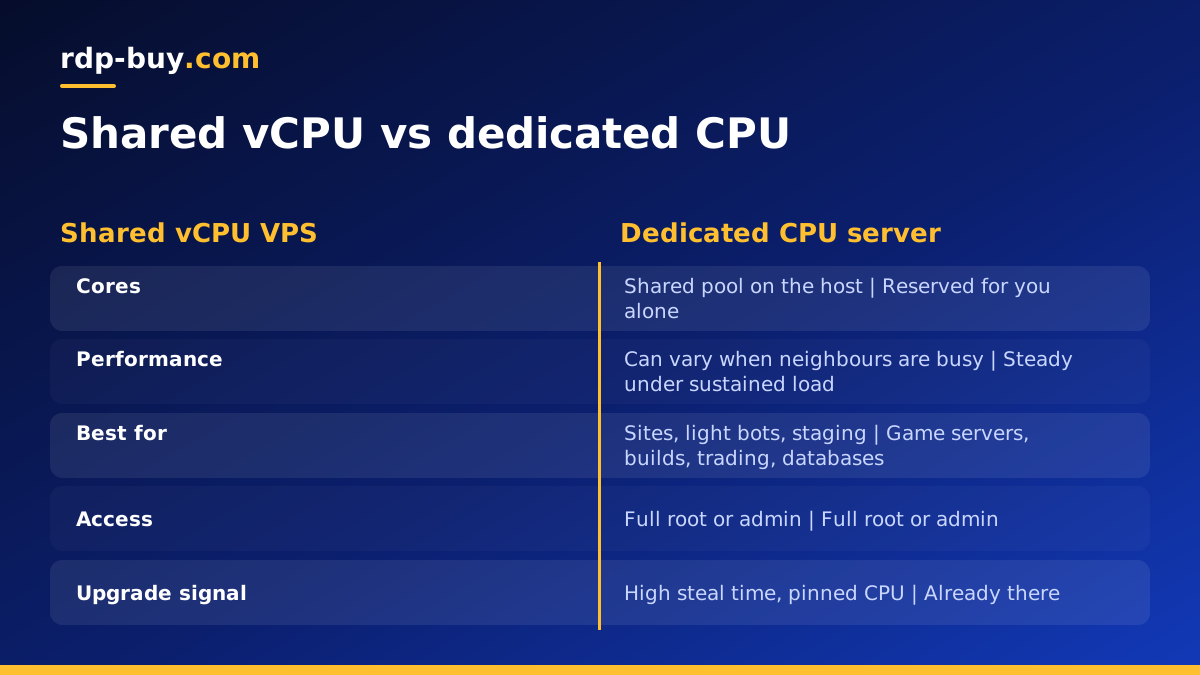
What a dedicated CPU server is
Every virtual server runs on a physical machine with a fixed number of processor cores. On a standard VPS, the virtual CPUs you see are scheduled on those physical cores alongside virtual CPUs from other servers on the same host. Most of the time this works well, because most servers sit idle much of the day and the host has capacity to spare.
A dedicated CPU server changes that rule. The provider pins your virtual CPUs to physical cores, or physical threads, that are not handed out to anyone else. The cores are yours whether you use them or not. Memory and storage are allocated to you in the same way as on any VPS, and you still get the convenience of a virtual machine: quick provisioning, snapshots and easy resizing.
People often use the phrase dedicated server for two different things. One is a dedicated CPU virtual server, described here. The other is a whole physical machine with no virtualisation at all, usually called bare metal. Our guide on bare metal vs dedicated servers explains that distinction in detail.
Shared vCPU vs dedicated CPU: the real difference
The difference is not raw speed on a quiet day. A shared vCPU on a lightly loaded host can feel just as fast as a dedicated one. The difference is consistency.
On a shared plan, if neighbours on the same host get busy at the same time as you, the hypervisor has to share the physical cores between everyone. Your tasks still run, but they can take longer and timings vary from minute to minute. This is often called the noisy neighbour effect.
On a dedicated CPU plan, your cores are not part of that pool. Your processing capacity stays steady no matter what else runs on the host. That predictability is what you are paying for.
- Shared vCPU: good value, fine for bursty work, timings can vary when the host is busy.
- Dedicated CPU: reserved cores, steady performance under sustained load, better for latency sensitive work.
- Both: full root or administrator access, your own operating system and a dedicated IPv4 address.
Workloads that benefit from dedicated cores
Dedicated CPU makes the biggest difference for work that uses the processor heavily for long stretches, or work where an occasional slow moment causes real problems.
- Game servers with many players. Server ticks run on a tight loop. Steady CPU time keeps movement and combat smooth during busy evenings.
- Trading and automated strategies. Platforms that run many charts, indicators or expert advisors benefit from cores that are never shared at the wrong moment.
- Build servers and CI runners. Compiling code and running test suites keeps every core busy for minutes at a time.
- Databases under steady load. Query planning and indexing are processor heavy, and consistent response times matter for the apps on top.
- Media processing. Video transcoding, image pipelines and audio rendering use all available cores.
- AI agents running local tools. Agents that run code, scrape pages, process documents or host small local models can keep a processor busy for long periods. Hosted model APIs do the heavy reasoning elsewhere, but the surrounding work still runs on your server.
- Many containers on one host. A Docker host running a dozen services needs the combined capacity to be available, not borrowed.
When a shared VPS is still the better choice
Dedicated cores are not always worth it. A shared plan is usually the sensible choice for websites with modest traffic, personal projects, staging environments, a single workflow tool, light bots, and anything that sits idle most of the day and wakes up occasionally.
A good test: watch your processor use over a typical week. If it stays low with brief peaks, shared vCPU is fine. If it sits high for long periods, or if users notice slow moments when the server is busy, dedicated CPU will help. You can start on a Linux VPS and move up when the numbers tell you to.
How to tell if your current server is CPU starved
Before upgrading, confirm the processor is really the problem. Memory or disk can look like a slow CPU from the outside.
If memory is the bottleneck, a larger shared plan may solve the problem more cheaply. If steal time is high or processor use is pinned, dedicated cores are the right move.
- On Linux, run top or htop and look at the st value, often called steal time. Steal time is the share of time your virtual CPU wanted to run but the host gave the core to someone else. Consistently high steal time points to a busy shared host.
- Check load average against the number of cores. Load that stays above your core count means work is queuing.
- Use free to see whether memory is full and the server is swapping to disk. Swapping slows everything, but adding cores will not fix it.
- Use iostat or a similar tool to check disk wait. High wait means storage, not the processor, is the limit.
- On Windows, open Task Manager or Resource Monitor and watch processor and memory use during your busiest period.
Setting up a dedicated CPU server
Setup is the same as any virtual server. Choose Linux or Windows, pick a location, and wait for the ready notice. Servers are ready in minutes.
On Linux, update packages, create a non-root user, set up SSH keys and a firewall, then install your stack. On Windows, connect over Remote Desktop with the administrator account, run Windows Update, and install your software. Our guide on what you can run on an RDP or VPS lists common setups.
To get the full benefit of dedicated cores, make sure your software actually uses them. Many applications have a worker or thread setting. Web servers, databases, build tools and transcoders often default to conservative values that you can raise to match your core count.
Choosing a dedicated server plan
Match the core count to your sustained workload, not your peak, and leave some headroom. Pair it with enough memory for your application and its cache, and enough fast storage for data and backups.
Pick the location closest to your users, your exchange, or the APIs your software talks to, from 33 locations worldwide. Every plan includes full root or administrator access, a dedicated IPv4 address, and 24/7 support, with monthly, half-yearly or yearly billing. When steady performance matters, compare dedicated CPU server plans and choose the size that fits. For a broader checklist before you order, read how to buy a dedicated server.
