 Sign in
VPS Hosting for Game Servers: How to Choose and Set Up
VPS hosting for game servers gives you a private, always-on machine where your world keeps running after you log off, with your own settings, mods and player list. This guide explains what to look for, how to set one up, and when to buy VPS capacity instead of hosting from home.
Why run a game server on a VPS
Many multiplayer games let one player host the session on their own PC. That works for a quick evening, but the world disappears the moment the host quits, and everyone else depends on that player's home connection. A dedicated game server solves this by running the world on its own, separate from any one player.
A VPS, or virtual private server, is the most flexible way to run that dedicated server. You get a slice of a powerful physical machine with guaranteed resources, your own operating system and full root access. You choose the game version, install mods, schedule restarts and decide who can join. If the term is new to you, our guide on what a VPS is explains how virtualisation shares one host safely.
Compared with hosting at home, a VPS keeps your home IP address private, does not compete with your own gaming or streaming for bandwidth, and keeps running while your PC is off. Compared with a game-specific hosting panel, a VPS lets you run several games, a voice server, a website or a Discord bot on the same machine.
Which games run well on VPS hosting
Most games that ship a dedicated server tool can run on a VPS. The common ones include Minecraft (Java and Bedrock), Valheim, Terraria, Rust, ARK, Palworld, Project Zomboid, Counter-Strike, Unturned and many Steam titles distributed through SteamCMD.
Two questions decide whether a game is a good fit. First, does the server tool run on Linux? Many do, and Linux uses fewer resources for the operating system itself. Second, how demanding is the world? Survival games with large maps, many entities and heavy mods need far more memory than a small lobby game.
Some server tools are Windows only. For those, a Windows server with the licence included is the simpler route, and you manage it over Remote Desktop rather than SSH.
What specs matter for game server VPS hosting
Game servers are sensitive to a few resources more than others. Check the official server requirements for your game, then size up for your player count and mods.
- Memory (RAM). The most common limit. World data, players and mods all live in memory. Modded survival servers need noticeably more than vanilla ones.
- Single core speed. Many game server loops run mainly on one thread, so a fast core matters more than a large number of slow cores.
- Storage type. SSD or NVMe storage speeds up world saves, chunk loading and restarts.
- Location. Latency depends on distance. Put the server near most of your players rather than near yourself.
- A dedicated IP. A fixed IPv4 address means players can bookmark the server and you can set up a domain name that always points to it.
- Root access. You need it to install SteamCMD, Java, firewall rules and mod loaders.
Linux or Windows for a game server
Choose Linux when the game offers a Linux server build. It is lighter, scripting restarts and backups is straightforward, and tools like systemd, screen or tmux keep the server running in the background. Docker images exist for many popular game servers, which makes upgrades and rollbacks easier. Our comparison of Docker and VPS explains how the two fit together.
Choose Windows when the server tool only runs on Windows, when the mod tools you rely on are Windows programs, or when you prefer a graphical desktop. A Windows RDP server gives you a full desktop to manage it, with the licence already included. If you are weighing the two in general, see Windows or Linux server: which to rent.
How to set up a game server on a Linux VPS
The exact commands differ by game, but the general flow is the same for most titles distributed through Steam.
Write down the server address, ports and admin commands somewhere safe. When something goes wrong late at night, a short runbook saves a lot of guessing.
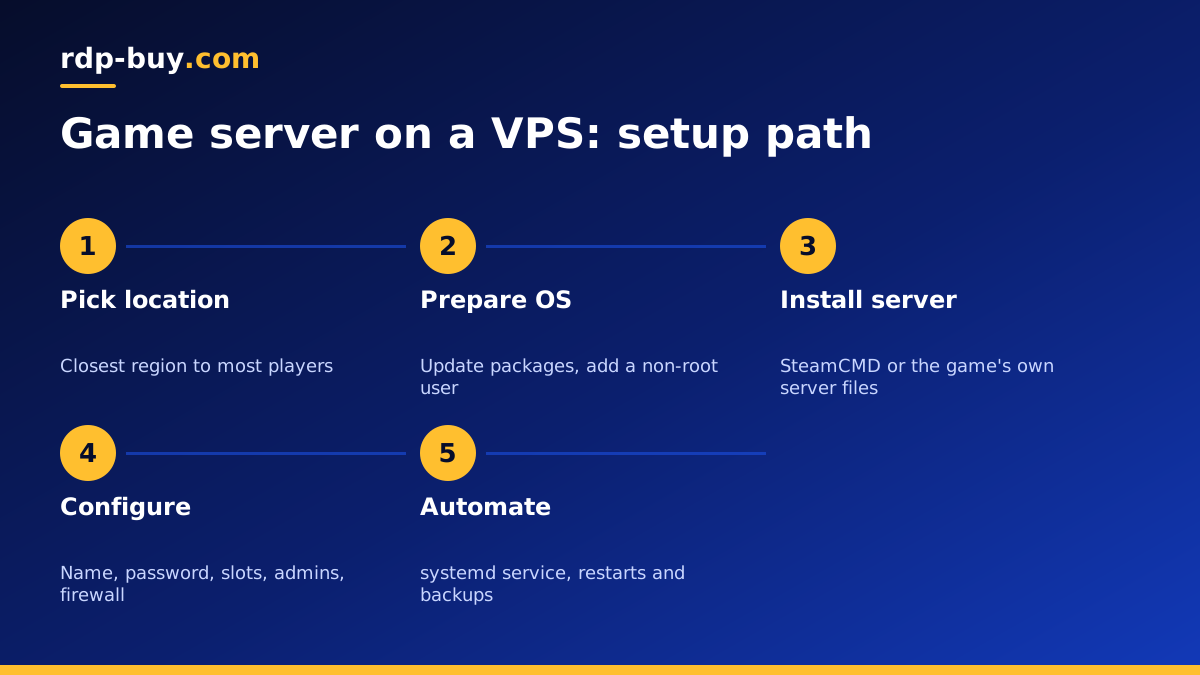
- Order a Linux VPS in a location close to your players and wait for the ready notice with the IP and root login. Servers are ready in minutes.
- Connect over SSH, update the system packages, and create a non-root user to run the game server.
- Install SteamCMD or the game's own server package, plus any runtime it needs, such as Java for Minecraft.
- Download the server files into the new user's home folder and run them once to generate the config files.
- Edit the config: server name, password, maximum players, world settings and admin list.
- Open only the game's ports in the firewall, along with SSH.
- Create a systemd service so the server starts on boot and restarts after a crash.
- Add a scheduled backup of the world folder to another location, and test that a restore works.
- Share the IP address and port with your players and join to confirm everything works.
Keeping a game server VPS secure and stable
Public game servers attract scanners and the occasional troublemaker. A few habits keep yours healthy.
Use SSH keys instead of passwords for the server login, and disable root login over SSH once your own user works. Keep the operating system and game server updated, but read patch notes before updating mods, since a game update can break them.
Run the game under its own user, never as root. Limit the firewall to the ports you actually need. Use whitelists or passwords for private communities, and give admin rights to as few people as possible.
Schedule a regular restart during quiet hours. Many games slowly use more memory over a long session, and a restart clears it. Combine that with automatic backups and you can recover from a corrupted save or a griefing incident quickly.
VPS or dedicated server for gaming
A VPS suits most community servers, from a few friends to an active public server. You can move to a larger plan as the player base grows.
A dedicated server becomes worth it when you run several busy worlds at once, host heavy modded packs, or run a network of servers where you want the whole machine's processor to yourself. Our guide to running a Palworld dedicated server shows what that looks like for one demanding game, and you can compare dedicated server plans when you outgrow a VPS.
Picking a VPS plan for your game server
Start with the memory your game needs for your expected players and mods, then pick a plan with some room to spare. Choose the location nearest to the majority of your players from the 33 locations available. You get full root access, a dedicated IPv4 address, and 24/7 support if something does not behave.
Monthly billing is a good way to test a new community; half-yearly or yearly billing suits a server that has settled. When you know your game and region, you can choose a Linux VPS hosting plan and follow the setup steps above to have players joining the same day.
