 Sign in
What Is a Bare Metal Server? How It Works and Who Needs One
A bare metal server is a physical computer in a data centre that belongs to one customer at a time, with no other tenants and no hypervisor you did not choose. Here is how it works, what it is good for, and how to decide whether bare metal hosting fits your project.
Bare metal server: the plain definition
The word metal refers to the hardware itself. A bare metal server is a complete machine, with its own processors, memory, disks and network interface, that is rented to a single customer. Nothing else runs on it unless you put it there.
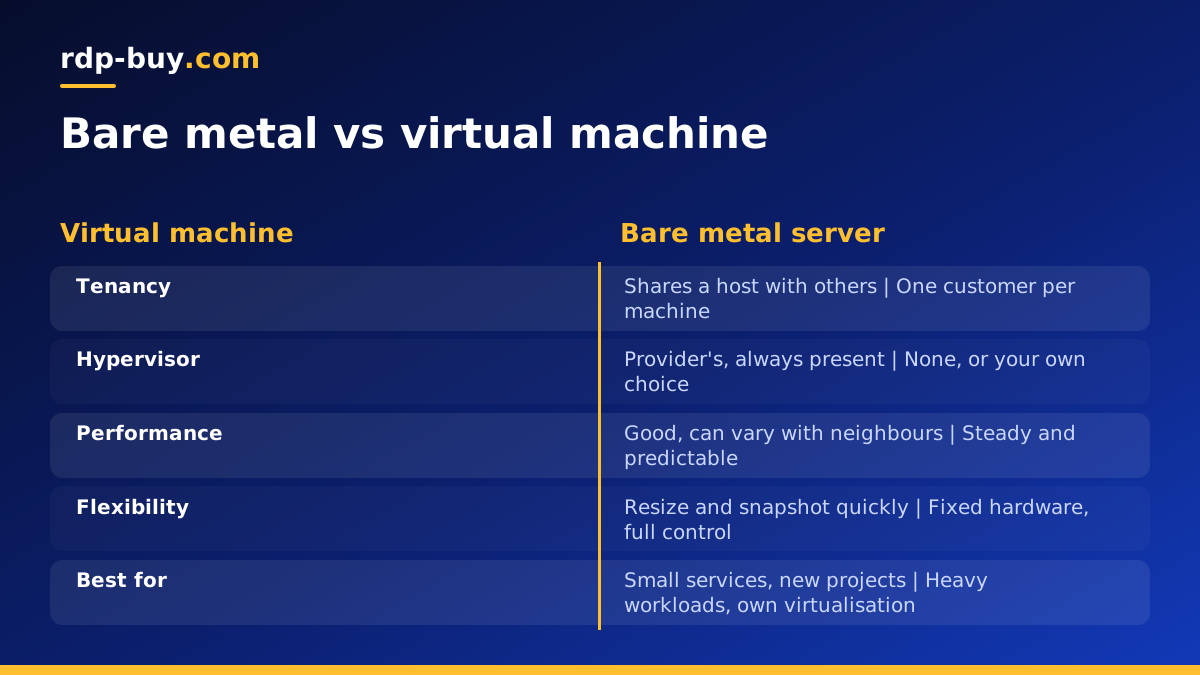
Most cloud servers are virtual machines. A provider takes one large physical host, installs a hypervisor, and slices the machine into many virtual servers for different customers. Bare metal skips that slicing. Your operating system is installed directly on the hardware, so it talks to the processor and disks without a layer in between.
This is why bare metal is often called single tenant hosting. The whole box is yours, and so are all of its resources.
How a bare metal server works in practice
Ordering bare metal today looks a lot like ordering a cloud server. You choose a hardware configuration, an operating system and a location. The provider takes a machine from its pool, installs the operating system automatically, and hands you the login details along with a dedicated IPv4 address.
From there you have full root access on Linux or administrator access on Windows. You can install any software, tune the kernel, set up your own virtualisation, or run containers directly on the hardware.
Behind the scenes the data centre handles power, cooling, physical security and network connectivity. If a disk or another component fails, the provider replaces it. You manage everything above the hardware: the operating system, updates, security and your applications.
That split of responsibility is the main reason people rent bare metal rather than buying their own servers and placing them in a colocation facility. If you are weighing those two paths, our guide on renting bare metal vs buying hardware covers the trade-offs.
What a bare metal server is good for
Bare metal suits workloads where you want every bit of the machine, predictable behaviour, or full control over the layers that a cloud provider normally hides.
- Running your own virtualisation. Install Proxmox, KVM or another hypervisor and carve the machine into your own virtual servers, for a team, a lab or clients.
- Large container hosts. Run Docker or Kubernetes nodes directly on the hardware, so every container gets native access to processor and storage.
- Databases with heavy input and output. Direct access to local disks helps databases that read and write constantly.
- Game server networks. Host many busy worlds on one machine without sharing cores with anyone else.
- Build farms and CI. Compile large codebases and run long test suites on a machine that is always ready.
- Self-hosted AI tooling. Run agents, vector databases, document pipelines and small local models side by side, with room to grow. Hardware with a GPU is a separate category, so check what the plan includes before planning model inference.
- Compliance and isolation. Some policies require that data never shares physical hardware with other organisations. Single tenancy makes that simple to show.
Bare metal vs cloud virtual machines
Virtual machines win on flexibility. You can create one in moments, resize it, snapshot it and throw it away. That makes them ideal for small services, short projects and anything that changes size often. A Linux VPS is the right starting point for most new projects.
Bare metal wins on control and consistency. There is no hypervisor overhead and no neighbours, so performance is steady, and you can use hardware features that virtual machines often hide, such as nested virtualisation or direct disk access.
There is also a middle option: virtual servers with dedicated CPU cores. They keep the convenience of virtualisation but reserve processor cores for you. Our explainer on dedicated CPU servers covers when that middle ground is enough, and bare metal vs dedicated server compares it directly with full bare metal.
Signs you have outgrown a virtual server
Many teams start on virtual servers and move to bare metal later. These are the usual signals that it is time.
- You run several large virtual servers that would fit comfortably inside one physical machine.
- Steal time or uneven response times show up during busy periods, even on larger plans.
- You want to run your own hypervisor or nested virtual machines.
- Your database or storage workload needs direct access to local disks.
- A customer or policy asks for single tenant hardware.
- You want one predictable machine instead of many moving parts.
Setting up a new bare metal server
A fresh bare metal server needs the same care as any internet-facing machine, with a few extra points because you own the whole stack.
Write down what you install and why. A short setup document makes it much easier to rebuild the server or add a second one later.
- Log in with the credentials from the ready notice and change the default password straight away.
- Update the operating system and enable automatic security updates if your workload allows it.
- Create a named user, add SSH keys, and turn off password login and direct root login over SSH.
- Configure a firewall that allows only the ports your services need.
- Check disk layout and set up RAID or another redundancy scheme if the plan has more than one disk and your data needs it.
- Install your platform: a hypervisor, Docker, a database or your application stack.
- Set up monitoring for disk health, memory and processor use, so you hear about problems early.
- Configure off-server backups. Single tenancy protects you from neighbours, not from deleted files or failed disks.
Common questions to ask before you order
Which operating system will you run, and does your software support it? Which location is closest to your users or data sources? How much storage do you need now, and how will you back it up? Will you use the machine as one big server or split it with your own virtualisation?
Answering these first keeps you from ordering more machine than you need, or less. Our server buying checklist walks through each question in more detail.
Choosing a bare metal server plan
Pick the configuration that fits your sustained workload, with headroom for growth. Choose a location from the 33 available that sits close to the people and services the server works with. You get full root or administrator access, a dedicated IPv4 address, and 24/7 support, with monthly, half-yearly or yearly billing.
If you need the whole machine for steady performance, single tenancy or your own virtualisation, you can buy a bare metal server and follow the setup steps above. If you are not there yet, a VPS is an easy place to start and move up from.
