 Sign in
Windows RDP vs TeamViewer vs RustDesk: Which to Use?
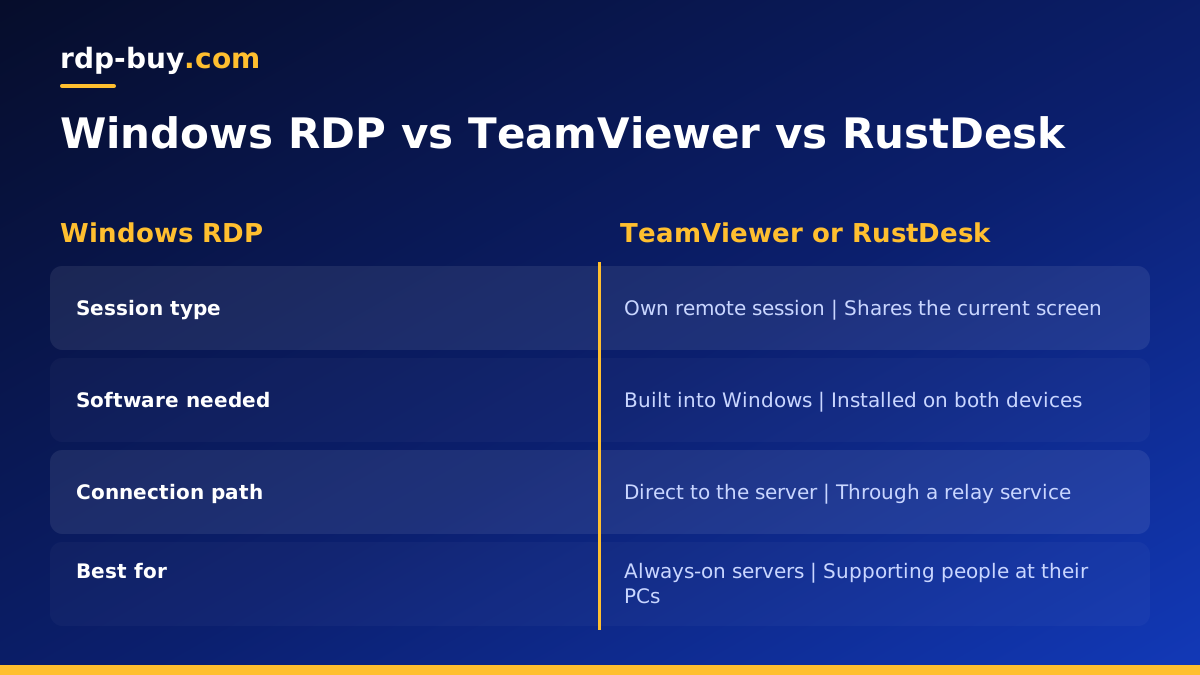
Windows RDP gives you your own session on a remote Windows machine, while TeamViewer and RustDesk share the screen of a computer someone may already be using. For an always-on Windows RDP server, built-in Remote Desktop is usually the cleanest choice; for helping a person at their own screen, a screen sharing tool fits better.
Windows RDP vs TeamViewer: two different jobs
The comparison between Windows RDP and TeamViewer comes up constantly, and RustDesk has joined it as a popular open source option. All three let you control a computer from somewhere else, so they look interchangeable at first. Under the surface they are built for different jobs, and picking the wrong one leads to awkward workarounds.
Remote Desktop Protocol, or RDP, is built into Windows. When you connect, Windows creates a remote session for you. On a server, that session runs on its own, with no one sitting in front of a monitor. TeamViewer and RustDesk work differently: they capture the screen that is already displayed on a computer and stream it to you, so you see exactly what a local user would see. That makes them excellent for support calls and less natural for headless servers.
If your goal is a remote machine that runs trading platforms, bots or desktop apps around the clock, you are really looking for an RDP server, and the built-in client is all you need. If your goal is to help your parents fix their laptop, a screen sharing tool is the better pick.
How Windows RDP works
Windows Remote Desktop listens for connections on the server and authenticates you with a Windows username and password. The client is already part of Windows as Remote Desktop Connection, and Microsoft publishes apps for Mac, iPhone, iPad and Android. You type the server address, sign in and get a full desktop.
Because RDP sends drawing instructions and compressed screen updates rather than a raw video stream, it tends to feel responsive for everyday office work, browsers and trading terminals. It also redirects clipboard, local drives and printers when you allow it, which makes moving files to and from the server simple.
On a hosted server, RDP is normally enabled from the start. With rdp-buy.com you get full administrator access and a dedicated IPv4 address, so you connect straight to your own machine without a relay service in the middle. If you are new to the client, the guide on how to connect to your RDP server covers the first login.
- Built in: no extra software on a Windows server or on a Windows PC client.
- Own session: you get a desktop of your own, not a mirror of someone else's screen.
- Direct connection: traffic goes from your device to your server address.
- Best for: servers and machines that run unattended.
How TeamViewer works
TeamViewer is a commercial remote access product. You install it on both computers, and each device gets an ID. The connection is brokered through TeamViewer's own infrastructure, which is why it often works without changing router or firewall settings. That convenience is a big reason it became the default tool for help desks.
The trade offs are licensing and control. TeamViewer offers a free tier for personal use, and its terms restrict commercial use without a paid licence, so check the current terms on its own site before using it for work. Your sessions also depend on an outside service being available and on your account settings being secure.
On a remote server, TeamViewer can be installed, but it adds a layer you do not strictly need. You would usually still use RDP to set it up in the first place.
How RustDesk works
RustDesk is an open source remote desktop tool, with its source code published on GitHub. Like TeamViewer, it uses device IDs and shares the screen that is currently displayed. Its main attraction is that you can run your own relay and ID server, so connections do not need to pass through a third party at all.
That makes RustDesk interesting for people who want TeamViewer style convenience with more control. The cost is setup time: running your own relay server means managing another service, ideally on a Linux VPS with a fixed address. For simply reaching a Windows server you rent, it solves a problem RDP does not have.
Security compared
Security depends far more on how you configure a tool than on which tool you choose. That said, each has typical risks worth knowing.
- Windows RDP: the main risk is an exposed login screen. Use a long unique password, keep Windows updated, enable Network Level Authentication and consider limiting access by IP in the firewall. Our guide on RDP vs SSH touches on how each protocol handles this.
- TeamViewer: the main risks are weak account passwords and unattended access left on without two factor sign in. Turn on two factor authentication and remove devices you no longer use.
- RustDesk: on the public relay, the risks are similar to TeamViewer. On a self hosted relay, you also take responsibility for patching that server.
- All three: never share connection details in chat or email, and lock the account after you finish a session.
Which one should you use?
Here is the practical rule. If the remote computer is a server that runs on its own, use Windows RDP. It is already there, it gives you a proper session and it connects directly. If you need to see and control a screen that a real person is using, use TeamViewer or RustDesk. If you want that screen sharing style but dislike depending on a vendor's relay, RustDesk with your own relay server is the middle path.
Many people end up using two tools: RDP for their own servers and a screen sharing app for support. That is a sensible setup, not a compromise.
- Running MetaTrader or trading bots on a remote machine: Windows RDP. See forex RDP plans.
- Supporting family or clients at their own PCs: TeamViewer or RustDesk.
- Reaching a home PC from outside without opening ports: TeamViewer or RustDesk.
- Running browser automation or AI tools on Windows all day: Windows RDP, see Windows RDP for AI agents.
- Full control over every part of the connection path: RDP to your own server, or RustDesk with a self hosted relay.
Can you use them together?
Yes. A common pattern is to connect to a Windows server over RDP for daily work, then install RustDesk or TeamViewer inside it as a backup route. Another pattern is a Linux VPS running the RustDesk relay, used by a small team to reach their office machines. Both work well; just make sure every extra tool is kept updated and protected with strong credentials, because each one is another way in.
Getting a server that is ready for Remote Desktop
If your comparison has led you to Windows RDP, the next step is a machine to connect to. A hosted Windows server stays on around the clock, so your programs keep running when your own computer is off or travelling. Pick a location close to the services your apps talk to, such as your broker or the APIs your tools call, from the 33 options on the server locations page.
When you are ready, compare plans to buy RDP with the Windows licence included, full admin access and a dedicated IPv4. Servers are ready in minutes, billing can be monthly, half-yearly or yearly, and 24/7 support is there if your first connection does not go to plan. If you are unsure how much memory you need, read which RDP plan you need first.
